The OSI model is a seven-layer conceptual framework from ISO that describes how network communication should be organised, so it is mainly a teaching and reference model. The TCP/IP model is a four-layer model from the US Department of Defense that describes how the Internet actually works, so it is the one implemented in real protocols. In short, OSI is the theory with seven layers, while TCP/IP is the practice with four.
The OSI model and the TCP/IP model are the two reference models for computer networking. Both appear in every computer-networks and GATE syllabus. Students often mix up how many layers each has, and which one real networks actually run.
The core difference is purpose. OSI describes networking in clean theory, while TCP/IP describes what engineers actually built. This guide names every layer in both models, maps them onto each other, compares them in detail, and shows when each one matters.
If you are still mapping out the basics, it helps to know the difference between a MAC address and an IP address first, because each one lives on a different layer.
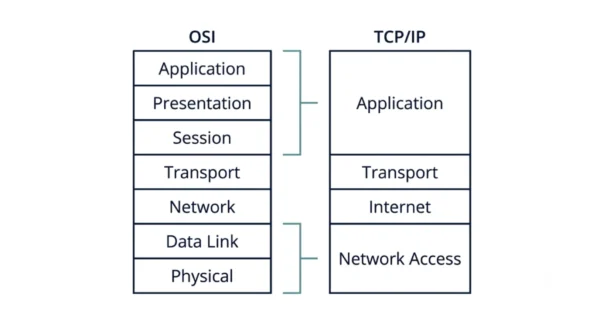
What is the OSI Model?
The Open Systems Interconnection (OSI) model is a conceptual framework that standardises the functions of a telecommunication or computing system into seven abstraction layers. Each layer serves a specific purpose and interacts with the adjacent layers to facilitate communication between devices on a network.
The International Organization for Standardization (ISO) developed it, so it is vendor-neutral. Here are the seven layers, listed from the top down:
- Application — the interface the user’s program talks to (HTTP, FTP, SMTP, DNS).
- Presentation — translation, encryption, and compression, so the data arrives in a readable form (TLS, JPEG).
- Session — sets up, manages, and finally closes a conversation between two hosts.
- Transport — end-to-end delivery, reliability, and ports (TCP, UDP).
- Network — logical addressing, and therefore routing between networks (IP, ICMP).
- Data Link — framing and physical addressing on one link (Ethernet, MAC, switches).
- Physical — finally, the raw bits on the wire, radio, or fibre (cables, voltages, hubs).
A common mnemonic runs from layer 7 down: All People Seem To Need Data Processing. Because each layer is separated cleanly, the model suits teaching and protocol design well.
Examples:
- Application Layer: HTTP, FTP
- Transport Layer: TCP and UDP
Advantages of the OSI model:
- Clear separation of functions, so each layer has one job.
- Standardisation also allows for interoperability between vendors.
- Moreover, its layered structure makes faults easy to isolate.
- Furthermore, it is not tied to any single technology or protocol suite.
Disadvantages of the OSI model:
- Complexity, because seven layers are a lot to carry.
- Not directly implemented in real networks, so it stays theoretical.
- In addition, the Session and Presentation layers rarely map to real protocols.
Technical characteristics: it uses a layered structure, and each layer performs specific functions. Use cases: it is commonly used for teaching networking concepts, and it serves as a reference model for designing networking protocols.
What is the TCP/IP Model?
The Transmission Control Protocol/Internet Protocol (TCP/IP) model is a simpler and more widely used networking model that defines the protocols used on the Internet. It consists of four layers that align closely with the actual implementation of networking protocols.
The US Department of Defense developed it for ARPANET, and afterwards the Internet adopted it. Here are its four layers, again from the top down:
- Application — everything the app needs (HTTP, FTP, SMTP, DNS). It absorbs OSI’s top three layers.
- Transport — end-to-end delivery and ports (TCP, UDP).
- Internet — logical addressing, and thus routing (IP, ICMP, ARP).
- Network Access — also called Link, since it covers framing plus the physical medium (Ethernet, Wi-Fi).
Notice that the middle two layers match OSI almost exactly. The difference sits at the top and the bottom, where TCP/IP simply merges layers that OSI keeps apart.
Examples:
- Application Layer: HTTP, FTP
- Transport Layer: TCP, UDP
Advantages of the TCP/IP model:
- Simplicity, since fewer layers mean less to reason about.
- Directly implemented in the Internet, so it reflects reality.
- Likewise, it stays adaptable and flexible as networking technology changes.
- Proven at global scale, because the whole Internet runs on it.
Disadvantages of the TCP/IP model:
- However, it gives a less clear separation of functions than OSI.
- Besides, it may not fit all network implementations neatly.
- Therefore it does not strictly separate services, interfaces, and protocols.
Technical characteristics: it uses a four-layer structure, and it emphasises communication between hosts. Use cases: it is the standard model for Internet communication, and it is widely adopted in networking environments.
OSI Model vs TCP/IP Model: Comparison Table
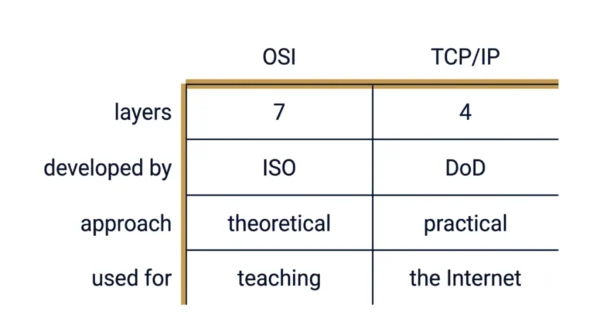
| Aspect | OSI Model | TCP/IP Model |
|---|---|---|
| Developed by | International Organization for Standardization (ISO) | Department of Defense (DoD) |
| Number of layers | Consists of 7 layers | Consists of 4 layers |
| Approach | Follows a vertical approach | Follows a horizontal approach |
| Layer boundaries | Each layer communicates with the layer directly above or below | Layers do not have strict boundaries; communication can occur across multiple layers |
| Emphasis | Emphasises conceptual functionality | Emphasises implementation |
| Services and protocols | Provides a clear demarcation between services, interfaces, and protocols | Does not strictly define these boundaries |
| Real-world use | Less used in practice, but serves as a reference model | More commonly used in real-world implementations |
| Where it is used | Used more in academic settings and for teaching networking concepts | Practical for network design, development, and troubleshooting |
| Implementability | Not directly implementable | Directly implemented in the protocols that define the Internet |
| Origin and goal | Encourages interoperability between different vendors’ products | Initially designed for ARPANET, then adopted for the Internet |
| Structure | Defines a strict hierarchy with well-defined functions at each layer | Evolved more organically and is less rigid in its structure |
| Nature | Complex and theoretical | Practical, and it closely reflects the Internet’s structure |
| Scope | Provides a comprehensive framework for protocol design and understanding | Focuses on the actual implementation of networking protocols |
| Technology coupling | Not tied to any specific technology or protocol suite | Associated with the TCP/IP protocol suite |
| Flexibility | Facilitates standardisation of network communication protocols | Adaptable and flexible to changes in networking technologies |
| Layer names | Application, Presentation, Session, Transport, Network, Data Link, Physical | Application, Transport, Internet, Network Access |
How the OSI and TCP/IP Layers Map
The two models are not rivals, because TCP/IP simply folds some OSI layers together. The mapping is short:
- OSI Application + Presentation + Session → TCP/IP Application.
- OSI Transport → TCP/IP Transport (an exact match).
- OSI Network → TCP/IP Internet (an exact match, renamed).
- OSI Data Link + Physical → TCP/IP Network Access.
So the middle of both stacks is identical, and only the ends differ. That is why engineers still say “layer 3” or “layer 4” from OSI even while running TCP/IP.
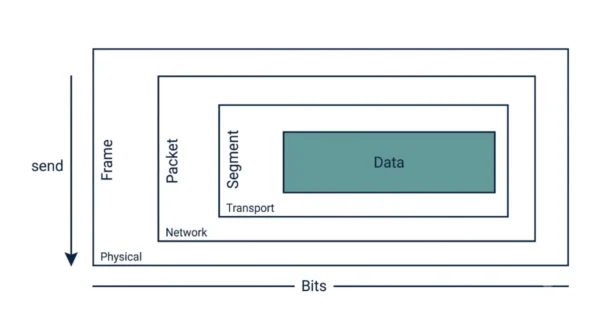
Each layer also wraps the data from the layer above, which is called encapsulation. The Transport layer turns your data into a segment. Next the Network layer wraps that into a packet. Then the Data Link layer wraps that into a frame. Finally the Physical layer sends it as bits. The receiver unwraps them in reverse, so each layer only reads its own header.
Practical Implementation
Consider a practical scenario where you need to understand the difference between the two models in real network code. Because TCP/IP is the model that ships, the code below speaks its language directly.
# TCP/IP model in practice: a client socket in Python
import socket

# Transport layer: SOCK_STREAM selects TCP
# Internet layer:  AF_INET selects IPv4
sock = socket.socket(socket.AF_INET, socket.SOCK_STREAM)

# Connect to the server (IP address + port)
server_address = ('localhost', 8080)
sock.connect(server_address)

# Application layer: send your own data
sock.sendall(b'hello')
sock.close()
Notice how the model shows up in two arguments. AF_INET picks IPv4, which is the Internet layer. Meanwhile SOCK_STREAM picks TCP, which is the Transport layer. So the operating system handles the Network Access layer for you, and your code supplies the Application layer.
Step-by-step implementation guide:
- Understand the OSI model layers and their functions.
- Next, compare how the TCP/IP model maps to the OSI model.
- Then implement a network communication scenario using TCP/IP sockets.
Best practices and optimisation tips:
- Follow the layering principles of the OSI model for modular and efficient network design.
- Similarly, use well-defined protocols from the TCP/IP suite for reliable communication.
- Finally, optimise network performance by minimising protocol overhead.
Common pitfalls and solutions:
- Pitfall: misinterpreting the OSI and TCP/IP models can lead to incorrect protocol implementations. Solution: study the models thoroughly and consult reference materials for clarity.
- Pitfall: overlooking protocol compatibility issues between layers. Solution: ensure proper mapping of protocols between OSI and TCP/IP layers for seamless communication.
When to Use Which
You never really choose one model over the other, yet each one earns its place.
Reach for the OSI model when you are learning, teaching, or troubleshooting. Its seven clean layers let you point at exactly where a fault sits, so network engineers still say “that is a layer 2 problem”. It also guides protocol design, because it separates services from interfaces.
Reach for the TCP/IP model when you are building something real. Every socket, router, and web request runs on it, so it describes what actually happens on the wire. In practice most people learn OSI for the vocabulary and then use TCP/IP for the work.
Interview Questions
Frequently Asked Questions
Wrapping Up
The OSI model and the TCP/IP model describe the same journey from two angles. OSI splits that journey into seven tidy layers for understanding, while TCP/IP keeps four layers that match the protocols people actually run.
Remember the simple rule: OSI is seven layers of theory from ISO, and TCP/IP is four layers of practice from the DoD. Their middle layers line up exactly, and only the top three and bottom two get merged. Knowing that mapping, plus the layer names, answers most exam and interview questions on the two.
Related reading on DiffStudy:
- TCP vs UDP
- MAC Address vs IP Address
- Classful vs Classless Addressing
- Simplex vs Half-Duplex vs Full-Duplex
- CS Fundamentals hub