
Synchronous transmission sends data as a continuous stream of blocks, timed by a shared clock, so it is fast and efficient for bulk data. Asynchronous transmission sends one character at a time, each wrapped in start and stop bits, so it needs no shared clock and stays simple and flexible. In short, synchronous trades flexibility for speed, while asynchronous trades speed for simplicity.
Synchronous and asynchronous transmission are two ways to send data between devices over a link. Both appear in every computer-networks and data-communications syllabus, so students need to know exactly how each one frames and times its data.
The split comes down to one question: is there a shared clock, or not? This guide defines each method, compares them in detail, fixes a common myth about distance, and shows when to use which.
It pairs closely with how data flows on a link, so it also helps to know simplex vs half vs full duplex.
What is Synchronous Transmission?
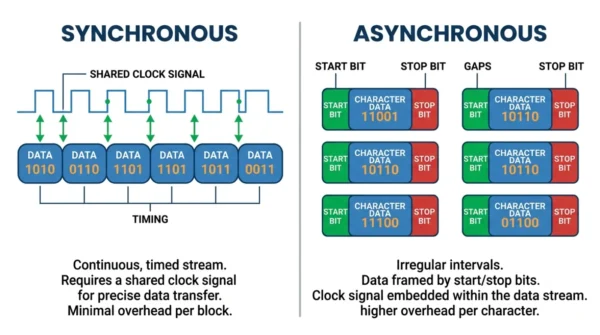
Synchronous transmission sends data in a continuous stream of blocks, with no start or stop bits around each character. Instead, a shared clock signal keeps the sender and receiver in step, so both run at the same speed and stay in perfect coordination.
Because the data flows as timed blocks, synchronous transmission reaches high data rates with little overhead. For example, the sender groups characters into frames and ships them with timing signals, so the receiver reads them accurately. As a result, it suits high-speed links such as fibre-optic backbones.
Advantages of synchronous transmission:
- Higher data transfer rates, since the stream is continuous.
- Less overhead, because there are no per-character start and stop bits.
- Less error-prone than asynchronous transmission over a steady link.
Disadvantages of synchronous transmission:
- Needs a shared clock signal, which adds hardware complexity.
- Less flexible, because both ends must stay synchronised.
What is Asynchronous Transmission?
Asynchronous transmission sends data one character at a time, and it wraps each character in a start bit and a stop bit to mark where the character begins and ends. Therefore the two devices need no shared clock, which makes the method flexible but slower than synchronous transmission.
Because each character carries its own framing, the timing can vary between characters. So asynchronous transmission stays simple and cheap to build, though the extra bits add overhead. For example, a UART serial link sends keystrokes this way.
Advantages of asynchronous transmission:
- More flexible, since it needs no shared clock signal.
- Simple and easy to implement in cheap hardware.
- Handles varying or bursty data rates well.
Disadvantages of asynchronous transmission:
- Slower data transfer rates than synchronous transmission.
- Higher overhead, because every character carries start and stop bits.
- More prone to errors if the timing drifts.
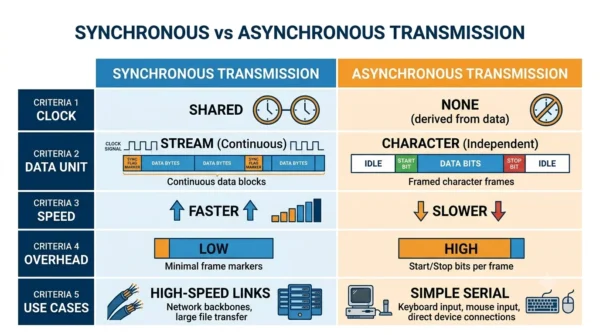
Synchronous vs Asynchronous Transmission: Comparison Table
| Aspect | Synchronous Transmission | Asynchronous Transmission |
|---|---|---|
| Clock signal | Requires a shared clock | Needs no shared clock |
| Data unit | Continuous stream of blocks | One character at a time |
| Start/stop bits | Not used | Wrap every character |
| Speed | Higher data transfer rates | Lower data transfer rates |
| Overhead | Lower (no per-character bits) | Higher (start/stop per character) |
| Efficiency at high speed | High | Lower |
| Error rate | Lower over a steady link | Higher, relies on framing bits |
| Hardware | More complex | Simpler |
| Real-time use | Well suited | Less suited |
| Transmission speed | Fixed | Can vary |
| Jitter and skew | Less susceptible | More susceptible |
| Typical distance | Longer-distance, high-speed links | Short-distance serial links |
| Synchronisation | Both ends must sync | No synchronisation needed |
| Examples | SONET, telephone networks, synchronous buses | UART/RS-232, keyboards, simple serial |
How They Frame Data
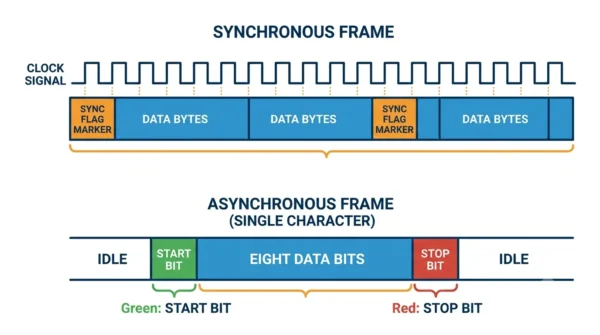
Synchronous transmission relies on the shared clock to mark where each bit and block begins. So it packs characters tightly into frames, with no gaps, which is why it moves bulk data so efficiently. Because the stream is steady, error checking across a whole block is also straightforward.
Asynchronous transmission instead marks each character with its own start and stop bits, so the receiver resynchronises on every character. That self-framing removes the need for a shared clock, yet it adds overhead and leaves more room for jitter. In short, synchronous frames by clock, while asynchronous frames by bits.
Practical Implementation
The two methods also look different in code. Synchronous transfer usually blocks until the data is sent, while asynchronous transfer can hand the work to another thread. Here are minimal C++ sketches of each.
Synchronous transmission example:
#include <iostream>
using namespace std;

int main() {
    // Synchronous data transmission
    cout << "Sending data synchronously..." << endl;
    // Perform synchronous data transmission here
    return 0;
}
Asynchronous transmission example:
#include <iostream>
#include <thread>
using namespace std;

void sendDataAsynchronously() {
    // Asynchronous data transmission
    cout << "Sending data asynchronously..." << endl;
    // Perform asynchronous data transmission here
}

int main() {
    thread t(sendDataAsynchronously);
    t.join();
    return 0;
}
Step-by-step guide:
- Identify the data transmission requirements.
- Choose synchronous or asynchronous transmission based on those needs.
- Implement the transmission logic accordingly in your application.
- Test the link to confirm it meets the requirements.
Best practices:
- Use synchronous transmission for real-time work where timing is critical.
- Choose asynchronous transmission when scalability and parallel processing matter more.
- Buffer data in asynchronous transmission so it can absorb bursts.
Common pitfalls and fixes:
- Synchronous transfer can block if the link is slow, so add timeouts or threading.
- Asynchronous transfer can cause race conditions, so guard shared data with a mutex.
When to Use Synchronous or Asynchronous Transmission
Choose synchronous transmission when speed, accuracy, and real-time flow matter most. For instance, high-speed networks, fibre backbones, and synchronous buses all rely on it, because a steady clocked stream moves bulk data efficiently.
Choose asynchronous transmission when flexibility and low cost matter more than raw speed. UART serial links and simple device connections fit this model, since they send data in short, irregular bursts without a shared clock.
In practice, many systems use both. A device might talk to a nearby chip asynchronously over UART, while the backbone behind it moves data synchronously at high speed.
Frequently Asked Questions
Wrapping Up
Synchronous and asynchronous transmission both move data over a link, yet they frame and time it differently. Synchronous transmission uses a shared clock and a continuous stream for speed, while asynchronous transmission uses start and stop bits per character for simplicity.
Remember the simple rule: synchronous for fast, steady, high-volume links, and asynchronous for cheap, flexible, bursty ones. So weigh your data volume, speed needs, and cost, and the right choice becomes clear.
Related reading on DiffStudy:



