
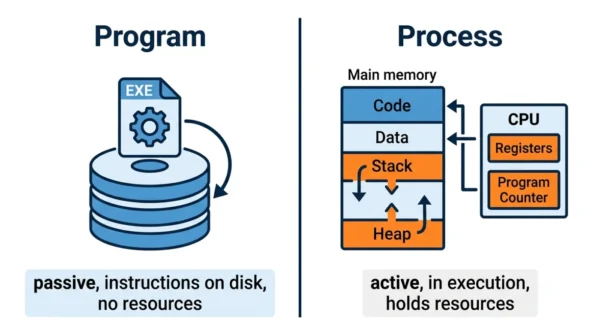
A program is a passive, static set of instructions stored on disk as an executable file, so it does nothing on its own. A process is a program in execution, so it is active, holds memory and CPU time, and has a state of its own. In short, a program is the recipe sitting in the book, while a process is the cooking actually happening in the kitchen. One program can launch many separate processes.
Process vs program is one of the first topics in any operating systems course, and it shows up in almost every GATE syllabus. Yet many students still mix up the two terms. The words sound similar, so the line between them blurs fast.
The distinction is simple once you see it. A program just sits there as a file. A process is what happens when you actually run that file. This guide defines each term, compares them in detail, and walks through what the operating system builds when a program starts.
If you are mapping out the basics, it also helps to know the related difference between a process and a thread, since a process can contain many threads.
What is a Program?
A program is a set of instructions written to perform a task. It lives on disk as an executable file, such as paint.exe or a compiled binary. Because it just sits there, a program is passive and static. It has no state of its own, and it does nothing until you run it.
So a program is essentially the plan, not the action. It occupies storage space, yet it claims no CPU time and no working memory while idle. For example, the paint.exe file on your PC is only a program until you double-click it.
Characteristics of a program:
- Passive and static, so it never runs by itself.
- Stored on disk as an executable file in secondary storage.
- Has a long lifespan, because the file stays until you delete it.
- Holds no system resources such as CPU time or memory.
Limitations of a program:
- Does nothing useful until the operating system executes it.
- Has no state, so it cannot track progress on its own.
- Cannot interact with the CPU or memory while it is just a file.
What is a Process?
A process is a program in execution. The moment you run a program, the operating system loads it into memory and turns it into an active, dynamic process. Therefore a process is far more than the code alone.
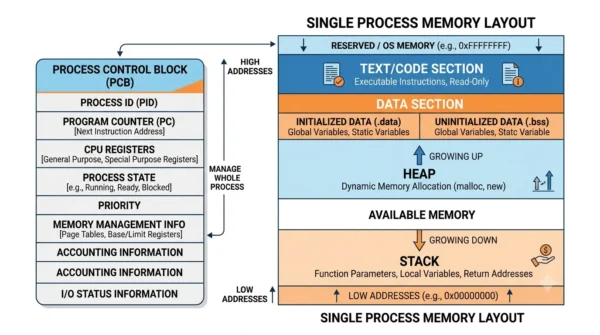
To manage it, the operating system creates a Process Control Block (PCB) for each process. A process also gets a program counter, a set of CPU registers, a stack, a heap, and a data section. On top of that, every process needs real system resources, namely CPU time, memory, and I/O. As a result, a process always carries an execution context that a plain program lacks.
Characteristics of a process:
- Active and dynamic, since it is actually running.
- Lives in main memory (RAM) while it executes.
- Holds resources, including CPU time, memory, and I/O.
- Has a state, so the operating system can pause and resume it.
Limitations of a process:
- Short lifespan, because it ends when the task finishes.
- Consumes resources, so too many processes can slow a system.
- Needs scheduling and management overhead from the operating system.
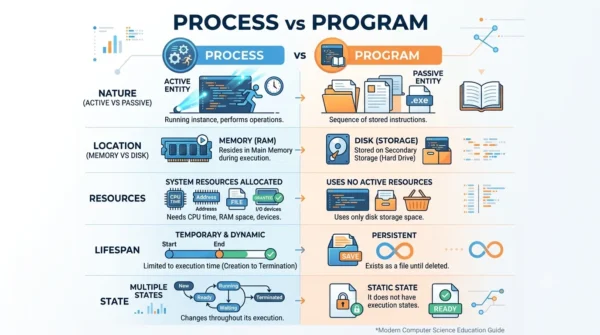
Process vs Program: Comparison Table
| Aspect | Process | Program |
|---|---|---|
| Definition | A program in execution | A set of instructions stored as a file |
| Nature | Active and dynamic | Passive and static |
| State | Has a state (ready, running, waiting) | Has no state of its own |
| Lifespan | Short, ends when the task finishes | Long, lasts until the file is deleted |
| Resources | Holds CPU time, memory, and I/O | Holds no resources while idle |
| Storage location | Loaded into main memory (RAM) to run | Stored on disk in secondary storage |
| Address space | Has its own virtual address space | Occupies physical space on disk |
| Control structure | Has a Process Control Block (PCB) | Has no PCB |
| Components | Code, data, stack, heap, registers | Only the code (instructions) |
| Program counter | Tracks the next instruction | None, because nothing runs |
| Execution | Runs on the CPU | Does not run on its own |
| Threads | Can contain one or more threads | Has no threads |
| Instances | One program can spawn many processes | A single executable file |
| Created by | The OS when a program is run | A programmer writing and compiling code |
| Scheduling | Scheduled by the OS for the CPU | Not scheduled |
| Example | Running paint.exe is a process | The paint.exe file on the PC is a program |
How a Program Becomes a Process
The clearest way to see the gap is to follow one example. Say you have paint.exe on your disk. Right now it is only a program, because it just sits there as a file.
Then you double-click it. At that point the operating system springs into action. First it loads the instructions from disk into main memory. Next it allocates an address space with a code section, a data section, a heap, and a stack. After that it builds a Process Control Block to track the program counter, the CPU registers, and the process state. Finally the scheduler gives the new process CPU time, so the code actually runs.
So the same file can become several processes at once. If you open paint.exe twice, you get two separate processes from one program. Each process has its own memory, its own PCB, and its own state, even though they share the same underlying code. That is the core idea: a process equals a program plus its execution context plus allocated resources.
Process States and Threads
Because a process is active, it moves through several states during its life. The operating system tracks the current state in the PCB and switches the process between them as needed.
- New: the process is being created.
- Ready: it is waiting for the CPU to be assigned.
- Running: the CPU is executing its instructions.
- Waiting (blocked): it is waiting for I/O or an event.
- Terminated: it has finished and is being cleaned up.
A program, by contrast, never has a state, since it does not run. Moreover, a single process can hold one or more threads. Each thread is a separate path of execution inside the same process, and all threads share that process’s memory. For example, a browser tab can run several threads at once while staying inside one process.
When the Distinction Matters
This is not just exam trivia, because the difference shapes how systems behave. When you study scheduling, the CPU schedules processes, not program files. So understanding that gap is the first step toward grasping how the job scheduler and CPU scheduler divide their work.
The distinction also explains everyday behaviour. When your task manager shows several entries for the same app, each one is a separate process from a single program. Likewise, when an app freezes, you end its process, yet the program stays safely on disk. Therefore the program is permanent, while the process is temporary.
In short, remember the direction of the relationship. A program is the static cause, and a process is the active effect of running it. Keep that straight, and most operating-systems questions on the topic become easy.
Interview Questions
Frequently Asked Questions
Wrapping Up
A process and a program describe two sides of the same code. The program is the static set of instructions on disk, while the process is that program brought to life in memory.
Remember the simple rule: a program is passive and permanent, and a process is active and temporary. A process adds an execution context, namely a PCB, a program counter, registers, a stack, a heap, and a state. Keep that relationship clear, and most operating-systems exam and interview questions on the topic fall into place.
Related reading on DiffStudy:



