
A process is an independent program in execution with its own private address space, memory, and resources, so processes stay isolated and one crashing does not crash the others. A thread is a lightweight unit of execution inside a process, and threads of the same process share its code, data, and heap while each keeps its own stack, registers, and program counter. In short, the process vs thread split is about isolation versus sharing: separate address spaces cost more but stay safe, while a shared address space is fast but offers no protection.
Process and thread are two core units of execution in any operating system. Both show up in every GATE and operating-systems syllabus. Students often blur how each one uses memory and why one crashing thread can take down a whole program.
The key question is simple. Should each task run in its own protected memory, or should many tasks share one memory to talk faster? A process takes the first path, while a thread takes the second. This guide defines each one, compares them in detail, and shows when to use which.
If the difference between code and a running task is still fuzzy, it helps to read process vs program first, because a program is passive code on disk while a process is that program actually running.
What is a Process?
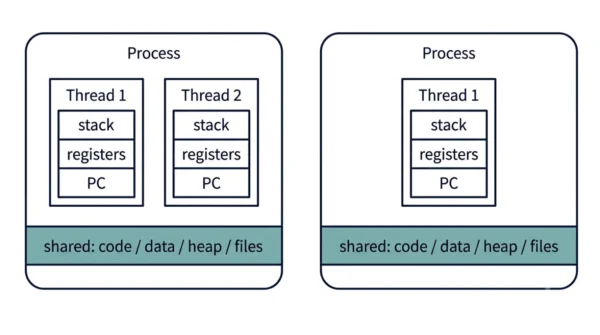
A process is an independent program in execution. When you launch a program, the operating system loads it into memory and gives it its own private address space, so the process gets its own code, data, heap, and stack segments plus its own open files and other resources.
The kernel tracks each process through a Process Control Block (PCB), which holds its id, state, registers, and memory map. Because every process is isolated, one process cannot read or corrupt another’s memory directly. So if one process crashes, the others keep running. To share data, two processes must use inter-process communication (IPC), such as pipes, message queues, or shared memory. A process is therefore the heavyweight unit, and you can read more about how the OS picks which one runs in our note on the job scheduler vs CPU scheduler.
Advantages of a process:
- Strong isolation, so one crash cannot corrupt another process.
- Better security, because the address space is private and protected.
- True independence, so processes can run on separate cores cleanly.
- A fault stays contained, which makes the system more robust.
Disadvantages of a process:
- Heavyweight, since each one needs its own memory and resources.
- Slow creation, because the OS sets up a whole new address space.
- Costly context switching, as the memory map changes on every switch.
- Harder communication, because sharing data needs IPC.
What is a Thread?
A thread is a lightweight unit of execution that lives inside a process. One process can hold many threads, and this is called multithreading. All threads of the same process share that process’s address space, code, data section, heap, and open files.
However, each thread still keeps its own stack, registers, and program counter, so every thread can run its own sequence of instructions. Because the threads share one memory, they communicate cheaply through that shared memory, with no IPC needed. Their context switch is also cheaper, since the address space stays the same. The downside is real, though: threads have no isolation, so one misbehaving thread that corrupts shared memory can crash the whole process. To stay safe, threads need synchronization with locks or mutexes to avoid race conditions.
Advantages of a thread:
- Lightweight, so creation and teardown are fast.
- Cheap communication, because threads share the same memory directly.
- Low context-switch cost, since the address space does not change.
- Better responsiveness, as one thread can work while another waits.
Disadvantages of a thread:
- No isolation, so one bad thread can crash the entire process.
- Needs synchronization, because shared data invites race conditions.
- Harder to debug, since bugs depend on timing and interleaving.
- Shared fate, so a fatal error in one thread dooms its siblings.
Process vs Thread: Comparison Table
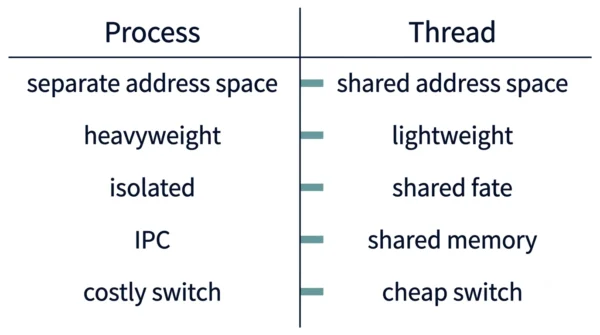
| Aspect | Process | Thread |
|---|---|---|
| Definition | An independent program in execution | A unit of execution within a process |
| Weight | Heavyweight, takes more resources | Lightweight, takes fewer resources |
| Creation time | Takes more time to create | Takes less time to create |
| Address space | Has its own private address space | Shares the address space of its process |
| Memory sharing | Memory is not shared between processes | Memory is shared among threads |
| Communication | Slow and complex, needs IPC | Easy and efficient via shared memory |
| Isolation on crash | One crash does not affect other processes | One crash can bring down the whole process |
| Context switching | Expensive, the memory map changes | Inexpensive, the address space stays the same |
| Termination effect | If it dies, all resources are reclaimed and its threads die | If it dies, only its stack is reclaimed |
| Data access | Each process operates independently | One thread can read and write another thread’s data |
| Segments owned | Owns its own code, data, heap, and stack | Owns only its stack, registers, and PC; shares code, data, and heap |
| Resources and files | Private resources and open files | Shares the process’s resources and open files |
| Synchronization | Rarely needed across processes | Needed, since shared data invites race conditions |
| OS structure | Described by a Process Control Block (PCB) | Described by a thread control block (TCB) |
| Security | Protected, isolated address space | No protection between threads of a process |
| Relationship | A process can contain many threads | A thread always belongs to one process |
How a Process and a Thread Work
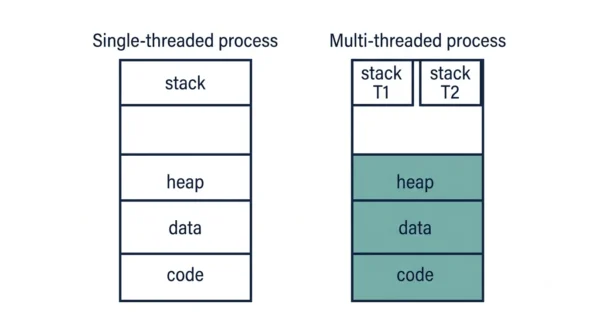
The clearest way to see the gap is one example: a web browser. The browser runs as a process with its own memory. Inside it, separate threads can render the page, run scripts, and download images at the same time. Because those threads share one address space, the download thread can drop data straight into a buffer the render thread reads, with no copying.
Now picture two whole browser windows as two separate processes. They cannot peek into each other’s memory at all. To pass data between them, they must use IPC, such as a pipe or shared-memory region the OS sets up. So sharing across processes takes real work, while sharing across threads is almost free.
The crash behaviour follows the same logic. If one thread corrupts the shared heap, the whole process can crash, because the threads share fate. By contrast, if one browser-window process crashes, the other window stays alive, since the OS isolates their memory. This is exactly why modern browsers put risky tabs in separate processes.
Context-switch cost follows too. Switching between two threads of one process is cheap, because the address space and page tables stay the same. Switching between two processes is dear, because the OS must swap the memory map and flush cached translations. As a result, threads win on speed, while processes win on safety.
User-Level vs Kernel-Level Threads
Threads come in two flavours, and the difference matters for performance. User-level threads live in a library above the kernel, so the kernel sees only one process. They switch fast, because no kernel call is needed. However, if one user thread blocks on I/O, the whole process can block, since the kernel cannot schedule the others.
Kernel-level threads are managed directly by the operating system, so the kernel schedules each thread on its own. They cost a little more to switch, yet they handle blocking far better and can truly run in parallel on multiple cores. Most modern systems map user threads onto kernel threads to get the best of both.
When to Use a Process or a Thread
You often have a choice between many processes and many threads, and the trade-off guides it.
Choose multiple threads when tasks must share data closely and run fast. Examples include a UI that stays responsive while work runs, or a server that handles many small requests inside one address space. Threads shine here, because the shared memory makes communication cheap.
Choose multiple processes when isolation and safety matter most. Examples include browser tabs, sandboxed plugins, and crash-prone components, because one process crashing must not take the rest down. So in practice, you trade the speed of sharing against the safety of isolation, and the workload decides.
Interview Questions
Frequently Asked Questions
Wrapping Up
Both processes and threads are fundamental building blocks of modern computing. A process is a self-contained execution unit with its own resources, while a thread is a lightweight subunit that shares memory and resources within a process.
Remember the simple rule: a process means isolation, and a thread means sharing. Processes stay safe but cost more to create and switch, whereas threads stay fast but share fate and need locks. Knowing that trade-off is enough to answer most exam and interview questions on the two.
Related reading on DiffStudy:



