
The job scheduler is the long-term scheduler. It picks which jobs leave the pool on disk and enter memory, so it sets the degree of multiprogramming and runs only now and then. The CPU scheduler is the short-term scheduler. It picks which ready process in memory gets the CPU next, so it runs every few milliseconds and shapes response time. In short, the job scheduler controls admission, while the CPU scheduler controls CPU allocation.
Job scheduler vs CPU scheduler is a classic operating-systems question, and it appears in every GATE syllabus. Both pick which work moves forward, yet they act at very different points and speeds. Students often blur the two, because both are “schedulers” that deal with processes.
The real split is simple. One scheduler decides which jobs are even allowed into memory, while the other decides which in-memory process runs right now. This guide defines each scheduler, compares them in detail, and shows a concrete example of how a process travels through both.
If the basics still feel shaky, it helps to know the difference between a process and a program first, since scheduling is all about processes.
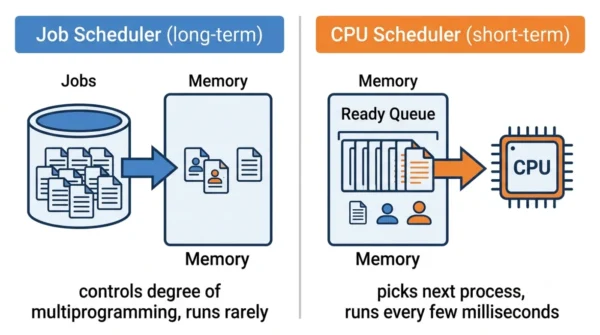
What is a Job Scheduler?
The job scheduler is the operating system’s long-term scheduler, also called the batch scheduler. When you submit a job, it does not run at once. Instead it waits in a job pool on disk, and the long-term scheduler decides which jobs the system admits into memory. So this scheduler manages background admission, not direct user interaction.
Its main job is to control the degree of multiprogramming, which is how many processes sit in memory at the same time. Because it admits jobs only now and then, it runs infrequently, often seconds or minutes apart. It also optimises resource use by choosing a healthy mix of jobs, for example some that are CPU-heavy and some that are I/O-heavy. As a result, the system stays busy without overloading memory.
Once the job scheduler admits a job, that job becomes a process and joins the ready queue. After that point, the long-term scheduler steps back, since the work of picking who actually runs belongs to a different scheduler.
Advantages of a job scheduler:
- It controls the degree of multiprogramming, so memory never gets overcommitted.
- It picks a balanced job mix, which keeps both the CPU and the I/O devices busy.
- It suits non-interactive work, such as batch processing, report generation, and system maintenance.
- It optimises overall resource utilisation across long-running workloads.
Disadvantages of a job scheduler:
- It adds admission delay, so a submitted job may wait before it ever enters memory.
- It plays almost no role in time-sharing systems, where jobs enter memory directly.
- A poor job mix can starve devices or waste memory, since the choice is made rarely.
What is a CPU Scheduler?
The CPU scheduler is the operating system’s short-term scheduler. It looks only at processes already in memory, sitting in the ready queue. From those, it picks the one that should get the CPU next. So unlike the job scheduler, it never reaches back to the disk pool.
Because the running process keeps changing, this scheduler runs very frequently, often every few milliseconds. After it selects a process, a small component called the dispatcher hands the CPU over and switches context. Its goals are clear: minimise waiting time, maximise throughput, and share the CPU fairly among ready processes. Therefore the CPU scheduler directly shapes how responsive a system feels.
This scheduler is the one that GATE questions usually mean by “scheduling algorithm”. Round Robin, First-Come First-Served, and Shortest Job First are all short-term CPU-scheduling policies, since they all decide which ready process runs next.
Advantages of a CPU scheduler:
- It keeps the CPU busy, so the processor rarely sits idle while work waits.
- It improves response time, which matters for interactive and real-time systems.
- It can honour priority levels, so urgent processes get the CPU sooner.
- It enables true multitasking, because it switches between processes quickly.
Disadvantages of a CPU scheduler:
- Frequent switching adds overhead, since each context switch costs time.
- A bad policy can cause starvation, so low-priority processes may wait too long.
- It has little control over the degree of multiprogramming, because that choice was already made earlier.
Job Scheduler vs CPU Scheduler: Comparison Table
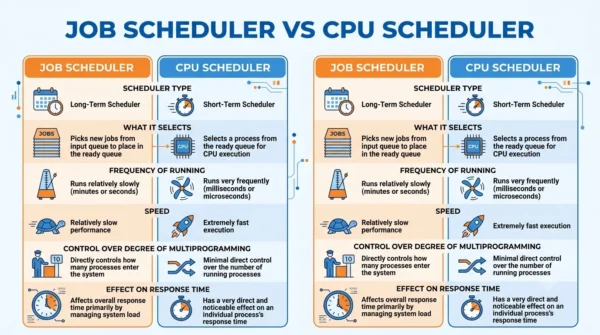
| Aspect | Job Scheduler | CPU Scheduler |
|---|---|---|
| Also known as | Long-term scheduler (batch scheduler) | Short-term scheduler |
| What it selects | Which jobs are admitted into the ready queue | Which ready process runs next and gets the CPU |
| Source of work | Job pool on disk (new jobs) | Ready queue in memory |
| How often it runs | Invoked very infrequently | Invoked very frequently |
| Speed | Slow (seconds to minutes apart) | Fast (every few milliseconds) |
| Degree of multiprogramming | Controls the degree of multiprogramming | Has little control over it |
| In time-sharing systems | Almost absent or minimal | Minimal but still essential |
| User interaction | Manages background admission without direct interaction | Decides which process runs next in real time |
| Main goal | Optimise resource use by scheduling a good job mix | Allocate CPU time fairly by priority and policy |
| Resource allocation | Based on job requirements and system availability | Based on process priority and system policies |
| Best suited for | Non-interactive tasks like batch processing and maintenance | Interactive applications and real-time systems |
| Effect on response time | Indirect, through how many jobs are admitted | Direct, since it decides who runs now |
| Hands off work to | The ready queue (then the CPU scheduler) | The dispatcher, which switches context |
| Typical algorithms | Admission policies and job-mix balancing | Round Robin, FCFS, SJF, priority scheduling |
| Stage in the process life | New → Ready (admission) | Ready → Running (dispatch) |
| Present in modern PCs? | Rarely a distinct unit on interactive systems | Always present and constantly active |
How a Process Moves Through Both Schedulers
The clearest way to see the gap is to follow one job from start to finish.
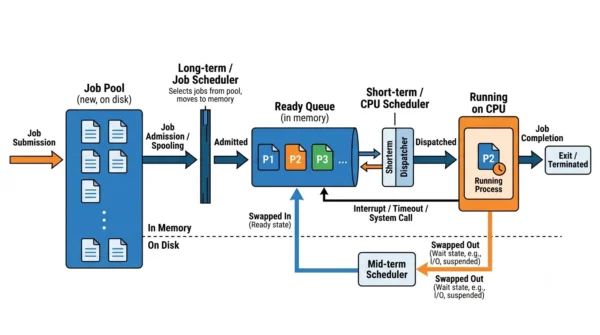
Say you submit a large report-generation job. First it lands in the job pool on disk in the new state. The job scheduler then looks at memory and the current job mix, and when there is room, it admits your job into memory. At that moment the job becomes a process and joins the ready queue.
Now the CPU scheduler takes over. It scans the ready queue and picks one process to run, and the dispatcher hands the CPU to it. Your process runs for a short slice, and then it may pause for input or get preempted. Meanwhile the CPU scheduler keeps cycling, so it picks the next ready process and the dispatcher switches again.
So the two schedulers never compete. The job scheduler decides whether your work gets into memory, while the CPU scheduler decides when it actually runs. One sets the stage rarely, and the other directs the action constantly.
The Mid-Term Scheduler
For completeness, operating systems often add a third scheduler. The mid-term scheduler handles swapping. When memory gets tight, it moves a partially run process out of memory and onto disk, and later it swaps that process back in to continue.
This scheduler sits between the other two in both timing and purpose. It runs more often than the long-term job scheduler, yet far less often than the short-term CPU scheduler. As a result, it helps keep the degree of multiprogramming sensible even after admission. So when you see “swapping” in an exam, think mid-term scheduler.
When Each Scheduler Matters
You never pick a scheduler by hand, yet the contrast still explains real system behaviour.
The job scheduler matters most on classic batch systems, where many jobs wait on disk and admission control is vital. Long, non-interactive, resource-heavy work fits here, such as batch processing, report runs, and overnight maintenance. Because admission is the bottleneck, the long-term scheduler does the heavy lifting.
The CPU scheduler matters most on interactive and real-time systems, where quick response is everything. Your phone, your laptop, and any time-sharing system lean on it constantly, since users expect instant reactions. So on the device in your hand, the short-term scheduler is the one working hardest. Both still exist in theory, but their weight shifts with the workload.
Interview Questions
Frequently Asked Questions
Wrapping Up
In the dance of task management, the job scheduler and the CPU scheduler each play a distinct part. The job scheduler decides which jobs enter memory, while the CPU scheduler decides which ready process runs next.
Remember the simple rule: long-term means admission and the degree of multiprogramming, and short-term means CPU allocation and response time. The mid-term scheduler then handles swapping in between. Knowing those three roles is enough to answer most exam and interview questions on operating-system scheduling.
Related reading on DiffStudy:



