
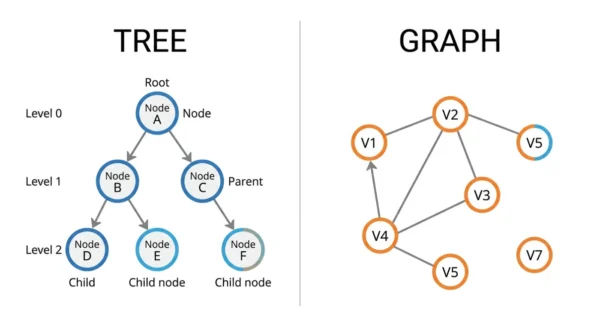
A tree is a special, restricted kind of graph. A tree is connected and acyclic, and it has one root. For n nodes it always has exactly n−1 edges. So every node except the root has a single parent. A graph is the general structure of vertices and edges. It can contain cycles, allow many parents or none, and split into disconnected parts. It can also hold up to n(n−1)/2 edges. In short: every tree is a graph, but most graphs are not trees.
Graphs and trees are the two non-linear data structures that show up in almost every algorithm course, GATE paper, and coding interview. They look alike on a whiteboard because both use nodes joined by edges. Yet they follow very different rules, and that difference decides which problems each one solves.
The quickest way to understand the pair is to see the tree as a graph with strict rules added. Once you know which rules a tree must obey, the contrasts in edges, cycles, paths, and traversal all follow naturally. Both belong to the wider family of non-linear data structures, so neither stores data in a straight sequence.
This guide explains both structures from first principles. Then it compares them on the axes that matter: hierarchy, cycles, edges, paths, representation, and time complexity. It also covers the edge-counting and spanning-tree results that examiners love to test.
What is a Tree?
A tree is a connected, acyclic data structure that arranges nodes in a hierarchy. One node sits at the top as the root. Every other node descends from it through edges, and each of those nodes has exactly one parent. Nodes with no children are leaf nodes; the rest are internal nodes.
Because a tree forbids cycles, you can never loop back to a node you have already left. That single rule keeps the structure tidy and predictable. It also means there is exactly one path from the root to any node. So traversal never needs to guard against revisiting.
Trees model anything with a clear parent-child shape. Examples include a file system, an HTML DOM, an organisation chart, or a compiler’s expression tree. Common variants include the binary tree, binary search tree, AVL tree, heap, and trie.
What is a Graph?
A graph is a set of vertices joined by a set of edges. It carries no built-in hierarchy, so there is no root and no parent-child rule. Any vertex can connect to any number of other vertices, which makes the graph the most general non-linear structure.
This freedom is the point. A graph can contain cycles, and it can be directed or undirected. Its edges can carry weights, and it can even break into disconnected components. Those options let a graph model networks that a tree simply cannot.
Maps, social networks, web links, dependency systems, and electrical circuits are all graphs. Where a tree captures hierarchy, a graph captures relationships of any shape, including many-to-many connections.
Is a Tree a Type of Graph?
Yes, and this is the cleanest way to remember the whole comparison. A tree is a connected, undirected, acyclic graph with exactly one path between every pair of nodes. So the set of all trees sits entirely inside the set of all graphs.
The reverse is not true. A graph becomes a tree only when it satisfies every tree rule at once. It must be connected, it must avoid cycles, and it must hold exactly n−1 edges for n nodes. Break any one of those conditions and the structure is a graph but not a tree.
Useful characterisation: a tree is minimally connected and maximally acyclic. Remove any edge and it falls into two pieces; add any edge and it gains a cycle. That balance is exactly what the n−1 edge count protects.
Graph vs Tree: Key Differences
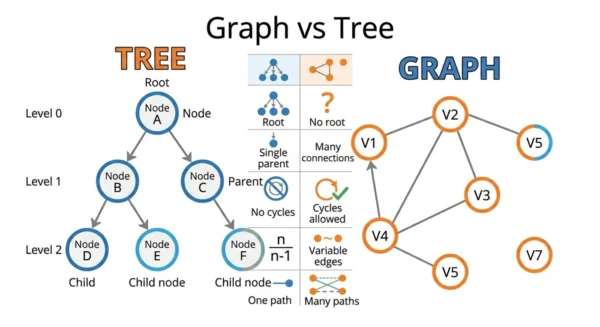
| Aspect | Tree | Graph |
|---|---|---|
| Definition | A connected, acyclic graph with one root | A set of vertices joined by edges, no hierarchy required |
| Structure | Strictly hierarchical, organised in levels | Non-hierarchical network; any vertex links to any other |
| Root node | Exactly one root, the unique starting point | No root; traversal can start anywhere |
| Parent-child | Every node except the root has one parent | No parent concept; a vertex has neighbours |
| Cycles | Never; a tree is acyclic by definition | Allowed; a graph may be cyclic or acyclic |
| Number of edges | Always exactly n−1 for n nodes | 0 up to n(n−1)/2 (undirected simple graph) |
| Connectivity | Always a single connected component | May be connected or split into components |
| Direction | Conceptually parent to child (downward) | Directed or undirected |
| Paths between nodes | Exactly one unique path | Zero, one, or many paths |
| Traversal | Pre-order, in-order, post-order, level-order | BFS and DFS with a visited set |
| Applications | File systems, DOM, B-trees, decision trees | Maps, social networks, web links, circuits |
Edges and Paths: the Numbers
Examiners test this section often, so it pays to know the counts cold. The edge rule is the fastest way to tell the two structures apart.
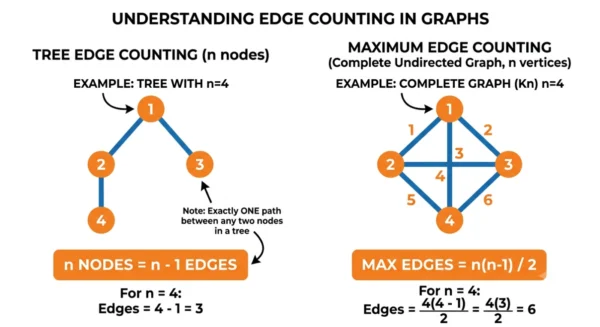
A tree with n nodes always has exactly n−1 edges. The reason is short. A tree must stay connected, which needs at least n−1 edges, and it must stay acyclic, which allows at most n−1 edges. Both bounds meet, so the count is fixed. You can prove it by induction: one node needs zero edges, and each new node joins the tree with exactly one new edge.
That result has a powerful converse, and GATE uses it: a connected graph with exactly n−1 edges is always a tree. So you can confirm a structure is a tree just by checking connectivity and edge count.
A graph has no such limit. An undirected simple graph on n vertices holds anywhere from 0 edges up to n(n−1)/2, and a directed simple graph reaches n(n−1). For four nodes, a tree always has 3 edges, while a complete undirected graph has 6.
Paths differ just as sharply. A tree gives exactly one simple path between any two nodes, so routing is unambiguous. A graph may offer zero paths when disconnected, one path, or many competing paths. That is why graph algorithms work so hard on shortest paths.
Spanning trees and forests. A spanning tree keeps every vertex of a connected graph but only n−1 edges. So it is the tree hidden inside the graph. A complete labelled graph on n vertices has nn−2 spanning trees by Cayley’s formula. A group of separate trees is a forest. A forest with k trees and n nodes has n−k edges, which generalises the n−1 rule.
Representation and Time Complexity
How you store each structure decides its memory cost and speed. A tree stores each node with links to its children, so the space is O(n) for n nodes. A balanced search tree then supports search, insert, and delete in O(log n).
A graph needs a representation of arbitrary connections, and you usually pick one of two. An adjacency list stores each vertex with its neighbours and uses O(V+E) space, which suits sparse graphs. An adjacency matrix uses a V×V grid and O(V2) space, which suits dense graphs and constant-time edge lookups.
Traversal of a graph by BFS or DFS runs in O(V+E) on an adjacency list. If you want the full picture of how structure choice drives speed, see our guide to the time complexity of data structures. The way nodes link in memory also echoes the trade-off between an array and a linked list.
Code Examples
The two snippets below show the core idea. A tree walk needs no visited set. A graph walk must track visited vertices to survive cycles.
Tree node with pre-order traversal (Python)
class TreeNode:
    def __init__(self, data):
        self.data = data
        self.children = []          # structure enforces one parent

    def add_child(self, child):
        self.children.append(child)

root = TreeNode("CEO")
root.add_child(TreeNode("Manager 1"))
root.add_child(TreeNode("Manager 2"))

def preorder(node):                 # no visited set needed
    if node is None:
        return
    print(node.data)
    for child in node.children:
        preorder(child)

preorder(root)   # CEO, Manager 1, Manager 2
Graph as an adjacency list with BFS (Python)
from collections import deque

class Graph:
    def __init__(self):
        self.adj = {}

    def add_edge(self, u, v):       # undirected
        self.adj.setdefault(u, []).append(v)
        self.adj.setdefault(v, []).append(u)

g = Graph()
for u, v in [("A", "B"), ("A", "C"), ("B", "C")]:   # cycle A-B-C-A
    g.add_edge(u, v)

def bfs(graph, start):
    visited, q = {start}, deque([start])
    while q:
        node = q.popleft()
        print(node)
        for nbr in graph.adj[node]:
            if nbr not in visited:  # visited set avoids looping on cycles
                visited.add(nbr)
                q.append(nbr)

bfs(g, "A")
Both BFS and DFS apply to trees and graphs alike. The difference is the cycle guard, and the choice of helper structure: DFS leans on a stack while BFS uses a queue. For a deeper look at the two strategies, read DFS vs BFS.
Types of Trees and Graphs
Both structures branch into specialised forms that target specific problems.
Common trees
- Binary tree — each node has at most two children.
- Binary search tree — ordered for fast lookup; see binary tree vs binary search tree.
- AVL and red-black trees — self-balancing for O(log n).
- Heap — a complete tree for priority queues.
- Trie — a prefix tree for strings.
- Spatial trees — like quad trees and k-d trees.
Common graphs
- Directed graph — edges carry a direction.
- Undirected graph — edges work both ways.
- Weighted graph — edges hold a cost or distance.
- Cyclic and acyclic — a DAG is a directed acyclic graph.
- Connected and disconnected — one piece or several.
- Complete graph — every vertex links to every other.
Real-World Applications
Trees fit hierarchical data. File systems, the HTML DOM, organisation charts, B-tree database indexes, and decision trees all rely on a single-parent shape.
Graphs fit networks. Social platforms model friendships, and GPS apps model road maps. Search engines model linked web pages, and package managers model dependencies. Minimum-spanning-tree algorithms such as Prim’s and Kruskal’s connect graph vertices at the lowest cost.
When to Use a Tree vs a Graph
Choose a tree when your data is hierarchical and each item has a single parent. Trees give predictable traversal, one path per node, and clean O(log n) operations when balanced. Reach for them for lookup tables, parsing, and any ranked structure.
Choose a graph when relationships are networked, many-to-many, or cyclic. Graphs handle shortest paths, connectivity questions, and dependency resolution that a tree cannot express. If you ever need more than one path between items, you need a graph.
Interview Questions on Graph vs Tree
Frequently Asked Questions
Wrapping Up
The whole comparison collapses to one idea: a tree is a graph that obeys strict rules. It stays connected, avoids cycles, and keeps one root. It also locks its edge count at n−1, which forces a single path between any two nodes. A graph drops those rules and gains the freedom to model any network.
When you meet a new problem, ask whether the data is a hierarchy or a network. Hierarchy with one parent per node points to a tree; many-to-many links or cycles point to a graph. That one question usually picks the right structure for you.
Related reading on DiffStudy:
- Linear vs Non-Linear Data Structures
- DFS vs BFS and Stack vs Queue
- Binary Tree vs Binary Search Tree
- Prim’s vs Kruskal’s Algorithm
- Array vs Linked List and Time Complexity of Data Structures
- CS Fundamentals hub



