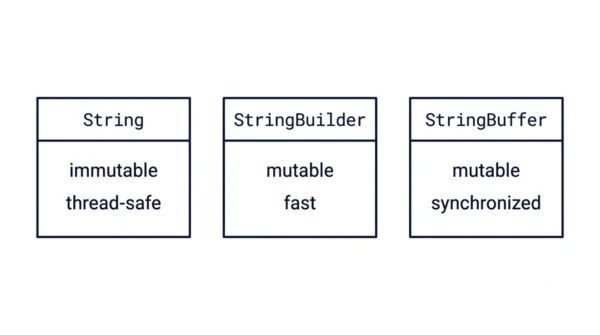
String is immutable, so every change makes a new object, which is simple and thread-safe but slow for heavy edits. StringBuilder is mutable and edits one buffer in place, so it is fast, but it is not thread-safe. StringBuffer is the same as StringBuilder yet synchronised, so it is thread-safe but a little slower. In short, use String for fixed text, StringBuilder for fast single-threaded building, and StringBuffer when many threads share the buffer.
String, StringBuilder, and StringBuffer are the three ways Java holds and builds text. All three appear in every Java and interview syllabus. Beginners often blur which one is mutable and which one is thread-safe, so choosing the wrong one hurts performance.
The core split is mutability and thread safety. Can the object change in place, and is it safe across threads? String says no to both, StringBuilder says yes then no, and StringBuffer says yes to both. This guide defines each class, shows the code, compares them in detail, and explains when to use which.
If you are still mapping out Java basics, it also helps to know the difference between checked and unchecked exceptions.
What is String?
The String class represents a sequence of characters. Once created, a String is immutable, so its value cannot change. Any operation that seems to modify a String actually creates a new String object, and the old one is left untouched.
Because of that, Java can keep string literals in a shared string pool, so equal literals reuse one object. Immutability also makes String naturally thread-safe. The cost shows up only when you change text often, since each change allocates a new object.
Advantages of String:
- Simple to use and understand.
- Thread-safe, because it is immutable.
- Literals are cached in the string pool, which saves memory.
Disadvantages of String:
- Inefficient for frequent changes, since each one creates a new object.
- Repeated concatenation in a loop wastes memory and time.
What is StringBuilder?
The StringBuilder class is like String but mutable, so it changes text without creating new objects. It provides methods to append, insert, delete, and replace characters in one internal buffer. Therefore it suits building or editing text quickly.
StringBuilder is not synchronised, so it does no thread-safety locking. As a result, it is the fastest of the three for string building, which makes it the default choice in single-threaded code.
Advantages of StringBuilder:
- Efficient for frequent modifications, since it edits in place.
- Not synchronised, so it is faster than StringBuffer.
- Rich methods for append, insert, delete, and reverse.
Disadvantages of StringBuilder:
- Not thread-safe, so two threads can corrupt the buffer.
- Needs a final
toString()call to get a String back.
What is StringBuffer?
The StringBuffer class is like StringBuilder but synchronised, which makes it thread-safe. Its methods are marked synchronized, so only one thread can change the buffer at a time. Hence it fits cases where several threads share the same buffer.
That locking has a price. Because each method acquires a lock, StringBuffer runs a little slower than StringBuilder. So you pay for safety only when you actually need it.
Advantages of StringBuffer:
- Thread-safe, because its methods are synchronised.
- Mutable, so it edits text without new objects.
- Safe for many threads sharing one buffer.
Disadvantages of StringBuffer:
- Slower than StringBuilder, due to synchronisation overhead.
- Unnecessary in single-threaded code, where the lock adds no value.
String vs StringBuilder vs StringBuffer: Comparison Table
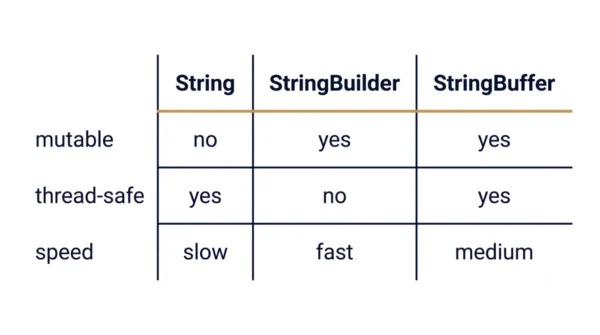
| Aspect | String | StringBuilder | StringBuffer |
|---|---|---|---|
| Mutability | Immutable | Mutable | Mutable |
| Thread safety | Thread-safe (immutable) | Not thread-safe | Thread-safe (synchronised) |
| Synchronisation | Not applicable | Not synchronised | Synchronised methods |
| Concatenation | Creates a new object each time | Efficient, edits in place | Efficient, edits in place |
| Append performance | Slow | Fast | Slower than StringBuilder |
| Modification methods | None (no in-place edit) | append, insert, delete, replace | append, insert, delete, replace |
| Best for | Fixed or rarely changed text | Frequent edits, single thread | Frequent edits, many threads |
| String building | Inefficient | Efficient | Efficient |
| Multi-threading | Safe but not for building | Not safe for shared edits | Safe for shared edits |
| Memory on edits | New allocation each change | Memory-efficient buffer | Buffer plus lock overhead |
| Heavy manipulation | Not advised | Recommended | Recommended (concurrent) |
| Introduced in | JDK 1.0 | JDK 1.5 | JDK 1.0 |
Code and Performance
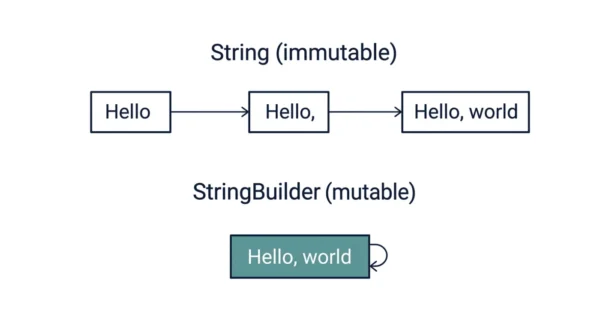
The same “build a greeting” task shows the difference across all three classes.
public class BuildText {
    public static void main(String[] args) {
        // Using String: each += makes a new object
        String result = "Hello";
        result += ", ";
        result += "world";
        System.out.println(result);

        // Using StringBuilder: edits one buffer, fast
        StringBuilder sb = new StringBuilder();
        sb.append("Hello");
        sb.append(", ");
        sb.append("world");
        System.out.println(sb.toString());

        // Using StringBuffer: same, but thread-safe
        StringBuffer sbf = new StringBuffer();
        sbf.append("Hello");
        sbf.append(", ");
        sbf.append("world");
        System.out.println(sbf.toString());
    }
}
The loop trap. The clearest performance gap appears when you concatenate in a loop. Joining n pieces with String += rebuilds the whole text each time, so the cost grows roughly with the square of n. Doing the same with a StringBuilder appends into one buffer, so the cost grows only linearly. Therefore a StringBuilder can be dramatically faster for large loops.
Step-by-step:
- Create a String, a StringBuilder, or a StringBuffer, depending on your need.
- Use the right methods to concatenate or edit the text.
- Call
toString()on a StringBuilder or StringBuffer to get the final String.
Best practices:
- Use String when the content rarely changes.
- Use StringBuilder for mutable edits in single-threaded code.
- Use StringBuffer only when several threads share the buffer.
Common pitfall: concatenating with + inside a loop, which creates many intermediate String objects. Solution: build the text with a StringBuilder instead, then convert once at the end.
When to Use Which
You choose by asking two questions: does the text change, and do threads share it?
Use a String when the text is fixed, such as a constant, a key, or a label. Since it never changes, immutability is a feature, not a cost. So String keeps simple values simple and safe.
Use a StringBuilder when you build or edit text in one thread, such as assembling a report or joining tokens in a loop. Because it edits in place with no locking, it is the fastest option. Therefore it is the everyday default for string building.
Use a StringBuffer only when more than one thread edits the same buffer. Its synchronised methods keep the data safe, at a small speed cost. So reach for it purely when concurrency demands it, not by habit.
Interview Questions
+= on a String copies the whole text into a brand-new object, so a loop of n appends does roughly n-squared work. A StringBuilder instead appends into one buffer, so the same loop is closer to linear. Therefore StringBuilder is far faster for large loops.Frequently Asked Questions
Wrapping Up
String, StringBuilder, and StringBuffer solve the same job at three trade-off points. String is immutable and safe but slow to edit, StringBuilder is mutable and fast, and StringBuffer is mutable and thread-safe.
Remember the simple rule: String for fixed text, StringBuilder for fast single-threaded building, and StringBuffer only when threads share the buffer. Weighing mutability against thread safety answers most exam and interview questions on the three.
Related reading on DiffStudy:
- Checked vs Unchecked Exceptions
- Method Overloading vs Overriding
- Comparator vs Comparable
- CS Fundamentals hub