
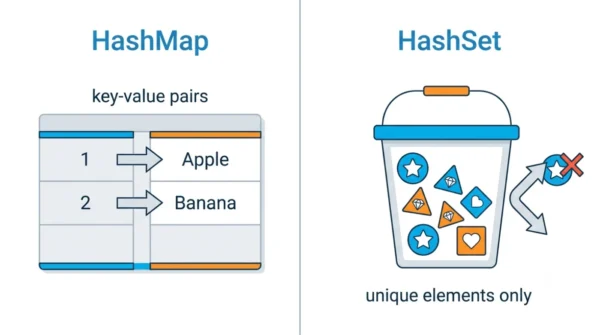
HashMap stores key-value pairs and implements the Map interface, so you look up a value by its key. HashSet stores only unique elements and implements the Set interface, so it just tracks membership. In fact, a HashSet is backed by a HashMap internally. In short, use HashMap for key-value mapping and HashSet for a collection of distinct items.
Indeed, HashMap and HashSet are two of the most used collection classes in Java. They look similar because both rely on hashing, so students often mix up when to reach for each one.
The core split is what they hold: a HashMap holds key-value pairs, whereas a HashSet holds single, unique values. This guide defines each class, shows code for both, compares them in detail, and explains when to use which.
It also pairs well with the close cousin comparison, HashMap vs Hashtable.
What is a HashMap?
Specifically, HashMap stores elements as key-value pairs. It uses a hash table for storage, and it allows duplicate values but not duplicate keys. Because of that hashing, basic operations like get() and put() run in average constant time.
import java.util.HashMap;

public class HashMapExample {
    public static void main(String[] args) {
        HashMap<Integer, String> map = new HashMap<>();
        map.put(1, "Apple");
        map.put(2, "Banana");
        map.put(3, "Orange");

        System.out.println(map.get(2)); // Output: Banana
    }
}
Advantages of HashMap:
- Efficient key-value storage and retrieval, in average O(1).
- Allows one null key and multiple null values.
- Flexible for caches, lookups, and counting.
Disadvantages of HashMap:
- Not synchronised, so it is not thread-safe by default (use ConcurrentHashMap for that).
- Performance can drop with a high load factor or poor hashing.
What is a HashSet?
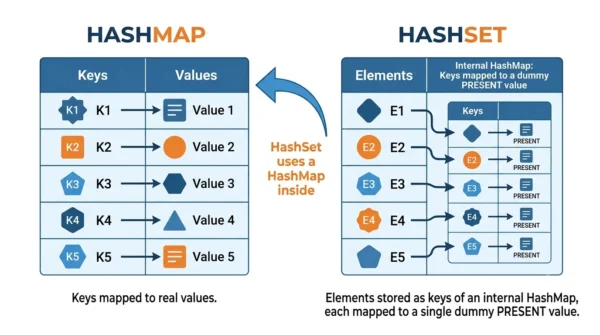
By contrast, HashSet is a collection that does not allow duplicate elements. It also uses a hash table, so add(), remove(), and contains() run in average constant time. Notably, a HashSet is backed by a HashMap internally, storing each element as a key with a shared dummy value.
import java.util.HashSet;

public class HashSetExample {
    public static void main(String[] args) {
        HashSet<String> set = new HashSet<>();
        set.add("Apple");
        set.add("Banana");
        set.add("Orange");

        System.out.println(set.contains("Banana")); // Output: true
    }
}
Advantages of HashSet:
- Efficient at keeping elements unique.
- Allows one null element.
- Simple membership tests with
contains().
Disadvantages of HashSet:
- Not synchronised, so it is not thread-safe by default.
- Cannot store key-value pairs like a HashMap.
HashMap vs HashSet: Comparison Table
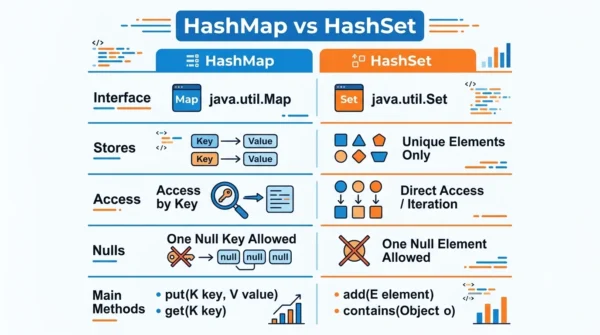
| Aspect | HashMap | HashSet |
|---|---|---|
| Interface | Implements Map; stores key-value pairs | Implements Set; stores unique elements |
| Access | Uses a key to retrieve a value | Elements are accessed directly |
| Null handling | One null key, multiple null values | One null element |
| Main methods | put(key, value), get(key) | add(element), contains(element) |
| Iteration | Over keys, values, or entries | Over elements |
| Duplicates | Unique keys; values may repeat | All elements are unique |
| Storage | Hash table of entries | Hash table (backed by a HashMap) |
| Special methods | keySet(), values(), entrySet() | No such methods |
| Relies on | equals() and hashCode() of keys | equals() and hashCode() of elements |
| Removal | Removes a key-value pair | Removes an element |
| Best for | Key-value mappings and lookups | Unique items and set operations |
| Iteration order | Not guaranteed (use LinkedHashMap to keep order) | Not guaranteed (use LinkedHashSet to keep order) |
Code and Best Practices
Both classes follow the same few steps in practice. First, create the collection. Next, add elements with put() for a HashMap or add() for a HashSet. Then retrieve or iterate as needed.
For example, here a HashSet ignores a duplicate automatically:
import java.util.HashSet;

public class HashSetDemo {
    public static void main(String[] args) {
        HashSet<String> set = new HashSet<>();
        set.add("apple");
        set.add("banana");
        set.add("apple"); // ignored, it is a duplicate

        for (String element : set) {
            System.out.println(element);
        }
    }
}
Best practices:
- Use a HashMap for key-value pairs, and a HashSet for unique elements.
- Set a sensible initial capacity to avoid frequent resizing.
- Use generics so the compiler enforces type safety.
Common pitfall and fix: if you use custom objects as keys or elements, you must override equals() and hashCode(). Otherwise, lookups and uniqueness break, because the collection cannot match objects correctly. So always override both methods together in your custom classes.
When to Use HashMap or HashSet
Choose a HashMap when you need to associate values with keys. For example, caches, lookup tables, counting word frequencies, and database-style records all fit the key-value model.
Choose a HashSet when you only care about which elements are present. For instance, removing duplicates, checking membership, and set operations like union or intersection all suit a HashSet.
In short, if your data has a natural key, reach for HashMap; if it is just a bag of distinct values, reach for HashSet.
Frequently Asked Questions
Wrapping Up
HashMap and HashSet both use hashing, yet they solve different problems. A HashMap maps unique keys to values, while a HashSet stores a collection of unique elements and is backed by a HashMap inside.
So remember the rule: choose HashMap when your data has keys, and HashSet when you just need distinct values. With that, plus the comparison table above, you can pick the right collection with confidence.
Related reading on DiffStudy:



