
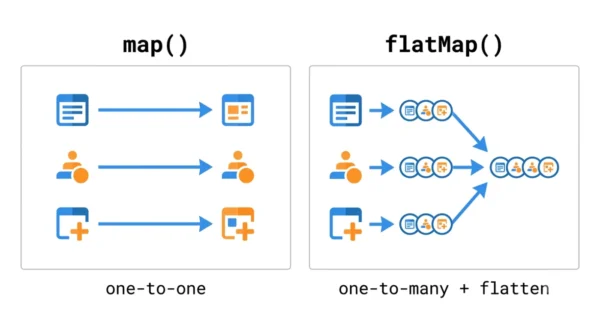
map() transforms each element of a stream into exactly one new element, so the count stays the same. flatMap() transforms each element into a stream of elements and then flattens all those streams into one. Use map() for a one-to-one change. Reach for flatMap() when each element maps to many values, or to flatten nested collections.
map vs flatMap is one of the most common Java Streams questions, and a frequent point of confusion. Both are intermediate operations, both take a function, and both return a stream. The difference is what that function returns and what happens to the result.
In one line: map is one-to-one, while flatMap is one-to-many followed by flattening. That single idea explains every example below. Both were added in Java 8 with the Stream API.
This guide defines each operation, compares them with a table, shows working code, and covers when to reach for flatMap. They build on the object-oriented and functional style of modern Java.
What is map() in Java Streams?
map() is an intermediate Stream operation that applies a function to every element and replaces it with the result. It is a one-to-one transformation: one input element produces exactly one output element. So the stream keeps the same number of elements.
Its parameter is a Function<T, R>, and it returns a Stream<R>. You use it to convert or reshape each element, such as turning names into their lengths or strings into uppercase.
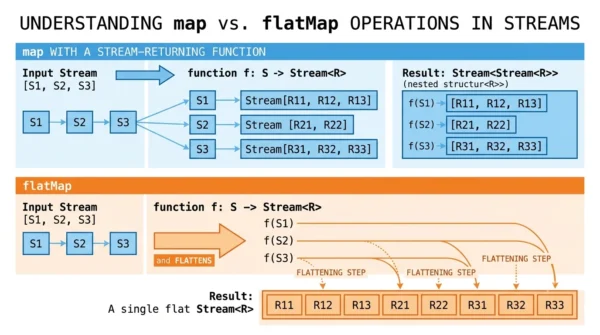
The catch appears when the function itself returns a collection or stream. Then map() gives you a stream of streams, like Stream<Stream<R>>, which is rarely what you want. That is exactly the problem flatMap() solves.
What is flatMap() in Java Streams?
flatMap() is also an intermediate operation. It maps each element to a stream, then flattens all of those streams into a single stream. It is a one-to-many transformation followed by a merge.
Its parameter is a Function<T, Stream<R>>, so the function must return a stream. The final result is a flat Stream<R>. So a stream of lists becomes a single stream of all their elements.
This makes flatMap() the tool for nested structures. Whenever you have a Stream of collections, or each element expands into zero or more values, flatMap collapses it into one clean, single-level stream.
map vs flatMap: Key Differences
| Aspect | map() | flatMap() |
|---|---|---|
| Mapping | One-to-one | One-to-many, then flattened |
| Mapper function | Function<T, R> | Function<T, Stream<R>> |
| Function returns | A single value | A stream of values |
| Result | Stream<R> | Stream<R> (flattened) |
| Element count | Same as input | Can grow, shrink, or stay |
| Nested data | Keeps it nested (stream of streams) | Flattens it into one level |
| Typical use | Transform each element | Flatten collections, one-to-many |
| Example | names.map(String::toUpperCase) | lists.flatMap(List::stream) |
Code Examples
The contrast is clearest with a transform versus a flatten. The first reshapes each element; the second collapses nested lists.
map() — one-to-one transform:
List<String> names = List.of("ann", "bob");

List<String> upper = names.stream()
        .map(String::toUpperCase)          // 1-to-1
        .collect(Collectors.toList());

// [ANN, BOB]  -- same number of elements
flatMap() — flatten nested lists:
List<List<Integer>> nested =
        List.of(List.of(1, 2), List.of(3, 4));

List<Integer> flat = nested.stream()
        .flatMap(List::stream)             // 1-to-many, then flatten
        .collect(Collectors.toList());

// [1, 2, 3, 4]  -- one flat stream
With map(List::stream) you would get a Stream<Stream<Integer>>, which is awkward to use. flatMap does the same mapping and then merges the inner streams into one, giving the flat list you actually want.
When to Use flatMap
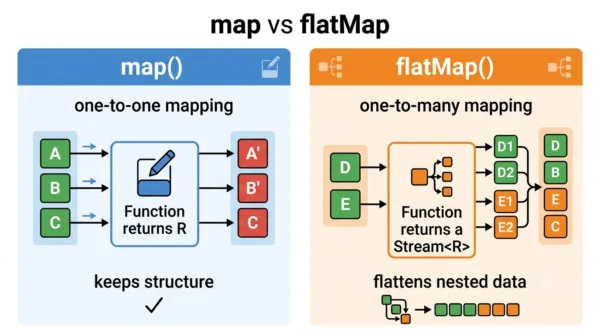
Reach for flatMap() whenever each element expands into more than one value, or none. Flattening a list of lists, splitting sentences into words, or pulling every order line from every order all fit it perfectly.
Stick with map() when the transformation is a clean one-to-one swap. Examples are converting a type, extracting a field, or formatting a value. If the mapping function returns a single value, map() is correct and simpler.
A quick rule: if your mapping function returns a collection or stream, you almost always want flatMap() so the result stays flat. If it returns one value, use map().
map vs flatMap in Optional
The same idea appears on Optional, not just streams. Optional.map() applies a function and wraps the result. But if that function already returns an Optional, you end up with a nested Optional<Optional<R>>.
Optional.flatMap() avoids the nesting: the function returns an Optional, and flatMap keeps it as a single Optional<R>. So the rule carries over — use flatMap when the function returns the same wrapper type you are already in.
Interview Questions on map vs flatMap
map() performs a one-to-one transformation: each element becomes exactly one new element, and the mapper returns a single value. flatMap() performs a one-to-many transformation: the mapper returns a stream for each element, and flatMap flattens all those streams into one. Use flatMap when each element expands into multiple values or you need to flatten nested collections.Stream<Stream<R>>, because map keeps each result as its own element. That nested stream is hard to work with. flatMap() exists precisely to flatten that into a single Stream<R>.collect() or forEach() runs. That is why you can chain them with other intermediate steps before collecting a result.Frequently Asked Questions
Function<T, Stream<R>> and the result is a flat Stream<R>.Wrapping Up
map and flatMap look alike but answer different questions. map() asks “what does each element become?” and returns one value each. flatMap() asks “what stream does each element become?” and then merges them into one flat stream.
So when the mapping returns a single value, use map(). When it returns a stream or collection, or one element should expand into many, use flatMap() to keep the result flat.
Related reading on DiffStudy:
- Comparator vs Comparable in Java
- Method Overloading vs Overriding
- Procedural vs Object-Oriented Programming
- Java vs Python
- CS Fundamentals hub



