Checked exceptions are checked by the compiler, so Java forces you to either catch them or declare them with throws; they extend Exception and usually mean a recoverable problem like a missing file. Unchecked exceptions are not checked at compile-time, so handling is optional; they extend RuntimeException and usually mean a bug, like a null reference. In short, checked is enforced and recoverable, while unchecked is optional and signals a programming error.
Exceptions in Java split into checked exceptions and unchecked exceptions. Both appear in every Java and interview syllabus. Understanding the difference is crucial for writing robust, error-handling code, yet beginners often mix up which ones the compiler forces you to handle.
The core question is when Java checks the exception. Does the compiler demand handling before the program runs, or not? Checked exceptions take the first path, while unchecked exceptions take the second. This guide defines each type, shows the hierarchy and the code, compares them in detail, and explains when to use which.
If you are still mapping out Java basics, it also helps to know the difference between method overloading and overriding.
What are Checked Exceptions?
Checked exceptions are exceptions that are checked at compile-time. This means the compiler forces you to either handle the exception with a try-catch block or declare it with the throws keyword in the method signature. So you cannot ignore a checked exception and still compile.
In the hierarchy, a checked exception is a subclass of Exception but not of RuntimeException. It usually marks a recoverable condition, such as a file that is missing or a network link that drops. Common examples are IOException, SQLException, and FileNotFoundException.
Advantages of checked exceptions:
- Forces developers to handle exceptions, which leads to more robust code.
- Improves readability by naming the exceptions a method can throw.
- Encourages clean, deliberate error handling for expected failures.
Disadvantages of checked exceptions:
- Can lead to verbose code with many
try-catchblocks. - May force handling in methods where the exception rarely occurs.
What are Unchecked Exceptions?
Unchecked exceptions, also known as runtime exceptions, are not checked at compile-time. So Java does not require you to catch or declare them. These exceptions typically result from programming errors, and the code compiles whether or not you handle them.
In the hierarchy, an unchecked exception is a subclass of RuntimeException. It usually marks a bug rather than a recoverable event. Common examples are NullPointerException, ArrayIndexOutOfBoundsException, and ArithmeticException.
Advantages of unchecked exceptions:
- Simplifies code, since you need not handle exceptions that are unlikely.
- Helps surface programming errors during development.
- Allows faster development through less restrictive error handling.
Disadvantages of unchecked exceptions:
- Can cause unexpected crashes if they are never handled.
- May hide real issues in the code when they go unaddressed.
The Exception Hierarchy
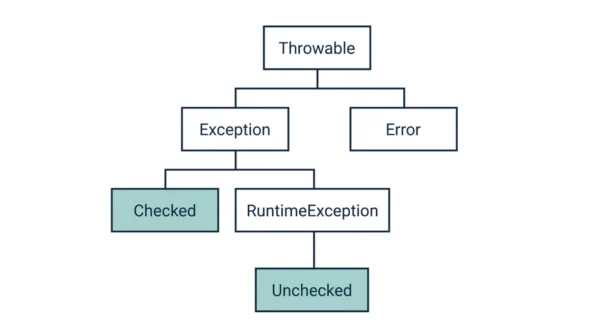
Every Java exception sits under one root class, so the tree explains the whole split.
At the top is Throwable. It has two children: Exception and Error. Under Exception sit the checked exceptions, plus one special subclass, RuntimeException. Under RuntimeException sit the unchecked exceptions. So the rule is short: if a class extends RuntimeException, it is unchecked; if it extends Exception but not RuntimeException, it is checked. Error, meanwhile, marks serious failures like OutOfMemoryError, and it is also unchecked.
Checked vs Unchecked Exceptions: Comparison Table
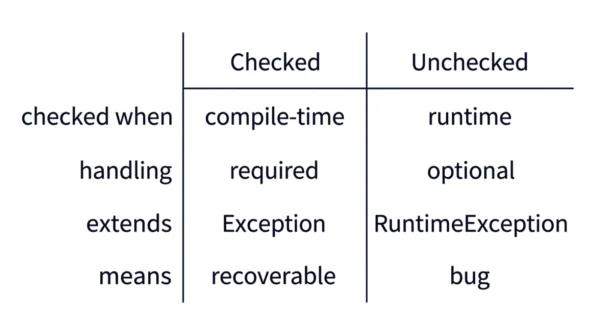
| Aspect | Checked Exceptions | Unchecked Exceptions |
|---|---|---|
| Handling | Must be handled at compile-time with try-catch or throws | Not mandatory to handle or declare at compile-time |
| Parent class | Subclass of Exception (not RuntimeException) | Subclass of RuntimeException |
| Compiler rule | Forces developers to handle or declare in the method signature | Developers are not compelled to handle |
| Examples | IOException, SQLException, FileNotFoundException | NullPointerException, ArrayIndexOutOfBoundsException |
| When checked | Checked at compile-time (compile-time exceptions) | Not checked at compile-time (runtime exceptions) |
| Hierarchy note | Descends from Throwable via Exception | Descends from Throwable via RuntimeException |
| Nature | Considered recoverable | Usually unexpected; indicate programming errors |
| Intent | Handle conditions a good app should anticipate and recover from | Signal failures that usually cannot be recovered from |
| Error handling | Forces clean error handling | Allows faster development with less restriction |
| Robustness | Require explicit handling to stay robust | Give more freedom but risk runtime errors |
| Stability | Help create predictable, stable programs | Can cause unexpected termination if unhandled |
| Verbosity | More verbose due to mandatory handling | Less verbose due to optional handling |
| Responsibility | Encourage graceful handling | Put the responsibility on the developer |
| Typical use | Expected conditions that can be recovered from | Unexpected or logical errors |
Code Examples
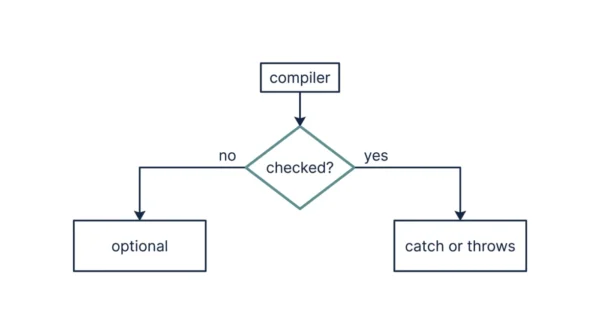
The clearest way to see the difference is one method of each kind.
A checked exception must be declared or caught. Here readFile can throw IOException, so the method declares it with throws, otherwise the code would not compile.
import java.io.File;
import java.io.FileReader;
import java.io.IOException;

public class FileHandler {
    public void readFile(String fileName) throws IOException {
        File file = new File(fileName);
        FileReader fr = new FileReader(file);  // may throw IOException
        // read file contents
        fr.close();
    }
}
An unchecked exception needs no declaration. Here divide throws ArithmeticException, which extends RuntimeException, so the compiler does not force any handling.
public class MathUtil {
    public int divide(int dividend, int divisor) {
        if (divisor == 0) {
            throw new ArithmeticException("Cannot divide by zero");
        }
        return dividend / divisor;
    }
}
Step-by-step handling:
- Create a class or method that may throw exceptions.
- Identify whether each exception is checked or unchecked.
- Handle a checked exception by catching it or declaring it with
throws. - Handle an unchecked exception with a try-catch, or let it propagate up the call stack.
Best practices:
- Use checked exceptions for recoverable errors, and unchecked for programming errors.
- Avoid catching unchecked exceptions unless necessary, to keep the code clear.
- Always provide a meaningful error message when handling an exception.
Common pitfall: swallowing an exception by catching it without any real handling. Solution: always log the exception or rethrow it after handling, so failures never happen silently.
When to Use Which
You choose the type by asking whether the caller can reasonably recover.
Use a checked exception for a recoverable condition that a method should anticipate, such as a missing file or a dropped network connection. Because the compiler enforces handling, the caller cannot forget to deal with it. So checked exceptions suit expected, external failures.
Use an unchecked exception for a programming error that a caller cannot sensibly recover from, such as a null reference or a bad array index. Since handling is optional, the code stays clean, and the bug surfaces during testing. Therefore unchecked exceptions suit logic errors that you should fix, not catch.
Interview Questions
Frequently Asked Questions
Wrapping Up
Checked and unchecked exceptions split Java error handling by one rule: does the compiler enforce it? Checked exceptions extend Exception, mark recoverable problems, and must be caught or declared. Unchecked exceptions extend RuntimeException, mark programming bugs, and need no handling.
Remember the simple test: if it extends RuntimeException, it is unchecked and optional; otherwise it is checked and enforced. Match checked exceptions to recoverable, external failures and unchecked exceptions to logic errors, and most exam and interview questions on the two fall into place.
Related reading on DiffStudy:
- Method Overloading vs Overriding
- Abstraction vs Encapsulation in Java
- Comparator vs Comparable
- CS Fundamentals hub