
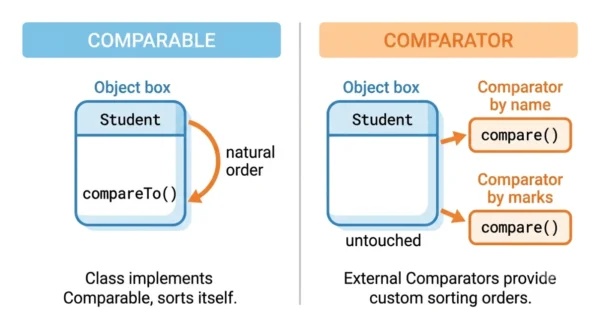
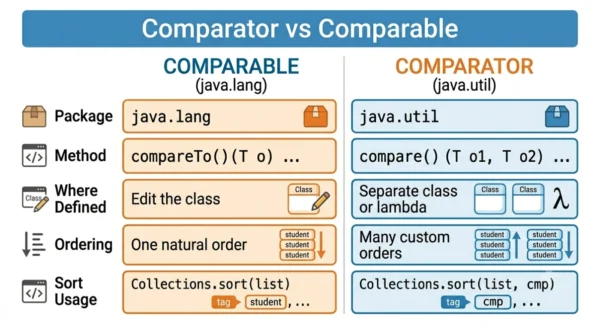
Comparable lets a class define its own single natural order. You implement compareTo() inside the class, and Collections.sort(list) uses it. Comparator defines an order outside the class. You implement compare() in a separate class or lambda. So you can sort the same objects many ways, and even sort types you cannot edit. In short: Comparable is one built-in order owned by the object. Comparator is any number of custom orders owned by the caller.
Comparator vs Comparable is one of the most common Java interview questions. It trips people up because both interfaces sort objects, and both return a negative, zero, or positive number. The real difference is where the sorting logic lives and how many orders you can have.
Comparable builds the order into the class itself, so every object knows how to compare itself to another. Comparator keeps the order separate, so you can define as many orderings as you need without touching the class. That single design choice explains every other difference below.
This guide defines each interface on its own and compares them point by point. It then shows working code for both, plus the interview questions and FAQs that come up most. Both interfaces are core to the Java Collections framework and to sorting with Collections.sort, List.sort, TreeSet, and TreeMap.
What is the Comparable Interface?
Comparable lives in the java.lang package and declares a single method, compareTo(T o). A class implements Comparable to give its objects a natural order — the one default way they should sort. Because the method sits inside the class, every object can compare itself to another of the same type.
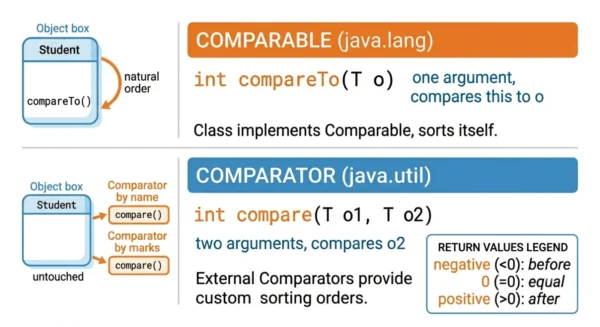
The compareTo() method takes one argument and returns an int:
- negative — this object comes before the other;
- zero — the two are equal in order;
- positive — this object comes after the other.
Once a class implements Comparable, Collections.sort(list) and Arrays.sort(array) sort it with no extra arguments. A TreeSet or TreeMap then uses that order automatically. The catch: a class has only one natural order, and adding it means editing the class itself.
What is the Comparator Interface?
Comparator lives in the java.util package and declares compare(T o1, T o2). You write a Comparator outside the class, in a separate class or a lambda. This lets you define many orders for the same type. It can even sort classes you cannot modify, such as library classes.
The compare() method takes two arguments and returns the same negative, zero, or positive int. You pass a Comparator as the second argument to Collections.sort(list, comparator) or list.sort(comparator).
Comparator is a functional interface, so you can write it as a lambda. Java 8 also added helpers like Comparator.comparing(), thenComparing(), and reversed(), which make multi-field sorting short and readable. See how interfaces fit the wider language in our guide to abstract class vs interface.
Comparator vs Comparable: Key Differences
| Aspect | Comparable | Comparator |
|---|---|---|
| Package | java.lang | java.util |
| Method | compareTo(T o) — one argument | compare(T o1, T o2) — two arguments |
| Where it lives | Inside the class being sorted | In a separate class or a lambda |
| Order it defines | The single natural order | Any custom order you write |
| Number of orderings | One per class | As many as you like |
| Modifies the class? | Yes — the class implements it | No — the class stays untouched |
| Sort call | Collections.sort(list) | Collections.sort(list, comparator) |
| Lambda / functional | Conventionally implemented in the class | Functional interface, commonly a lambda |
| Typical use | One obvious order; TreeSet, TreeMap | Many orders, or sorting classes you cannot edit |
Code Examples
The snippets below sort the same Student class. First comes its natural order with Comparable, then other orders with Comparator.
Comparable — the class defines its own order:
import java.util.*;

class Student implements Comparable<Student> {
    String name;
    int marks;
    Student(String name, int marks) { this.name = name; this.marks = marks; }

    // Natural order: by marks, ascending
    @Override
    public int compareTo(Student other) {
        return Integer.compare(this.marks, other.marks);
    }
}

List<Student> list = new ArrayList<>(List.of(
        new Student("Asha", 82), new Student("Ravi", 75)));

Collections.sort(list);   // uses compareTo -> sorts by marks
Use Integer.compare(a, b) rather than a - b, because subtraction can overflow for large values.
Comparator — the order lives outside the class:
import java.util.*;

// Sort by name, without touching the Student class
Comparator<Student> byName = (a, b) -> a.name.compareTo(b.name);
Collections.sort(list, byName);

// Java 8+: combine keys, by marks descending then name
list.sort(Comparator.comparingInt((Student s) -> s.marks)
                     .reversed()
                     .thenComparing(s -> s.name));
The Comparable version bakes one order into Student. The Comparator version adds new orders from the outside and never changes the class. That is why it scales to many sort rules. Overriding compareTo or compare is a form of method overriding, one of the building blocks of object-oriented programming.
When to Use Comparator vs Comparable
Use Comparable when a class has one obvious, default order and you own the class. Sorting students by marks, dates by time, or money by amount all fit a single natural order. Comparable then keeps the call simple: Collections.sort(list).
Use Comparator when you need more than one order, or when you cannot edit the class. Sorting the same students by name, then by marks, then by age calls for several comparators. Comparator also wins when the type comes from a library you do not control. You simply add the order from outside.
Many real programs use both. A class implements Comparable for its default order, and callers pass a Comparator whenever they need a different one. The two interfaces work together rather than competing.
Interview Questions on Comparator vs Comparable
int. A negative value means the first object should come before the second, zero means they are equal in order, and a positive value means the first comes after the second. compareTo(o) compares the current object to o, while compare(o1, o2) compares two passed-in objects. The sort uses the sign of the result, not its exact size.Student can implement compareTo to sort by marks, while a separate Comparator sorts by name. Callers pick whichever order they want at sort time.compare(), so it is a functional interface and you can write it as a lambda. That keeps sorting concise, as in list.sort((a, b) -> a.name.compareTo(b.name)). Java 8 also added static and default helpers such as Comparator.comparing(), thenComparing(), and reversed() for clean multi-field sorting.Frequently Asked Questions
compareTo(o), and Collections.sort(list) uses it. Comparator defines order outside the class using compare(o1, o2), so you can create many orders and sort types you cannot edit. Comparable lives in java.lang and Comparator in java.util.java.lang, which is imported automatically, so a class can implement it without an import. Comparator is in java.util, so you import java.util.Comparator (or java.util.*) to use it. This split is a common interview detail.Collections.sort(list, comparator) or list.sort(comparator), and the class does not need to implement Comparable at all. With a lambda or Comparator.comparing(), you can sort by any field on the fly without editing the class.Wrapping Up
The whole comparison rests on one idea: Comparable puts the order inside the object, while Comparator keeps it outside. Comparable gives a class its single natural order through compareTo. Comparator lets callers define any number of custom orders through compare.
So reach for Comparable when there is one clear way to sort and you own the class. Reach for Comparator when you need several orders or cannot touch the class. Used together, they cover every sorting need in Java cleanly.
Related reading on DiffStudy:
- Abstract Class vs Interface
- Method Overloading vs Overriding
- Procedural vs Object-Oriented Programming
- Abstraction vs Encapsulation
- CS Fundamentals hub




Gratias tibi ago pro hoc articulo informativo! Comparator et Comparable interfacia semper me confudunt, sed nunc melius intellego quomodo ea in Java uti possim. Magna est discrimina inter ea recte intellegere. Bene scripsisti!