
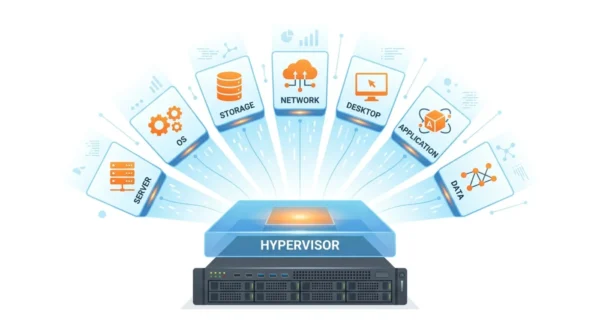
Virtualization in cloud computing uses software, called a hypervisor, to split one physical machine into many isolated virtual ones. The main types of virtualization in cloud computing are server, operating system, storage, network, desktop, application, and data virtualization. Each one abstracts a different resource so the cloud can pool it, share it, and scale it on demand.
Virtualization is the engine under every cloud platform. It lets a provider run thousands of isolated workloads on shared hardware, which is what makes pay-as-you-go cloud possible at all. Understanding its types is core to cloud, GATE, and system-design exams.
The word covers more than just virtual machines. Storage, networks, desktops, and even applications can be virtualized, each solving a different problem. This guide walks through every type, the techniques behind them, and how they fit together in the cloud.
If you also want the broader distinction between the cloud and the technology beneath it, see our guide to cloud computing vs virtualization.
What is Virtualization in Cloud Computing?
Virtualization is the process of creating a software-based, or virtual, version of a physical resource such as a server, storage device, network, or operating system. A thin software layer abstracts the real hardware and presents it as one or more independent virtual resources.
In the cloud, this abstraction is everything. It lets a provider pool the hardware in a data centre and hand out slices of it as virtual machines, virtual disks, and virtual networks. Many isolated tenants then share the same physical servers safely, which keeps utilisation high and cost low.
The result is the on-demand, elastic model that defines cloud computing. You rent a virtual resource in minutes, scale it up or down, and pay only for what you use, all without ever touching the physical box.
The Hypervisor: Type 1 vs Type 2
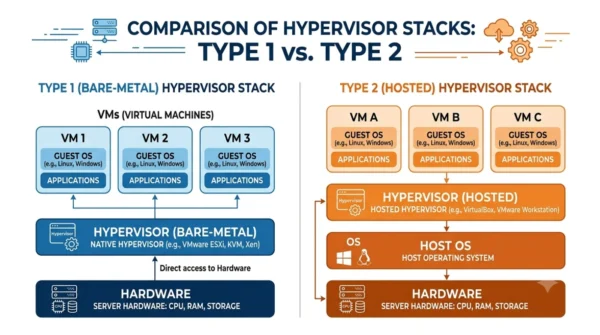
A hypervisor is the software that creates and runs virtual machines. It sits between the hardware and the virtual machines, gives each one a share of CPU, memory, and storage, and keeps them isolated. There are two kinds.
- Type 1 (bare-metal) runs directly on the hardware, with no host operating system underneath. It is fast and secure, so cloud providers use it. Examples include VMware ESXi, Microsoft Hyper-V, and Xen.
- Type 2 (hosted) runs as an application on top of a normal operating system. It is easier to set up and suits desktops and testing. Examples include VMware Workstation and Oracle VirtualBox.
Cloud platforms lean on Type 1 hypervisors because they squeeze the most performance from each server and add the least overhead.
The 7 Types of Virtualization in Cloud Computing
Virtualization is not one thing. Each type abstracts a different resource, and the cloud uses all of them together.
1. Server (Hardware) Virtualization
Server virtualization splits one physical server into several virtual machines, each with its own operating system. The hypervisor shares the CPU, memory, and disk among them. This is the most common type and the foundation of cloud IaaS, where every virtual machine you rent is a slice of a shared server.
2. Operating System (OS-Level) Virtualization
OS-level virtualization runs many isolated user-space instances on a single operating system kernel, instead of full virtual machines. These instances are containers. They start in seconds and use far less memory than virtual machines, which is why Docker and Kubernetes power so much of modern cloud.
3. Storage Virtualization
Storage virtualization pools many physical drives, often across different devices, into a single logical store. Users see one large, flexible pool rather than separate disks. It simplifies backups, scaling, and migration, and underpins cloud object and block storage.
4. Network Virtualization
Network virtualization combines hardware and software network resources into a single software-based network. It lets the cloud create isolated virtual networks, such as a VPC, on shared physical infrastructure. Software-defined networking (SDN) is the technology that makes this practical at scale.
5. Desktop Virtualization
Desktop virtualization hosts user desktops on a central server and streams them to any device. Staff log in to the same environment from a laptop, tablet, or thin client. Virtual Desktop Infrastructure (VDI) and services like cloud desktops use this to centralise management and security.
6. Application Virtualization
Application virtualization runs a program in an isolated layer instead of installing it on the local operating system. The app behaves as if installed, but it stays separate, which avoids conflicts and simplifies delivery. Streamed and packaged apps use this approach.
7. Data Virtualization
Data virtualization presents data from many sources, such as databases, files, and APIs, through a single unified layer. Applications query one virtual view without knowing where the data physically lives. It speeds up analytics and integration across a sprawling cloud estate.
Virtualization Techniques: Full, Para, Hardware-Assisted & Container-Based
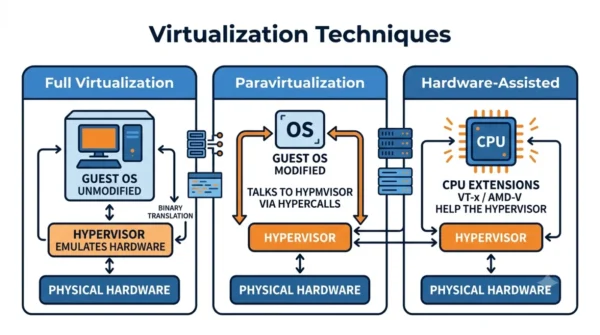
Server virtualization can be built in several ways. These implementation types are the ones exams ask about most, so each gets its own breakdown.
Full Virtualization
The hypervisor completely emulates the hardware, so an unmodified guest operating system runs as if on a real machine. This gives universal compatibility, strong isolation, and legacy OS support, at the cost of some performance overhead. VMware ESXi is a classic example.
Para-Virtualization
The guest operating system is modified to know it is virtual and talks to the hypervisor through efficient hypercalls instead of emulated hardware. That lowers overhead and improves performance, but it needs a guest that supports it. Xen popularised this approach.
Hardware-Assisted Virtualization
CPU extensions such as Intel VT-x and AMD-V, plus Intel VT-d and AMD-Vi for I/O, let the processor handle virtualization directly. Unmodified guests then run at near-native speed, which is why every modern cloud relies on it. It blends full virtualization’s compatibility with far better performance.
Container-Based Virtualization
Also called OS-level virtualization, containers share the host kernel and isolate only the user space instead of running a full guest OS. They are lightweight, start in seconds, and are highly portable, so Docker, Kubernetes, Podman, and containerd dominate modern deployments. The trade-off is lighter isolation than a virtual machine and no separate guest OS.
| Technique | Guest OS | Performance | Example |
|---|---|---|---|
| Full | Unmodified | Moderate (overhead) | VMware ESXi |
| Para | Modified (hypercalls) | High | Xen |
| Hardware-assisted | Unmodified | Near-native | KVM, modern hypervisors |
| Container-based | Shares host kernel | Highest, fastest start | Docker, Kubernetes |
Types of Virtualization Compared
| Type | What it virtualizes | Cloud example |
|---|---|---|
| Server | A physical server into many VMs | EC2 / Compute Engine instances |
| Operating system | One OS kernel into many containers | Docker, Kubernetes pods |
| Storage | Many drives into one logical pool | Cloud block and object storage |
| Network | Physical network into virtual networks | VPC, software-defined networking |
| Desktop | Desktops hosted and streamed | VDI, cloud desktops |
| Application | Apps run in an isolated layer | Streamed / packaged apps |
| Data | Many sources into one virtual view | Data virtualization / federation layers |
Benefits of Virtualization in Cloud Computing
Virtualization earns its place because it cuts cost and adds flexibility at the same time. A few benefits stand out.
- Higher utilisation: one server runs many workloads, so expensive hardware sits idle far less.
- Elastic scaling: virtual resources spin up or down in minutes to match demand.
- Isolation and security: each virtual machine or container is sandboxed from its neighbours.
- Fast recovery: snapshots and live migration make backup and failover quick.
These gains are why virtualization sits beneath every cloud service model, from IaaS, PaaS, and SaaS upward.
Interview Questions on Virtualization
Frequently Asked Questions
Wrapping Up
Virtualization turns one physical machine into many virtual resources, and the cloud uses every flavour of it. Server and OS virtualization run the workloads, storage and network virtualization pool the infrastructure, and desktop, application, and data virtualization deliver it to users.
Learn the seven types and the three techniques behind them, and the whole cloud stack starts to make sense. Each layer is just another resource being abstracted, pooled, and shared on demand.
Related reading on DiffStudy:



