
Preemptive scheduling can interrupt a running process to hand the CPU to a higher-priority or time-sliced task, so it stays responsive. Non-preemptive scheduling lets a process keep the CPU until it finishes or blocks, so it stays simple and predictable. In short, preemptive switches tasks on demand, while non-preemptive waits for each task to release the CPU.
CPU scheduling decides which process runs next, and the big split is whether the operating system can interrupt a running process. That single choice separates preemptive from non-preemptive scheduling.
This topic appears in every operating-systems and GATE syllabus, so students need to know how each one allocates the CPU and where each fits. This guide defines both, compares them in detail, lists their algorithms, and shows when to use which.
It builds on process basics, so it also helps to know the difference between a process and a thread.
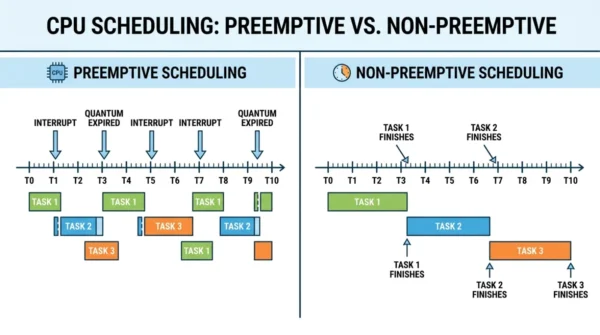
What is Preemptive Scheduling?
Preemptive scheduling works by time slicing: the operating system gives each task a slot and can interrupt it to switch to another. So the CPU can move to a higher-priority process the moment it arrives, which stops any one process from hogging the CPU.
Advantages:
- Responsive, since high-priority tasks are served quickly.
- Strong multitasking, because many tasks share the CPU fairly.
- Well suited to real-time systems, where timing is critical.
Challenges:
- Context-switch overhead, because the CPU keeps switching tasks.
- More complex to implement, since the OS must manage interruptions.
- Low-priority processes can starve when high-priority ones keep arriving.
What is Non-Preemptive Scheduling?
By contrast, non-preemptive scheduling follows a run-to-completion model: once a process gets the CPU, it keeps it until it finishes or voluntarily blocks. So the OS only switches tasks at those natural stopping points.
Advantages:
- Simple to implement, with far less coding complexity.
- Predictable, because interruptions happen only at completion.
- Low overhead, since there are almost no forced context switches.
Limitations:
- Limited responsiveness when priorities change quickly.
- A long process can block others, the so-called convoy effect.
- Poorer CPU use if a high-priority task waits behind a long one.
Preemptive vs Non-Preemptive Scheduling: Comparison Table
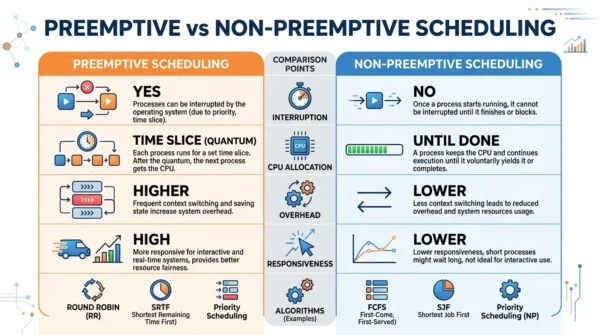
| Aspect | Preemptive Scheduling | Non-Preemptive Scheduling |
|---|---|---|
| Interruption | A process can be interrupted mid-execution | A process runs to completion |
| CPU allocation | For a limited time slice | Until the process finishes or blocks |
| Switch trigger | Higher-priority arrival or time-slice expiry | Only on completion or voluntary yield |
| Waiting / turnaround time | Generally lower | Generally higher |
| Responsiveness | High | Lower in dynamic scenarios |
| Flexibility | Flexible | Rigid |
| Context-switch overhead | Higher | Little to none |
| Implementation | More complex | Simpler |
| Predictability | Less predictable | More predictable |
| Starvation risk | Low-priority tasks can starve | Short tasks wait behind long ones (convoy effect) |
| Real-time suitability | Well suited | Often not suitable |
| CPU utilisation | Efficient under changing load | Efficient under stable load |
| Algorithms | Round Robin, SRTF, preemptive Priority | FCFS, SJF, non-preemptive Priority |
| Best for | Real-time, dynamic, multi-user systems | Simple, batch, predictable workloads |
Algorithms and Examples
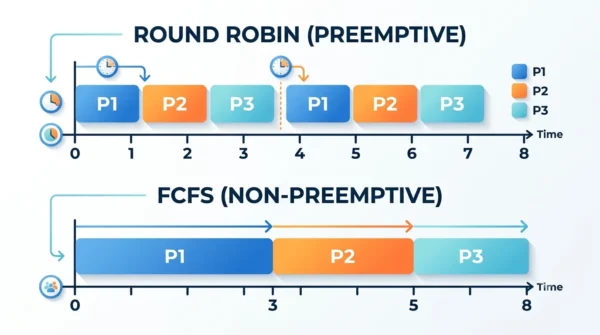
The clearest way to tell them apart is by their algorithms. Preemptive ones can pause a running process:
- Round Robin: each process gets a fixed time quantum, then the CPU moves on.
- SRTF (Shortest Remaining Time First): a shorter job that arrives can preempt the current one.
- Preemptive Priority: a higher-priority arrival takes the CPU immediately.
By contrast, non-preemptive ones never interrupt a running process:
- FCFS (First Come First Served): processes run in arrival order.
- SJF (Shortest Job First): the shortest waiting job runs next, but only once the current one finishes.
- Non-preemptive Priority: the highest-priority waiting job runs next, again only after completion.
When to Use Preemptive or Non-Preemptive Scheduling
Choose preemptive scheduling when responsiveness matters. For instance, real-time systems, interactive desktops, and multi-user servers all need to react fast to new, high-priority work, so the ability to interrupt is essential.
Choose non-preemptive scheduling when simplicity and predictability matter more. For example, batch jobs and simple embedded systems run fine in arrival order, and they avoid the overhead of constant switching.
In practice, most modern operating systems are preemptive, since users expect snappy, fair multitasking. Even so, non-preemptive policies still suit specific, stable workloads.
Frequently Asked Questions
Wrapping Up
Preemptive and non-preemptive scheduling both decide which process runs, yet the interruption rule sets them apart. Preemptive scheduling slices time and switches on demand for responsiveness, while non-preemptive scheduling runs each task to completion for simplicity.
So match the policy to the goal: preemptive for real-time and interactive systems, and non-preemptive for stable, predictable workloads. Because users expect snappy multitasking, most modern operating systems lean preemptive.
Related reading on DiffStudy:



