
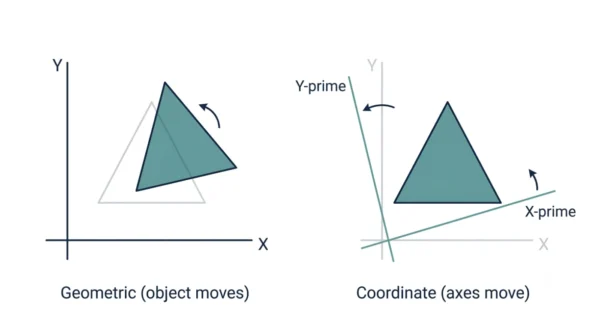
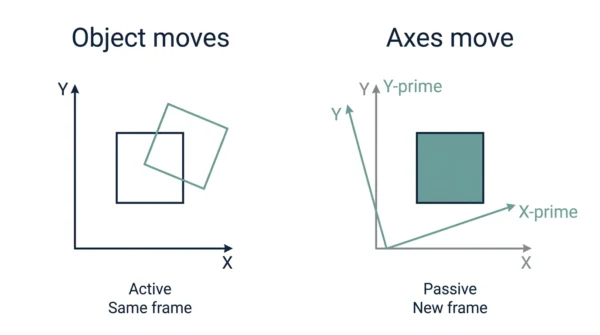
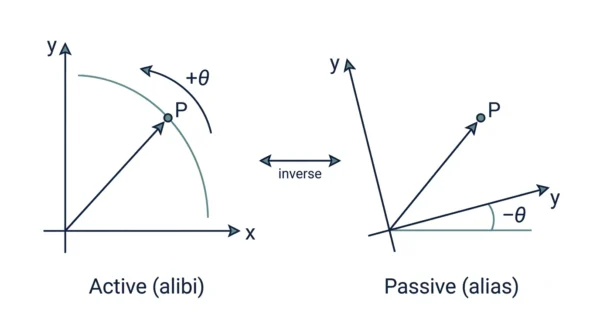
A geometric transformation moves the object — it translates, rotates, scales, reflects, or shears the points of a shape while the axes stay fixed. A coordinate transformation instead moves the axes — the object stays put, yet the same point gets new numbers in the new frame. So one is active (the object changes), and the other is passive (the viewpoint changes). In short, the two are inverses: rotating the object by +θ gives the same result as rotating the axes by −θ.
Geometric transformation and coordinate transformation sit at the heart of computer graphics and linear algebra. Both appear in every graphics and GATE syllabus, and both use the same matrix math. Yet students often blur them, because each one rearranges points on the screen.
The core question is simple. Does the object move, or does the coordinate frame move? Geometric transformation takes the first path, while coordinate transformation takes the second. This guide defines each technique, compares them in detail, and shows where each one is used. If you are still mapping out the basics, it also helps to understand viewing transformations first.
What is Geometric Transformation?
A geometric transformation alters the shape, size, or position of objects in a two- or three-dimensional space. It covers a range of operations, such as translation, rotation, scaling, shearing, and reflection. The coordinate axes stay fixed, while the object’s points move within that frame.
Because the object itself changes, this is also called an active transformation, or an alibi transformation — the object gets a new “alibi”, a new place to be. Rigid transforms like translation and rotation preserve the underlying geometric properties of the object, such as lengths and angles. That makes geometric transformations crucial in computer graphics, computer vision, and image processing, where you place and animate shapes.
Advantages of geometric transformation:
- Moves and reshapes objects directly, so you can model and animate a scene.
- Preserves object properties under rigid transforms, since lengths and angles stay intact.
- Enables complex shape manipulations, because you can chain several operations.
- Widely used in computer graphics and animation, so the workflow is well understood.
Disadvantages of geometric transformation:
- Limited to altering object properties directly, so it only moves what you target.
- Requires careful handling of vertices and polygons, especially for large meshes.
- May result in distortion or loss of detail when scaling or shearing aggressively.
What is Coordinate Transformation?
A coordinate transformation changes the coordinate system, or frame of reference, rather than the object. The object stays exactly where it is, yet the same point gets new coordinates in the new frame. So it converts coordinates from one system to another, which enables efficient calculations across frames.
Because the object stays fixed and only the viewpoint changes, this is also called a passive transformation, or an alias transformation — the same point gets a new “alias”, a new label. The shape itself is unchanged by a pure coordinate change; only the numbers describing it change. Coordinate transformation plays a vital role in robotics, computer-aided design (CAD), and geographical information systems (GIS), and in graphics it maps points between world, camera, and screen frames.
Advantages of coordinate transformation:
- Facilitates precise positioning and movement, because every frame shares one math.
- Essential for navigation and robotics, since sensors and the world use different frames.
- Allows accurate spatial calculations, so you compute once and reuse the result.
- Maps cleanly between world, view, and screen frames in a graphics pipeline.
Disadvantages of coordinate transformation:
- Does not change the object itself, so it cannot model or deform a shape.
- Relies on coordinate system conversions, which add bookkeeping between frames.
- Complexity increases with higher dimensions, because each axis needs care.
Geometric vs Coordinate Transformation: Comparison Table
| Aspect | Geometric Transformation | Coordinate Transformation |
|---|---|---|
| What moves | The object’s points move | The axes, or frame, move |
| Also called | Active (alibi) transformation | Passive (alias) transformation |
| Core idea | Alters the shape, size, or position of objects | Manipulates the coordinates of objects |
| Object properties | Preserved under rigid transforms | The shape is unchanged; only its numbers change |
| Scope | Deals with the objects as a whole | Deals with individual points and their coordinates |
| What it modifies | Directly modifies the properties of objects | Modifies the coordinates that define objects |
| Frame of reference | Fixed; the object moves inside it | Changed; a new frame replaces the old one |
| Matrix relationship | Apply matrix M | Apply the inverse, M⁻¹ |
| Operations | Translate, rotate, scale, shear, reflect | Change of basis, frame-to-frame mapping |
| Capability | Enables complex shape manipulations | Facilitates precise positioning and movement |
| Math used | 2D 3×3 and 3D 4×4 homogeneous matrices | The same matrices, applied as the inverse |
| Common fields | Computer graphics, animation, visual effects, computer vision, image processing | Navigation, robotics, GPS, CAD, GIS, world-to-camera-to-screen mapping |
| Typical risk | May distort or lose detail when scaling or shearing | Relies on coordinate system conversions |
| Handling effort | Requires careful handling of vertices and polygons | Complexity increases with higher dimensions |
| Mental model | Move the actor on a fixed stage | Keep the actor, move the camera |
| Relationship | Dual and inverse: object by +θ equals axes by −θ | |
How They Work: A Worked Example
Both transformations use the same matrices, so the clearest way to see the gap is one small rotation. Take a single point P at coordinates (1, 0), and rotate by 90 degrees.
As a geometric (active) transform, you rotate the object by +90°. The point physically swings from (1, 0) to (0, 1) against fixed axes. So the object moved, and its new coordinates are (0, 1).
As a coordinate (passive) transform, the point stays put, yet you rotate the axes by +90°. In that new frame the very same point now reads as (0, −1). So nothing moved on the page; only the frame, and therefore the numbers, changed.
Notice the sign flip. A geometric rotation by +θ matches a coordinate rotation by −θ, which is exactly the inverse relationship. In matrix terms, if a geometric transform applies matrix M to the object, then the matching coordinate transform applies M⁻¹ to the point. Both run on 3×3 homogeneous matrices in 2D and 4×4 matrices in 3D, so the engineering is identical — only the direction differs.
Applications and Use Cases
Each technique lands where its strength fits, so both appear throughout graphics and engineering.
Geometric transformation applications
Geometric transformation finds extensive use in computer graphics, animation, and visual effects. It lets artists and designers build realistic, captivating virtual worlds. Game developers, for example, lean on it to bring characters and environments to life, which makes gameplay immersive. Beyond games, it is vital in medical imaging, architectural design, and industrial simulations, because each one moves and reshapes modelled objects.
Coordinate transformation applications
Coordinate transformation, by contrast, plays a critical role in navigation systems, robotics, and GPS technology. It enables precise positioning and movement, so it supports accurate path planning for autonomous vehicles and robotic arms. It also drives satellite imagery, cartography, and geographical analysis, which aids mapping and geospatial data processing. In a graphics pipeline, meanwhile, it maps points from world space to camera space to screen space, a topic the windowing and clipping stage builds on.
When to Use Which
You pick the transformation by asking what should move — the object, or your point of view.
Choose a geometric transformation when you want to place or animate an object. Moving a character across a scene, rotating a model, or scaling a sprite all change the object, so the active view fits. That is also why modelling and animation tools lean on it.
Choose a coordinate transformation when you want to change the frame of reference. Converting a robot’s sensor readings into world coordinates, or mapping world points into the camera’s view, keeps the object fixed and swaps the frame. So whenever you reach for one, remember the other is just its inverse, and the same matrices serve both.
Interview Questions
Frequently Asked Questions
Wrapping Up
Geometric transformation and coordinate transformation solve the same problem from opposite directions. One moves the object on a fixed stage, while the other keeps the object and moves the stage instead.
Remember the simple rule: geometric is active and moves the object, and coordinate is passive and moves the axes. They are inverses, so a transform by M one way equals a transform by M inverse the other way. Knowing that duality, plus the shared matrix math, is enough to answer most exam and interview questions on the two.
Related reading on DiffStudy:
- Viewports and Viewing Transformations
- Windowing vs Clipping in Computer Graphics
- CS Fundamentals hub



