
Structured data is highly organised in rows and columns (like a database table), easy to query with SQL. Unstructured data has no fixed format (text, images, video) and needs advanced tools to analyse. Semi-structured data sits in between, with tags or a flexible schema (like JSON or XML). So structured vs unstructured data is really a spectrum, from rigid and searchable to free-form and rich.
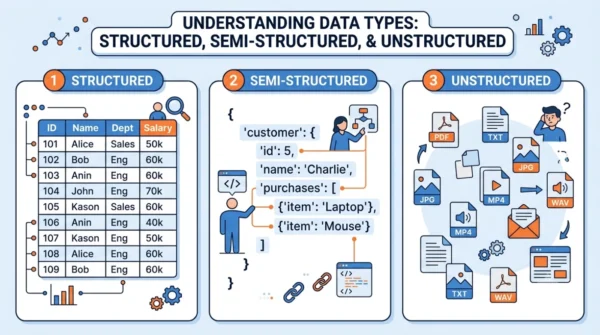
Data comes in different shapes. So how organised it is decides how you store, query, and analyse it. Specifically, the three types are structured, semi-structured, and unstructured data.
Because of that, this split is core to databases, big data, and data-science work. This guide defines each type with examples and trade-offs. It then compares them in a table and shows how to work with each in practice.
It also pairs closely with the choice of database, covered in our guide to SQL vs NoSQL.
What is Structured Data?
Structured data has a defined length and format. Indeed, it sits in rows and columns with a fixed schema. So a machine can search and process it easily. For example, it lives in relational databases and spreadsheets.
Example: a database table with columns like ID, Name, and Age.
- Advantages: easy to organise and analyse, with fast query performance and high data integrity.
- Disadvantages: rigid, and not flexible for storing complex or varied data types. So changes need a schema update.
What is Semi-Structured Data?
Semi-structured data does not fit neatly into tables, though. But it still carries some organisation through tags or markers that separate elements. It has a flexible, self-describing schema. For example, common formats are JSON, XML, and NoSQL documents.
Example:
{
  "name": "John Doe",
  "age": 30,
  "city": "New York"
}- Advantages: more flexible than structured data, and suitable for data with varying schemas and faster ingestion.
- Disadvantages: however, it needs more processing to extract meaning, and can be inconsistent across records.
What is Unstructured Data?
In contrast, unstructured data has no predefined format or organisation. Instead, it exists in its natural form, such as text, images, video, and audio. For instance, social media posts, emails, and multimedia files all count.
Example: text from blog posts or social comments, and images or videos without metadata.
- Advantages: rich in insight, since it can reveal patterns through text mining, sentiment analysis, and machine learning.
- Disadvantages: hard to search and analyse without advanced tools, so it usually needs preprocessing first.
Unstructured data is by far the largest share created today. In fact, analysts often put it at around 80% of all enterprise data.
Structured vs Semi-Structured vs Unstructured Data: Comparison Table
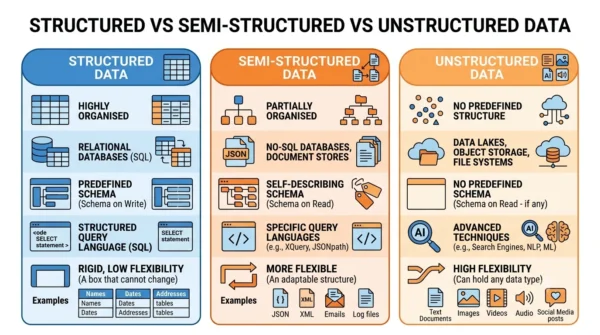
| Aspect | Structured | Semi-Structured | Unstructured |
|---|---|---|---|
| Organisation | Rows and columns, fixed schema | Flexible schema with tags | No predefined model |
| Storage | Relational database, spreadsheet | JSON, XML, NoSQL | Object storage, data lakes |
| Schema | Schema on write (fixed) | Self-describing / partial | Schema on read (none) |
| How to query | SQL | NoSQL / query languages | Search, NLP, ML tools |
| Flexibility | Low (rigid) | Medium | High |
| Data integrity | High and consistent | Moderate | Low, can be inconsistent |
| Ease of analysis | Easy | Moderate | Hard (needs preprocessing) |
| Schema change | Requires altering the schema | Easy schema evolution | No impact on storage |
| Share of data | Small (about 20%) | Growing | Large (about 80%) |
| Best for | Finance, CRM, business apps | Web apps, IoT, APIs | Text/image mining, social analytics |
| Processing | Fast queries | Faster ingestion | Advanced (NLP, ML) |
| Examples | DB tables, spreadsheets | JSON, XML, log files | Text, images, video, audio |
Examples and Types of Each
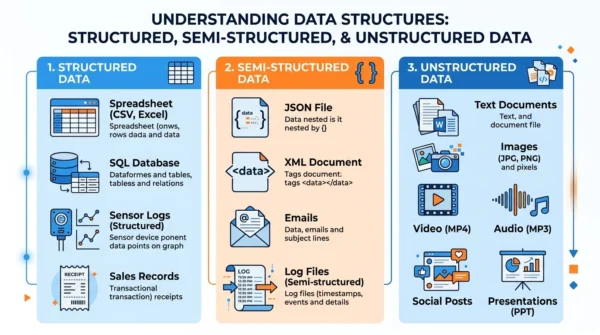
In short, concrete examples make the three types easy to tell apart.
- Structured data types: for example, relational database tables, spreadsheets, sensor and transaction logs, and any data that fits fixed fields.
- Semi-structured data types: such as JSON and XML files, log files, email (with header fields), and NoSQL documents.
- Unstructured data types: for instance, text documents, images, video, audio, PDFs, and social media posts.
Practical Implementation
Of course, the same employee data looks very different in each format.
Structured — a relational table in SQL:
CREATE TABLE employees (
    ID INT PRIMARY KEY,
    Name VARCHAR(50),
    Department VARCHAR(50)
);
Semi-structured — the same data as JSON:
{
  "employees": [
    {"ID": 1, "Name": "Alice", "Department": "HR"},
    {"ID": 2, "Name": "Bob", "Department": "IT"}
  ]
}
Unstructured — the same data as free text:
Employee ID: 1, Name: Alice, Department: HR
Employee ID: 2, Name: Bob, Department: IT
So structured data goes into a relational database with a defined schema. Meanwhile, semi-structured data sits in a file or a NoSQL store. Finally, you keep unstructured text in a file or document store and index it for search.
Best Practices and Common Pitfalls
To begin with, a few habits keep each data type manageable.
- Use structured data when relationships are well defined, and normalise it to avoid redundancy.
- Also index databases for quicker retrieval.
- Likewise, store semi-structured data in a NoSQL database for flexibility, and validate it before processing.
- Finally, add full-text search and preprocessing for unstructured data to make it usable.
In particular, the common pitfalls are mixing data types inside a structured table, leaving inconsistent schemas in semi-structured data, and skipping preprocessing for unstructured data. Enforce types, validate, and clean the data to avoid them.
When to Use Each Type
Use structured data when the schema is clear and you need fast, reliable queries, such as finance, inventory, or CRM systems.
Choose semi-structured data when the schema varies or evolves, such as web APIs, IoT feeds, and document stores.
Reach for unstructured data when the value is in rich content, such as text, images, or social posts. Pair it with analytics tools like NLP or machine learning.
Frequently Asked Questions
Wrapping Up
Overall, structured, semi-structured, and unstructured data form a spectrum. Structured data is rigid and searchable, while unstructured data is free-form and rich, and semi-structured data balances the two.
So match the type to the job: structured for clean, query-heavy systems, semi-structured for flexible web and IoT data, and unstructured for content that needs deeper analytics. Of course, most real systems handle a mix of all three.
Related reading on DiffStudy:



