Z-buffer vs painter’s algorithm is about where the visibility decision happens. The painter’s algorithm sorts every polygon by depth. Then it paints them back to front, so nearer surfaces cover farther ones. That sort costs work, and it still fails whenever polygons overlap in a cycle or pass through each other. Instead, the z-buffer works differently. It keeps one depth value per pixel and tests each polygon’s pixels against that value directly. So no sorting happens at all. Because the test runs per pixel, cyclic overlap and intersecting polygons cause no trouble. That correctness costs memory, though: a whole extra buffer, at screen resolution. Modern GPUs implement the z-buffer directly in hardware. Still, the painter’s algorithm survives in simple 2D layering, where its overdraw barely matters.
Every 3D scene packs several surfaces onto the same few pixels. So a renderer has to decide, pixel by pixel, which surface actually shows. That decision is called hidden surface removal, and two classic methods solve it in almost opposite ways.
GATE and university papers test this topic through short trace questions. Given a few polygon depths, you work out what a z-buffer holds after each step. Examiners also ask why the painter’s algorithm can fail outright, not just run slowly. This guide covers both methods in full, then walks the same pixel through both, side by side.
Hidden surface removal runs late in the pipeline. It waits until a scene is fully transformed and placed on screen. Only then can a renderer ask which surface wins each pixel. That transform step is covered in geometric transformation vs coordinate transformation.
The Hidden Surface Problem
A 3D scene is really a pile of flat polygons in space. So many of them project onto the very same pixel on screen. Only the nearest one should actually appear there; the rest sit behind it, hidden from the camera.
Skip that decision, and a renderer just draws polygons in whatever order they arrive. For example, a wall behind a chair could paint right over the chair. The picture would look wrong, even though every polygon on its own was perfectly correct.
This decision comes late in the pipeline, after clipping and mapping are already done. Before that, clipping trims away geometry outside the view, the job covered in Cohen-Sutherland vs Liang-Barsky. Mapping then places what remains onto the actual screen, through a viewport. After that, hidden surface removal runs, once every polygon already has its final screen position.
Two classic algorithms answer the visibility question in opposite ways. The painter’s algorithm sorts polygons before it draws a single pixel. The z-buffer tests depth at every pixel instead, without sorting anything at all.
The Painter’s Algorithm
The painter’s algorithm gets its name from an actual painting technique. A painter blocks in the background, then layers detail over it, with nearer objects on top. So the algorithm copies that order exactly.
It starts by sorting every polygon by depth. That sort works in object space, on whole polygons, not on individual pixels. Painting itself then happens in image space, one polygon at a time.
Polygons get drawn back to front, the nearest one landing on top. So each later polygon simply paints over whatever came before it at the same pixel. Because painting follows strict depth order, the nearest polygon always wins in the end.
This approach needs no per-pixel depth storage. That was its whole appeal on early, memory-poor hardware, back when a full depth buffer was too expensive to keep.
But that sort is not free. So its cost grows with the number of polygons in the scene, not just the number of pixels on screen. A single pixel can also get written several times, once for every polygon that lands on it. Every write except the last one is wasted work, called overdraw.
Advantages of the painter’s algorithm.
- Needs no per-pixel depth buffer, so it suited memory-poor hardware.
- Simple to implement once polygons are sorted by depth.
- Still useful for flat 2D layering, where draw order is already fixed.
Disadvantages of the painter’s algorithm.
- Sort cost grows with polygon count, not pixel count.
- Overdraw wastes work, since a pixel may be painted several times.
- Fails outright on cyclic overlap and on intersecting polygons, unless they are split first.
The Z-Buffer Algorithm
The z-buffer algorithm, also called the depth-buffer algorithm, solves visibility per pixel instead of per polygon. So it keeps a second buffer alongside the frame buffer, one depth value for every pixel, at the same resolution.
Both buffers start with a clean slate. The depth buffer initialises to the farthest possible value. The frame buffer, meanwhile, initialises to the background colour.
Then each polygon gets processed, in any order at all. For every pixel that polygon covers, the algorithm computes that pixel’s depth. If that depth is nearer than the value stored, it writes the new colour and depth. Otherwise, it discards the pixel and simply moves on.
So no sorting is required anywhere in this process. Polygons can arrive in any order, since every pixel resolves its own nearest surface on its own.
Because the test runs per pixel, not per polygon, cyclic overlap and intersecting polygons cause no trouble at all. So splitting is never needed.
Advantages of the z-buffer.
- Needs no sort; polygons can arrive in any order and the result stays correct.
- Handles cyclic overlap and intersecting polygons directly, with no splitting.
- Implemented in graphics hardware, so modern GPUs run it at full speed.
Disadvantages of the z-buffer.
- Costs memory for a full extra buffer, at screen resolution.
- Still suffers overdraw, unless the scene happens to arrive front to back.
- Guarantees only the correct final pixel, not less drawing work overall.
Z-Buffer vs Painter’s Algorithm: Comparison Table
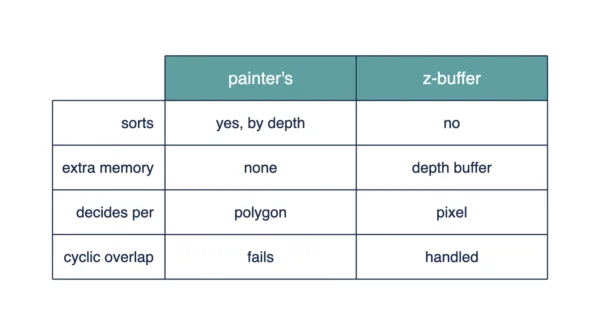
| Aspect | Z-Buffer | Painter’s Algorithm |
|---|---|---|
| How visibility is decided | Compares each pixel’s depth to a stored value | Sorts polygons, then paints back to front |
| Sorting required | No | Yes, every polygon by depth |
| Extra memory required | Yes, a full depth buffer at screen resolution | No per-pixel depth storage needed |
| Where the test happens | Per pixel | Per polygon |
| Handling of cyclic overlap | Correct, with no special handling | Fails; no back-to-front order exists |
| Handling of intersecting polygons | Correct, resolved per pixel | Fails unless the polygons are split |
| Need for polygon splitting | Never needed | Needed for cyclic or intersecting cases |
| Overdraw | Still occurs, unless input arrives front to back | Occurs whenever polygons overlap on screen |
| Order sensitivity of input | Result does not depend on arrival order | Result depends on a correct depth sort |
| Hardware support | Implemented directly in GPU hardware | Rarely implemented in hardware today |
| Effect of scene complexity | Cost tracks pixel count and overdraw | Sort cost grows with polygon count |
| Resolution dependence | Depth buffer size grows with resolution | Sort cost does not depend on resolution |
| Typical use today | Standard method in modern 3D rendering | Simple 2D layering, some basic renderers |
| Main limitation | Extra memory for the depth buffer | Cannot handle cycles or intersections alone |
Worked Example: One Pixel, Both Ways
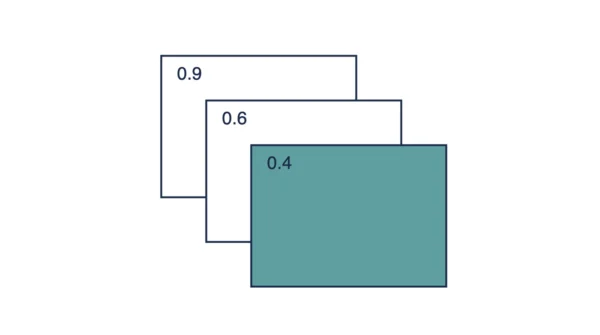
Take one pixel on screen. Three polygons project onto it. Polygon A sits at depth 0.9, polygon B at 0.4, and polygon C at 0.6. A smaller number means nearer to the camera.
Watch the z-buffer process them in arrival order: A, then B, then C. The depth buffer starts at 1.0, the farthest possible value.
| Step | Polygon | Depth | Test against buffer | Action | Buffer after |
|---|---|---|---|---|---|
| 0 | — | — | — | initialise | 1.0, background |
| 1 | A | 0.9 | 0.9 < 1.0, nearer | write A | 0.9, colour A |
| 2 | B | 0.4 | 0.4 < 0.9, nearer | write B | 0.4, colour B |
| 3 | C | 0.6 | 0.6 is not < 0.4 | discard | 0.4, colour B |
Trace it row by row. A arrives at 0.9, nearer than the 1.0 start, so it gets written. B arrives next, at 0.4, nearer than 0.9, so it overwrites A. C arrives last, at 0.6, not nearer than 0.4, so it gets discarded.
The final pixel holds colour B, the nearest of the three. No sorting happened at any point in this process.
In contrast, run the painter’s algorithm on the same pixel. It sorts first, farthest to nearest: A at 0.9, C at 0.6, B at 0.4. Painting then follows that order. A goes down first, C paints over it, and B paints over both, last.
The final pixel again holds colour B.
Both methods land on the same answer. Still, the real difference is the work behind it. The painter’s algorithm needed a full sort across three polygons, then wrote the pixel three times. Instead, the z-buffer needed no sort at all, just three cheap depth comparisons.
Where the Painter’s Algorithm Breaks
Depth sorting assumes each polygon has one clear depth relative to every other. But two situations break that assumption completely.
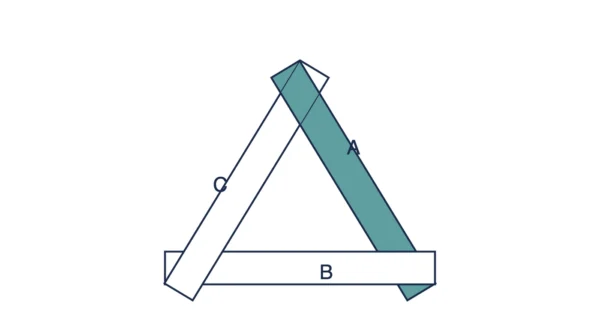
The first is cyclic overlap. Picture three long, thin polygons, A, B, and C, arranged like a pinwheel. A sits in front of B. B sits in front of C. C sits in front of A. Each relationship looks fine alone, but together they form a loop. So no back-to-front order can satisfy all three at once.
The second is intersecting polygons. Neither surface sits wholly in front of the other, since they pass through each other in space. So a single depth value per polygon cannot describe that. Different parts of the same polygon end up at different depths relative to its neighbour.
Both cases share one fix: split the polygons where the ordering breaks down. Each piece then gets a single, consistent depth. That splitting step adds real cost, and simple renderers often skip it entirely.
The z-buffer never runs into this problem. Its test happens per pixel, not per polygon. So a cycle or an intersection resolves correctly, one pixel at a time, with no splitting needed.
What the Depth Buffer Costs
A depth buffer is not free. It needs one value, usually 16, 24, or 32 bits wide, for every single pixel on screen.
Throughout this table, 1 MiB means 1,048,576 bytes, the binary definition, not the rounder 1,000,000-byte one.
| Resolution | Depth bits | Pixels | Depth buffer |
|---|---|---|---|
| 1024 × 768 | 16 | 786,432 | 1,572,864 bytes = 1.50 MiB |
| 1024 × 768 | 24 | 786,432 | 2,359,296 bytes = 2.25 MiB |
| 1920 × 1080 | 24 | 2,073,600 | 6,220,800 bytes = 5.93 MiB |
| 1920 × 1080 | 32 | 2,073,600 | 8,294,400 bytes = 7.91 MiB |
Take the 1920 × 1080 row at 24 bits. Multiply width by height: 1920 × 1080 = 2,073,600 pixels. At 24 bits, that is 3 bytes per pixel, so 6,220,800 bytes in total, or 5.93 MiB.
Move to 32 bits at that same resolution, and the buffer grows to 8,294,400 bytes, or 7.91 MiB. So extra depth precision costs real memory.
This buffer does not replace anything already there. It sits alongside the frame buffer, which stores colour, not depth. So a working display needs both buffers, at the same resolution, held in memory at once.
Where Each One Is Used
The z-buffer is the standard method today. It ships in graphics hardware, so every modern GPU runs it as a routine part of the rendering pipeline. So games, CAD software, and 3D modelling tools all rely on it by default.
The painter’s algorithm has not vanished, though. Simple 2D layering, where draw order is already fixed, still uses it directly. Some basic renderers, without real 3D depth data, use it too. A sort stays cheap when the scene is small.
Once visibility is decided, a renderer still has to draw each visible polygon’s edges. That rasterising step works pixel by pixel, on whichever surface just won the depth test, using algorithms such as DDA vs Bresenham line drawing algorithm.
Exam papers usually pair a z-buffer trace with a painter’s algorithm failure case. In fact, both questions test the same underlying idea: deciding, correctly, what a viewer should actually see.
Interview Questions
Frequently Asked Questions
Wrapping Up
Z-buffer vs painter’s algorithm comes down to where the decision happens. The painter’s algorithm decides per polygon, after a full depth sort. The z-buffer decides per pixel, with a cheap comparison and no sort at all.
Remember the trap cases for your exam. Cyclic overlap and intersecting polygons break the painter’s algorithm outright, unless the polygons are split beforehand. The z-buffer handles both correctly, without any splitting, since its test never depends on polygon order.
Finally, keep the memory cost in mind too. A depth buffer adds real bytes, at screen resolution, alongside the frame buffer already in use. That cost buys a correctness guarantee the painter’s algorithm cannot match alone.
Related reading on DiffStudy:
- Raster Scan vs Random Scan Displays
- Cohen-Sutherland vs Liang-Barsky Line Clipping
- Viewport vs Window in Computer Graphics
- Geometric Transformation vs Coordinate Transformation
- CS Fundamentals hub