
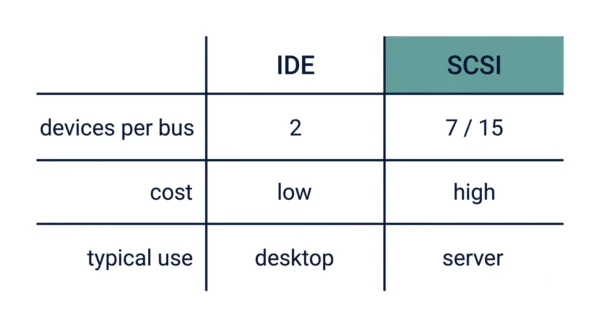
SCSI (Small Computer System Interface) and IDE (Integrated Drive Electronics) are both ways to connect storage drives, yet they target different machines. SCSI is the faster, pricier interface that puts many devices (7 or 15) on one bus, so it suits servers and workstations. IDE is the cheaper, simpler interface that puts at most two devices on a channel, so it suits ordinary desktop PCs. In short, SCSI trades cost for speed and expandability, while IDE trades raw power for low price and easy setup.
SCSI and IDE are two classic hard-drive interfaces, and the contrast still shows up in computer-organisation and GATE study notes. Both connect storage drives to a computer, yet they differ in cost, speed, and how many devices each one handles. Students often mix up which interface belongs in a server and which belongs in a home PC.
The core question is simple. Do you need one cheap channel for a couple of drives, or a fast bus for many devices at once? IDE answers the first need, while SCSI answers the second. This guide defines each interface, compares them in detail, and shows where each one fits today.
Because IDE is the parallel ATA interface, it later evolved into SATA, so it also helps to read our SATA vs PATA comparison alongside this one.
What is SCSI?
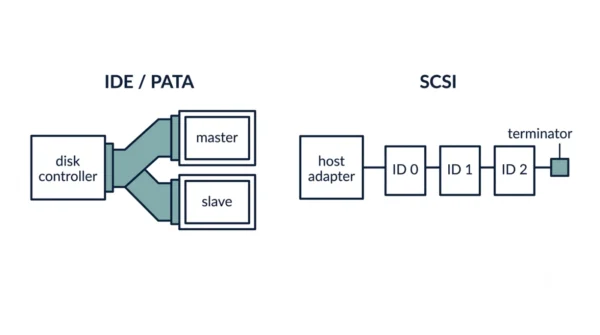
SCSI stands for Small Computer System Interface, usually said as “scuzzy”. It is a set of standards for connecting a computer to storage drives and other peripherals over a shared bus. So one SCSI bus can carry many devices at once, not just disks but also scanners, tape drives, and printers.
A narrow SCSI bus supports up to 7 devices, while a wide SCSI bus supports up to 15, and each device gets a unique SCSI ID. The drives connect in a chain, and the bus must end with a terminator at both ends. Because a smart controller on the host adapter manages the transfers, the CPU does less work, so SCSI keeps strong performance under heavy, multi-device load. For that reason, it became the interface of choice for servers and workstations.
Advantages of SCSI:
- Many devices per bus, since narrow SCSI takes 7 and wide SCSI takes 15.
- Faster data transfer, so it handles demanding server workloads well.
- Lower CPU overhead, because the intelligent controller offloads the work.
- Broad device support, as one bus can mix disks, scanners, and tape drives.
Disadvantages of SCSI:
- More expensive, so it rarely makes sense for a home PC.
- Harder to set up, because IDs, termination, and cabling all need care.
- Usually needs a host adapter card, which adds cost and a slot.
What is IDE?
IDE stands for Integrated Drive Electronics, also known as PATA (Parallel ATA) or simply ATA. The name comes from a neat idea: the disk controller sits right on the drive itself, instead of on a separate card. So the interface is cheap and simple, which is exactly why it spread across consumer desktop PCs.
An IDE channel supports at most two devices, set as master and slave with a jumper. The drives connect through a wide 40-pin ribbon cable, using either 40 or 80 conductors. Because the controller is built into each drive and the channel lives on the motherboard, you usually need no add-in card. However, IDE puts more work on the CPU, so it falls behind SCSI when many drives stay busy at once.
Advantages of IDE:
- Low cost, so it fits budget desktop builds easily.
- Simple setup, since master and slave are quick to configure.
- Built into the motherboard, so it needs no expansion card.
- Good enough speed for everyday desktop tasks.
Disadvantages of IDE:
- Only two devices per channel, which limits expansion.
- Higher CPU overhead, because the host does more of the transfer work.
- Slower under heavy, multi-device load than SCSI.
- Bulky ribbon cables that block airflow inside the case.
SCSI vs IDE: Comparison Table
| Aspect | SCSI | IDE |
|---|---|---|
| Full form | Small Computer System Interface | Integrated Drive Electronics |
| Also called | Parallel SCSI (“scuzzy”) | PATA, or Parallel ATA |
| Devices per bus | Up to 7, or 15 on wide SCSI | Up to 2 per channel |
| Device addressing | Unique SCSI ID per device | Master and slave per channel |
| Termination | Needs a terminator at both ends | Not required |
| Cost | More expensive | Less expensive |
| Setup | Harder to set up than IDE | Easier to set up than SCSI |
| Speed | Faster than IDE | Slower than SCSI |
| Data transfer rate | Higher transfer rate | Lower transfer rate |
| Typical drive RPM | Drives running at 10,000 RPM | Drives running at 7,200 RPM |
| CPU overhead | Lower (intelligent controller) | Higher (host does more work) |
| Cabling | Daisy-chained bus cable | 40-pin ribbon cable (40 or 80 conductors) |
| Add-in card | Usually needs a host adapter card | Built into the motherboard, no card |
| Device types | Disks, scanners, tape, and more | Mainly disks and optical drives |
| Typical use | Servers and high-end workstations | Consumer desktop PCs |
| Evolved into | SAS (Serial Attached SCSI) | SATA (Serial ATA) |
How SCSI and IDE Connect Drives
The clearest way to see the gap is to picture adding a few drives to one machine.
With IDE, you plug a drive into a channel and set a jumper to mark it master or slave. So one cable holds two drives at most, and a second channel is needed for more. Each drive carries its own controller, yet the host CPU still steps in to manage much of the transfer.
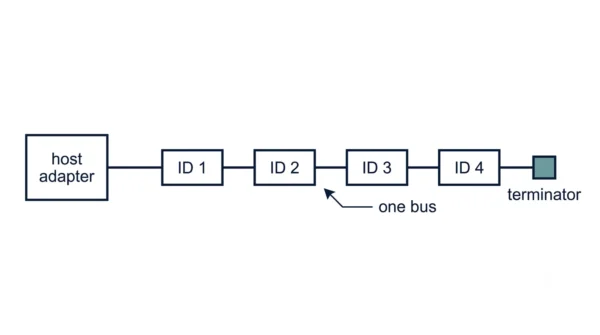
With SCSI, you connect the drives in a chain off the host adapter and give each one a unique ID. Then you fit a terminator at the end of the bus, which stops signal reflections that would corrupt the data. Because the adapter handles the traffic, the CPU stays freer, so the system keeps up even when several drives work at once.
Here is a concrete example. Suppose a server needs six hard drives plus a tape backup unit. On IDE, that means four separate channels and a lot of jumpers and cables. On a single wide SCSI bus, all seven devices share one chain, each with its own ID, terminated at the end. So SCSI scales cleanly where IDE quickly runs out of room.
Where SCSI and IDE Went Next
Both interfaces were parallel designs, and both gave way to faster serial successors. So you will rarely buy either one new today, yet the lineage still matters for exams.
- IDE became SATA. Parallel ATA hit a speed ceiling, so the industry moved to Serial ATA, which uses thin cables and runs much faster. For the full split, see our SATA vs PATA guide.
- SCSI became SAS. Parallel SCSI gave way to Serial Attached SCSI, which keeps the server-grade reliability while adding serial speed. Many enterprise drives still use SAS today.
So the old IDE-versus-SCSI split lives on as SATA versus SAS. The roles barely changed: the cheaper interface still rules desktops, while the pricier one still rules servers.
When to Use SCSI or IDE
You rarely choose between these two on new hardware, yet the trade-off still guides the thinking.
Choose an IDE-class interface when cost and simplicity lead. A home or office desktop with one or two drives fits perfectly, because the low price and easy setup matter more than peak speed there.
Choose a SCSI-class interface when you need many drives, high throughput, and low CPU overhead. Servers, storage arrays, and workstations fit here, since they keep several drives busy and cannot spare CPU cycles on disk traffic. So in practice the machine’s role decides, not the label on the cable.
Interview Questions
Frequently Asked Questions
Wrapping Up
SCSI and IDE solve the same job from opposite ends. SCSI puts many fast devices on one bus for servers, while IDE puts a couple of cheap drives on a channel for desktops.
Remember the simple rule: SCSI for speed, expandability, and servers; IDE for low cost, simple setup, and home PCs. Both have since gone serial, so SCSI lives on as SAS and IDE lives on as SATA. Still, knowing the trade-off between cost and capability answers most exam and interview questions on the two.
Related reading on DiffStudy:



