
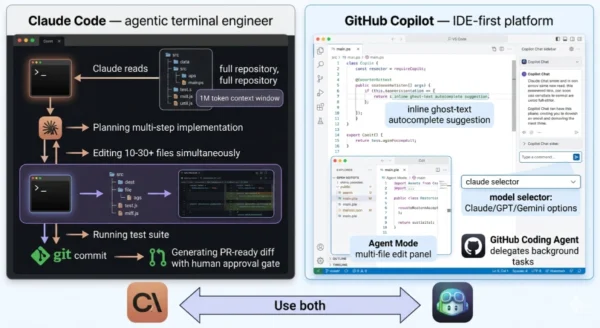
Claude Code vs GitHub Copilot is the AI coding tool comparison every developer is having in 2026 — and most people are framing it wrong. These are not two versions of the same product competing for the same job. Claude Code, launched by Anthropic, is a terminal-first agentic coding system that reads your entire repository, plans multi-step implementations across dozens of files, and delivers pull-request-ready diffs with minimal human direction. GitHub Copilot, built by GitHub and Microsoft, is an IDE-first completion and workflow platform that has evolved from inline autocomplete into a multi-model assistant with agent capabilities, PR review automation, and deep GitHub ecosystem integration. One is designed to do coding work autonomously. The other is designed to make you faster at coding yourself. The numbers for both are remarkable: GitHub Copilot has surpassed 15 million users with 4.7 million paid subscribers and 90% Fortune 100 adoption.
Claude Code reached $2.5 billion in annualized revenue by February 2026, doubled its VS Code extension installs from 17.7 million to 29 million daily since January, and now accounts for 4% of all public commits on GitHub — with projections pointing toward 20% by year-end. MIT Technology Review named AI coding tools one of its 10 Breakthrough Technologies of 2026. Whether you are a developer choosing your personal stack, an engineering manager evaluating team tooling, or a student learning what modern AI-assisted development looks like — this Claude Code vs GitHub Copilot comparison gives you everything you need to understand the difference, the benchmarks, the pricing, and the right decision for your workflow.
Claude Code vs GitHub Copilot: The AI Coding Landscape in 2026
The Claude Code vs GitHub Copilot comparison sits at the centre of the most consequential shift in software development since the introduction of version control. AI coding tools have moved from novelty to infrastructure in under two years. What began as autocomplete suggestions has evolved into autonomous agents that plan, execute, and commit code independently. The two tools at the top of this market represent two distinct architectural philosophies — and choosing between them, or deciding to use both, is one of the most important tooling decisions a developer or engineering organisation makes in 2026.
Claude Code vs GitHub Copilot: The GitHub Copilot Side
Definition
GitHub Copilot is an AI-powered development platform built by GitHub (Microsoft) that integrates AI assistance directly into the coding environments developers already use. Launched in 2021 as an inline code completion tool powered by OpenAI Codex, Copilot has evolved dramatically through 2025 and 2026 into a multi-model, multi-surface platform spanning inline suggestions, conversational chat, autonomous agent mode, PR review automation, terminal assistance, and background task delegation via the GitHub Coding Agent. It supports VS Code, JetBrains IDEs, Xcode, Neovim, Eclipse, Visual Studio, and more — giving it the broadest IDE coverage of any AI coding tool.
As of early 2026, Copilot supports Claude Opus 4.6, Sonnet 4.6, GPT-5 Codex, Gemini 3 Pro, and other frontier models through a single subscription, making it both a coding tool and a multi-model AI access platform. The GitHub Copilot CLI went generally available on February 25, 2026, adding specialized agents (Explore, Task, Code Review, Plan) and background cloud coding delegation to its terminal capabilities.
Strengths and Advantages
- Broadest IDE support: Works natively in VS Code, JetBrains (IntelliJ, PyCharm, WebStorm), Xcode, Neovim, Eclipse, and Visual Studio — the only AI coding tool that covers every major development environment
- Best value entry point: Free tier with 2,000 completions and 50 chat requests monthly; Pro at $10/month is the most cost-effective paid AI coding tool in the market, confirmed as the standout value across all 2026 pricing analyses
- Multi-model flexibility: Access Claude Opus 4.6, GPT-5 Codex, Gemini 3 Pro, and others within a single Copilot subscription — switch models per task without leaving your IDE or managing separate API keys
- GitHub ecosystem integration: Native access to issues, PRs, code review, GitHub Actions, and repository context — the Coding Agent can take a GitHub issue and autonomously produce a pull request
- Fastest inline experience: Copilot’s inline autocomplete remains the gold standard for moment-to-moment coding speed — 200ms average suggestion time, trained on billions of lines of code across languages
- Enterprise compliance maturity: IP indemnification, audit logs, SSO, SCIM provisioning, and organization-level policy controls — the most compliance-ready AI coding tool for regulated enterprise environments
Limitations and Constraints
- Limited context window: Operates in the 32K–128K token range for most interactions — cannot read and reason across an entire large codebase in a single session the way Claude Code can
- Premium request metering: Agent mode, Claude Opus 4.6 in chat (3x multiplier), code review, and Coding Agent all consume premium requests — heavy users exhaust monthly allocations faster than expected
- Weaker multi-file autonomy: Agent mode handles multi-file edits but requires more developer-directed orchestration — reliably manages 2–3 file changes vs Claude Code’s 10–30+ file coordinated changes
- GitHub dependency for full value: Teams using GitLab, Bitbucket, or other VCS platforms miss the Coding Agent’s issue-to-PR automation and the deepest GitHub ecosystem integration features
- Confidence issues: Copilot’s characteristic failure mode is the confident wrong answer — suggestions that look correct but introduce subtle bugs, requiring careful review on complex logic
- Context limited to open files: By default Copilot reads your open files and recent context, not your full repository architecture — reducing relevance on cross-cutting refactors without explicit workspace context
GitHub Copilot Key Technical Parameters (2026):
IDE Support: VS Code, JetBrains suite, Xcode, Neovim, Eclipse, Visual Studio, SQL Server Management Studio — the widest coverage of any AI coding tool. Models Available: Claude Opus 4.6, Claude Sonnet 4.6, GPT-5 Codex, Gemini 3 Pro, and other frontier models via model selector. Context Window: 32K–128K tokens depending on model and feature — open files plus workspace context with explicit indexing. Furthermore, Agent Capabilities: Agent Mode (multi-file edits in IDE), GitHub Coding Agent (background issue-to-PR delegation), Copilot CLI specialized agents (Explore, Task, Code Review, Plan — GA February 2026). Additionally, Pricing: Free (2,000 completions/50 chat requests) → Pro $10/month → Pro+ $39/month → Business $19/user → Enterprise $39/user. Moreover, Adoption: 15M total users, 4.7M paid subscribers, 42% market share, 90% of Fortune 100.
Claude Code vs GitHub Copilot: The Claude Code Side
Definition
Claude Code is Anthropic’s agentic coding tool — a terminal-first AI system that reasons across entire codebases, plans multi-step implementations, and executes them autonomously with human-in-the-loop approval gates. Unlike IDE-integrated tools that assist as you write, Claude Code operates as an autonomous engineer: you give it a task (“refactor the authentication module to use OAuth 2.1,” “implement rate limiting across all API endpoints,” “migrate this codebase from JavaScript to TypeScript”), it reads the relevant code across your entire repository using a 1 million token context window, plans the implementation, edits files, runs tests, and produces pull-request-ready diffs for your review.
Powered by Claude Opus 4.6 and Sonnet 4.6, Claude Code achieved an 80.8% score on SWE-bench Verified — the industry benchmark for autonomous software engineering capability. In the Claude Code vs GitHub Copilot comparison, the fundamental difference is architectural: GitHub Copilot’s ROI is measured in keystrokes saved per hour; Claude Code’s ROI is measured in engineering hours eliminated per week. Claude Code also supports Model Context Protocol (MCP) with over 300 integrations including GitHub, Slack, PostgreSQL, Sentry, Linear, and custom internal tools — enabling context-aware agentic workflows that reach beyond the codebase into your broader engineering stack.
Strengths and Advantages
- Deepest autonomous capability: Plans and executes multi-step tasks across 10–30+ files with minimal direction — architecture changes, large refactors, framework migrations, and full feature implementations that IDE-based tools cannot match
- 1 million token context window: Reads and reasons across entire large codebases in a single session — understanding cross-file dependencies, architectural patterns, and existing conventions before making any changes
- 80.8% SWE-bench Verified accuracy: The leading benchmark score for autonomous software engineering among production AI coding tools in early 2026
- MCP integration ecosystem: 300+ MCP integrations connect Claude Code to databases, APIs, documentation systems, incident tracking, and internal tooling — enabling context-aware tasks that span your full engineering stack
- No metering anxiety: Claude Code Max plans provide predictable monthly costs without the premium request multiplier system that makes heavy Copilot usage unpredictable
- Agent Teams capability: Spin up multiple parallel sub-agents with dedicated context windows and shared task lists — the most advanced multi-agent coding workflow available in any coding tool in 2026
Limitations and Constraints
- Higher cost ceiling: Realistic daily use of Claude Code’s agentic features requires the $100/month Max 5x plan or API token billing — significantly more expensive than Copilot Pro at $10/month
- Steeper learning curve: Requires deliberate prompt engineering and context management to extract best results — expect 1–2 weeks of experimentation before matching Copilot’s out-of-box productivity for routine coding
- Terminal-first friction: Developers accustomed to IDE-integrated AI assistance must adjust to a terminal-centric workflow — less natural for those whose entire workflow lives inside VS Code or JetBrains
- No native inline autocomplete: Claude Code does not provide the real-time keystroke-level suggestions that Copilot delivers as you type — it operates in a deliberate task-based mode, not a continuous assistance mode
- Rate limiting on lower tiers: The $20/month Pro plan hits rate limits quickly during intensive sessions — the $100/month Max 5x is the practical minimum for developers using agentic features daily
- API cost unpredictability: Token-based API billing can spike significantly — a complex debugging session with Opus 4.6 can consume 500K+ tokens and cost $15+ in a single sitting without a capped plan
Claude Code Key Technical Parameters (2026):
Primary Interface: Terminal CLI (+ VS Code extension, desktop app, and available as third-party agent within Copilot Pro+ and Enterprise). Context Window: Up to 1 million tokens with Claude Opus 4.6 — reads entire large codebases in a single session. Benchmark: 80.8% SWE-bench Verified — industry-leading score for autonomous software engineering. Furthermore, MCP Integrations: 300+ connections including GitHub, Slack, PostgreSQL, Sentry, Linear, Jira, and custom internal systems. Additionally, Agent Teams: Parallel sub-agents with dedicated context windows and shared task lists for coordinated multi-agent coding (research preview). Moreover, Pricing: Pro $20/month (rate-limited) → Max 5x $100/month → Max 20x $200/month → API pay-per-token. Adoption: $2.5B annualized revenue Feb 2026; 29M daily VS Code installs; 4% of all public GitHub commits.
Claude Code vs GitHub Copilot: Architecture and Workflow Deep Dive
GitHub Copilot Workflow Architecture
- Inline completion: As you type in your IDE, Copilot suggests completions ranging from single tokens to entire functions — ghost text displayed inline, accepted with Tab
- Copilot Chat: Conversational AI embedded in your IDE sidebar — ask questions, get explanations, request specific code, debug errors — stays within your editor context
- Agent Mode: Describe a multi-file task; Copilot iterates across files, recognises its own errors, suggests terminal commands, and self-heals runtime failures — requires more developer direction than Claude Code’s autonomous mode
- Copilot CLI: Terminal agents (Explore, Task, Code Review, Plan) with background cloud coding delegation — fire off tasks and return to review when complete (GA February 25, 2026)
- GitHub Coding Agent: Assign a GitHub Issue directly to Copilot; it autonomously writes code, opens a PR, responds to review comments, and runs security scans — the deepest GitHub ecosystem integration available
- Multi-model selection: Switch between Claude, GPT, and Gemini models per task within a single Copilot session — experiment with different models without managing separate tools
Claude Code Workflow Architecture
- Task intake: Describe the task in natural language in the terminal — Claude Code reads it, asks clarifying questions if needed, then proceeds autonomously
- Repository ingestion: Claude reads relevant files across your entire repository using up to 1M tokens of context — understands architecture, conventions, dependencies, and existing patterns before touching any code
- Implementation planning: Claude plans the multi-step approach, identifying which files to create or modify, in what order, with what logic — surfacing the plan for human review before execution begins
- Execution with checkpoints: Claude edits files, runs tests, and iterates — surfacing diffs and requesting approval at each significant step via human-in-the-loop gates
- MCP context extension: Connect external systems (databases, APIs, documentation, Slack, Linear) via MCP — Claude uses this context when executing tasks, enabling cross-system awareness
- Agent Teams: Spawn parallel sub-agents with dedicated context windows for independent subtasks — one agent refactors the auth module while another writes tests and a third updates documentation simultaneously
Claude Code vs GitHub Copilot: The Same Task, Two Approaches
Task: “Add input validation to all API endpoints”
GitHub Copilot approach:
- Open first endpoint file in VS Code
- Ask Copilot Chat: “Add input validation to this endpoint”
- Review and accept inline suggestions file by file
- Use Agent Mode to attempt multi-file changes (2–3 files reliably)
- Manually navigate to each remaining endpoint and repeat
- Review changes in each file individually before committing
Developer time: active involvement throughout; faster per-file but manual scaling
Task: “Add input validation to all API endpoints”
Claude Code approach:
- Run:
claude "Add input validation to all API endpoints using our existing validation library" - Claude reads all endpoint files, identifies the validation library, understands existing patterns
- Claude presents implementation plan — review and approve
- Claude edits all endpoints simultaneously, writes tests, checks for edge cases
- Review the complete diff across all files at once before committing
Developer time: task definition + final review; Claude handles the execution across all files
Claude Code vs GitHub Copilot: Feature Matrix
| Feature | GitHub Copilot | Claude Code |
|---|---|---|
| Inline real-time autocomplete | Yes — core feature, industry-leading speed and quality | No — task-based mode only, no keystroke-level suggestions |
| IDE support | VS Code, JetBrains, Xcode, Neovim, Eclipse, Visual Studio (6+) | Terminal CLI + VS Code extension + desktop app |
| Context window | 32K–128K tokens (open files + workspace) | Up to 1M tokens (full repository ingestion) |
| Multi-file autonomous editing | 2–3 files reliably via Agent Mode | 10–30+ files per task with full codebase context |
| Model selection | Claude, GPT, Gemini, and others per task in IDE | Claude Opus 4.6 / Sonnet 4.6 (Anthropic models only) |
| GitHub ecosystem integration | Native — issues, PRs, code review, Coding Agent, Actions | Via MCP GitHub integration; not platform-native |
| MCP integrations | Limited (some MCP support in CLI) | 300+ MCP integrations — databases, APIs, Slack, Linear |
| Background task delegation | Yes — GitHub Coding Agent works in background | Agent Teams (research preview) — parallel sub-agents |
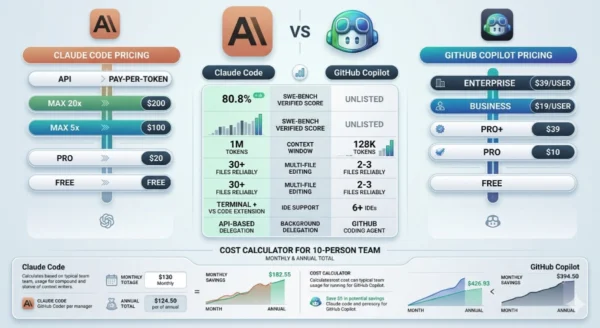
| SWE-bench Verified score | Not publicly benchmarked on SWE-bench | 80.8% — leading score among production tools |
| Entry price | Free (2,000 completions); Pro $10/month | Pro $20/month (rate-limited); $100/month for realistic daily use |
Claude Code vs GitHub Copilot: Use Cases and Real-World Scenarios
Where GitHub Copilot Excels
- Daily coding flow: Moment-to-moment inline suggestions as you write — Copilot shines for the continuous stream of small decisions that make up 80% of a developer’s day: completing function signatures, generating boilerplate, suggesting imports, and filling in pattern-matching logic
- JetBrains and multi-IDE teams: The only serious AI coding tool with full JetBrains support — teams using IntelliJ, PyCharm, or WebStorm have no comparable alternative for integrated AI assistance
- GitHub-native workflows: PR review automation, issue-to-PR Coding Agent, and GitHub Actions integration make Copilot the natural choice for teams whose entire workflow lives inside GitHub
- Teams with diverse model preferences: Copilot’s multi-model support lets teams experiment with Claude, GPT, and Gemini within a single subscription — valuable for organisations evaluating different models for different tasks
- Budget-conscious teams and students: At $10/month (or free), Copilot is the most accessible AI coding tool — students get free access, open-source maintainers get free access, and the free tier is genuinely usable for light personal projects
Where Claude Code Excels
- Large-scale refactors: Framework migrations, architectural changes, and pattern enforcement across hundreds of files — tasks where understanding the full codebase context is as important as writing the actual code
- Complex debugging across files: Subtle bugs that span multiple modules, services, or layers — Claude Code’s full-repository context allows it to trace root causes across the codebase in ways that file-limited tools cannot
- New codebase onboarding: Joining a new team or unfamiliar repository — Claude Code reads the entire codebase and can answer “how does authentication work here?” with the actual implementation as context, not generic advice
- Async and delegated development: Engineering leads and senior developers who want to delegate implementation tasks while focusing on architecture — Claude Code’s autonomous execution model is designed for this division of labour
- Cross-system context requirements: Tasks that require understanding both the codebase and external systems — Claude Code’s 300+ MCP integrations pull in Slack threads, Linear tickets, database schemas, and API documentation alongside the code
Claude Code vs GitHub Copilot: Developer Profile Match
| Developer Profile | GitHub Copilot Fit | Claude Code Fit |
|---|---|---|
| Student / beginner | High — free for students, inline suggestions teach patterns as you code | Low — cost and prompt engineering overhead not suited to learning stage |
| Individual developer (daily coding) | High — $10/month Pro is unmatched value for continuous coding assistance | Medium — valuable for complex tasks; combine with Copilot for full coverage |
| Senior engineer / tech lead | Medium — excellent inline; limited for large autonomous tasks | High — autonomous execution frees senior engineers for architecture and review |
| JetBrains IDE user | High — only serious option with native JetBrains support | Low-Medium — terminal + VS Code extension only; no JetBrains native support |
| GitHub-native team | High — Coding Agent, PR review, issue integration are unique advantages | Medium — MCP GitHub integration available but not platform-native |
| Enterprise with compliance requirements | High — SOC 2, IP indemnification, SSO, audit logs mature in Enterprise tier | Medium — enterprise controls available; Cursor has only SOC 2 Type 2 currently |
12 Critical Differences: Claude Code vs GitHub Copilot
The Claude Code vs GitHub Copilot comparison below covers every key dimension — from core architecture and workflow model to context window, pricing, IDE support, benchmarks, and team deployment considerations in 2026.
Aspect | GitHub Copilot | Claude Code |
|---|---|---|
| Core Philosophy | IDE-first platform that helps you write code faster — ROI measured in keystrokes saved and suggestions accepted per hour | Terminal-first autonomous agent that does coding work for you — ROI measured in engineering hours eliminated per week |
| Primary Interaction Model | Inline ghost-text suggestions as you type + conversational chat + agent mode within your existing IDE | Natural language task delegation in terminal → autonomous planning → execution → human review of diffs |
| Context Window | 32K–128K tokens — open files plus workspace context; cannot ingest full large repositories | Up to 1M tokens with Opus 4.6 — reads entire codebases including hundreds of files in a single session |
| Multi-File Editing | 2–3 files reliably via Agent Mode; more complex changes require developer orchestration | 10–30+ files per task with full cross-file context; coordinated changes across entire modules or layers |
| IDE Coverage | VS Code, JetBrains, Xcode, Neovim, Eclipse, Visual Studio — broadest coverage of any AI coding tool | Terminal CLI + VS Code extension + desktop app — no native JetBrains support |
| Model Selection | Multi-model: Claude Opus 4.6, GPT-5 Codex, Gemini 3 Pro, others — switch per task within Copilot | Claude Opus 4.6 and Sonnet 4.6 only — Anthropic models exclusively |
| Entry Price | Free tier (2,000 completions + 50 chat); Pro $10/month — most affordable AI coding tool in market | Pro $20/month (rate-limited); $100/month Max 5x for realistic daily agentic use |
| Performance Benchmark | Not publicly benchmarked on SWE-bench Verified | 80.8% SWE-bench Verified — leading score among production AI coding tools in early 2026 |
| GitHub Integration | Native — Coding Agent converts issues to PRs autonomously; PR review, code scanning, Actions all integrated | Via MCP GitHub connector — participates in Git workflows but does not own the GitHub.com surface natively |
| External Integrations | Limited MCP support; deep GitHub ecosystem; some third-party IDE extensions | 300+ MCP integrations — databases, Slack, Linear, Sentry, PostgreSQL, custom internal systems |
| Adoption | 15M total users, 4.7M paid, 42% market share, 90% Fortune 100 — most widely adopted AI coding tool | $2.5B ARR Feb 2026; 29M daily VS Code installs; 4% of all public GitHub commits; fastest growing |
| Best Hybrid Stack | Copilot Pro $10/month: always-on inline completions, chat, PR reviews, GitHub workflows | Claude Code Max 5x $100/month: complex refactors, architecture tasks, large codebase understanding |
Claude Code vs GitHub Copilot: Setup and Integration Guide
Phase 1 — Getting Started with GitHub Copilot
VS Code Setup (Most Common)
- Install the GitHub Copilot extension from the VS Code Marketplace — search “GitHub Copilot” and install the official extension
- Sign in with your GitHub account — Free tier activates immediately; Pro requires a subscription at github.com/features/copilot
- Enable workspace indexing for better context — open the Command Palette and run “Copilot: Index Workspace” for improved relevance on your specific project
- Open Copilot Chat with
Ctrl+Alt+I— use the chat panel for questions and the inline suggestion (Tab to accept) for code completion - Enable Agent Mode for multi-file tasks — switch to “Agent” in the Copilot Chat dropdown; describe the task and let Copilot plan and execute across files
Copilot CLI Setup (GA Feb 2026)
- Install Copilot CLI:
npm install -g @githubnext/github-copilot-clithen authenticate withgithub-copilot-cli auth - Use specialized agents:
copilot explorefor codebase questions,copilot taskfor implementation,copilot reviewfor code review,copilot planfor architecture planning - Delegate to background Coding Agent with
&prefix — run& implement rate limiting on all endpointsto delegate to cloud agent while you continue working - Resume background sessions with
/resume— check agent progress without blocking your terminal workflow - Configure GitHub Coding Agent on github.com — go to repository Settings → Copilot → enable Coding Agent; then assign issues directly to Copilot from the Issues view
Phase 2 — Getting Started with Claude Code
Terminal Installation
- Install Claude Code:
npm install -g @anthropic-ai/claude-code— requires Node.js 18+ and an Anthropic account - Authenticate:
claude auth login— sign in with your Anthropic account; Pro ($20/month) or Max ($100–200/month) plan required for full agentic features - Navigate to your project:
cd your-projectthen runclaudeto start an interactive session — Claude indexes your repository on first run - Give your first task: describe what you want implemented in natural language — be specific about the scope, the approach you prefer, and any constraints
- Configure
.claude/settings.jsonfor project-specific behaviour — define approved commands, restricted directories, and MCP server connections for your team’s workflow
MCP Integration Setup
- Add MCP servers to Claude Code configuration — edit
~/.claude/mcp_servers.jsonto define your integrations (GitHub, Slack, PostgreSQL, Linear, etc.) - GitHub MCP: Connect Claude Code to your repositories, issues, and PRs — Claude can read issue context, check PR status, and create branches without leaving the terminal session
- Database MCP: Connect to your PostgreSQL or MySQL database — Claude can query schema information and sample data when implementing data-layer features
- Verify connections:
claude mcp listshows active integrations;claude mcp test githubvalidates the GitHub connection - Start a context-rich session:
claude "Implement the feature described in Linear ticket LIN-482"— Claude reads the Linear ticket context, codebase, and relevant PRs to plan the implementation
Phase 3 — The Hybrid Workflow (Most Professional Developers)
- Daily coding with Copilot: Keep Copilot Pro ($10/month) running in VS Code as your always-on coding assistant — inline completions for routine code, Chat for quick questions, PR review for code review automation, and Agent Mode for small multi-file tasks. This covers the 80% of development work that is additive and sequential.
- Complex tasks with Claude Code: When you hit something that requires deep codebase understanding — large refactors, debugging subtle cross-file issues, onboarding to a new codebase, implementing a feature that touches many layers — switch to Claude Code in the terminal. The context window difference matters enormously for these tasks.
- Access Claude directly inside Copilot: As of early 2026, Claude Code is available as a third-party agent within Copilot Pro+ and Enterprise — you can delegate to Claude Code from within a Copilot workflow without leaving GitHub’s platform. This is the most seamless integration point between the two tools.
- Use Copilot’s multi-model for Claude access in IDE: Copilot Pro and Pro+ include Claude Opus 4.6 and Sonnet 4.6 in the model selector — for Claude-quality reasoning within your IDE without switching to the terminal, this is the most cost-effective path, especially if Claude Opus 4.6 tasks at 3x premium request multiplier are managed carefully.
- Total hybrid cost: Copilot Pro ($10/month) + Claude Code Max 5x ($100/month) = $110/month — both tools running simultaneously without conflicts, each covering the other’s weaknesses.
Claude Code vs GitHub Copilot: Pricing, Benchmarks and Team Cost Analysis
GitHub Copilot
15M+
Total users — most widely adopted AI coding tool; 90% Fortune 100 adoption
Claude Code ARR
$2.5B
Annualized revenue by February 2026 — doubled since January 1, 2026
SWE-bench Score
80.8%
Claude Code Verified accuracy — leading benchmark among production tools 2026
GitHub Commits
4%
Of all public GitHub commits now generated by Claude Code — projected 20%+ by end 2026
GitHub Copilot Pricing Tiers (2026)
| Plan | Monthly Price | Key Inclusions | Best For |
|---|---|---|---|
| Free | $0 | 2,000 completions + 50 chat requests/month; limited model access | Students, open-source maintainers, personal projects |
| Pro | $10/month ($100/year) | Unlimited completions; 300 premium requests; Coding Agent; multi-model; PR review | Individual developers — best value in the entire AI coding tools market |
| Pro+ | $39/month ($390/year) | 1,500 premium requests; full model access; Claude Code as third-party agent | Power users who hit Pro limits; teams needing maximum model access |
| Business | $19/user/month | Org management, SSO, policy controls, audit logs, IP indemnification | Engineering teams needing organization-level control and compliance |
| Enterprise | $39/user/month | Business features + custom knowledge bases, PR summaries, advanced admin | Large enterprises with compliance, custom knowledge, and advanced governance needs |
Claude Code Pricing Tiers (2026)
| Plan | Monthly Price | Key Inclusions | Best For |
|---|---|---|---|
| Pro | $20/month | Claude Code terminal access; rate-limited — hits ceiling quickly on intensive tasks | Light users evaluating Claude Code; occasional complex tasks alongside Copilot |
| Max 5x | $100/month | 5x higher usage limits; realistic daily agentic use; Agent Teams access | Senior developers and leads using Claude Code as primary autonomous coding tool |
| Max 20x | $200/month | 20x usage limits; priority access; for heavy enterprise power users | Developers running Claude Code continuously across multiple large projects |
| Teams | $25/seat/month (standard); $150/seat (premium Claude Code access) | Team management; minimum 5 members; shared usage tracking | Engineering teams deploying Claude Code at organisation level |
| API (pay-per-token) | ~$15/M input tokens (Opus 4.6) | Maximum flexibility; unpredictable billing; no rate limits | Teams with variable usage patterns; integration into custom tooling |
Team Cost Comparison (10 Developers)
| Scenario | Monthly Cost | Annual Cost | Notes |
|---|---|---|---|
| Copilot Business only | $190 | $2,280 | Flat, predictable — best for teams needing org controls at low cost |
| Claude Code Teams (standard) | $250 + API usage | $3,000+ API | Variable cost; API usage can significantly increase total depending on workload |
| Hybrid: Copilot Pro + Claude Code Max 5x per dev | $1,100 | $13,200 | Full AI coding stack per developer; maximum capability; common among senior engineering teams |
| Copilot Business + 3 Claude Code Max 5x power users | $490 | $5,880 | Practical hybrid — everyone gets Copilot; senior/lead developers get Claude Code |
Claude Code vs GitHub Copilot: Decision Framework
The Core Question: What Are You Optimising For?
The Claude Code vs GitHub Copilot decision simplifies to a single question: do you need continuous assistance while you code, or autonomous execution of complex tasks you delegate? GitHub Copilot is the answer to the first. Claude Code is the answer to the second. Most professional developers need both, and the economics of running them simultaneously ($10 + $100/month) are justified at any seniority level where complex engineering tasks are a regular part of the job.
Choose GitHub Copilot as Your Primary Tool If:
- You use JetBrains IDEs — Copilot is the only serious AI coding tool with full JetBrains support; Claude Code has no JetBrains extension
- Budget is your primary constraint — at $10/month, Copilot Pro delivers genuine daily value that no other tool matches at that price point
- Your workflow is centred on GitHub — issue tracking, PR review, and repository management all benefit from Copilot’s native GitHub ecosystem integration
- You want multi-model flexibility — Copilot Pro gives you access to Claude, GPT, and Gemini within one subscription without managing separate API keys or tools
- You are a student or early in your career — free tier for students, low cost for beginners, and the inline suggestion model teaches good coding patterns as you work
- Your team needs enterprise compliance features — IP indemnification, SSO, audit logs, and organisation-level policy controls are most mature in Copilot Enterprise
Choose Claude Code as Your Primary Tool If:
- Your work involves large, complex codebases where understanding cross-file architecture before touching anything is as important as writing the code itself
- You regularly tackle large-scale refactors, framework migrations, or architectural changes that span dozens of files — Claude Code’s 1M token context and multi-file autonomy are decisive advantages
- You are a tech lead or senior engineer who wants to delegate implementation to an AI and review the results rather than directing AI assistance line by line
- You need deep cross-system context — MCP integrations let Claude Code pull in Linear tickets, Slack threads, database schemas, and API documentation alongside your code
- SWE-bench benchmark accuracy matters for your evaluation — Claude Code’s 80.8% Verified score is the leading production benchmark in 2026
- You work primarily in the terminal and VS Code — Claude Code’s native environment is the terminal; VS Code extension provides IDE access but no JetBrains support
Claude Code vs GitHub Copilot: Quick Decision Table
| Situation | Recommendation |
|---|---|
| Primary IDE is JetBrains (IntelliJ, PyCharm, WebStorm) | GitHub Copilot — only viable option with full JetBrains support |
| Budget under $20/month for AI coding tools | GitHub Copilot Pro at $10/month — unmatched value at this price point |
| Need to refactor a 50,000-line codebase | Claude Code — 1M context + multi-file autonomy; Copilot cannot handle this at scale |
| Want inline real-time code suggestions while typing | GitHub Copilot — no equivalent in Claude Code’s task-based model |
| Senior developer delegating feature implementation | Claude Code — autonomous execution model designed for this workflow |
| Team deeply integrated with GitHub Issues and PRs | GitHub Copilot — Coding Agent’s issue-to-PR automation is a native advantage |
| Maximum AI coding capability, budget not constrained | Both: Copilot Pro ($10) + Claude Code Max 5x ($100) = $110/month total |
| Student learning to code | GitHub Copilot — free for students, inline suggestions teach coding patterns |
The Hybrid Reality in 2026
The most common configuration among professional developers surveyed in 2026 is running both tools simultaneously without conflict: GitHub Copilot in the IDE for continuous assistance, Claude Code in the terminal for complex autonomous tasks. As of early 2026, Claude Code is also available as a third-party agent within Copilot Pro+ and Enterprise, making the hybrid setup more seamless than ever. The Claude Code vs GitHub Copilot comparison is increasingly not a choice between the two — it is a question of which combination and which tier fits your workflow and budget.
Frequently Asked Questions
The GitHub Coding Agent is Copilot’s background task delegation system — you assign a GitHub Issue to Copilot, and it autonomously writes code, creates a pull request, responds to review comments, and runs security scans. It operates within GitHub’s platform natively, making it the most frictionless path from a ticket to a PR for teams already using GitHub Issues for task management. Compared to Claude Code, the Coding Agent is more constrained in scope — it is optimised for GitHub Issue resolution within the GitHub platform.
Claude Code’s agentic capability is broader: it handles open-ended tasks beyond Issue resolution, works with 1M token context across the full codebase, integrates with 300+ external systems via MCP, and supports Agent Teams for parallel multi-agent coordination. The practical comparison is: Coding Agent is the right tool for “take this GitHub Issue and open a PR.” Claude Code is the right tool for “redesign how our authentication system works across all services.”
The context window difference — 1 million tokens for Claude Code versus 32K–128K for GitHub Copilot — has significant practical implications for complex tasks. For routine development — adding a function, fixing a bug in a file you have open, explaining a block of code — the difference is irrelevant because the relevant context fits within Copilot’s window. For complex tasks, the gap is decisive. When refactoring an authentication module that is referenced across 40 files, Claude Code reads all 40 files simultaneously and understands every reference before touching any of them.
Copilot operates on the files you have open, requiring you to manage context manually. When debugging a subtle race condition that spans a microservices boundary, Claude Code can hold both services in context simultaneously. When migrating a codebase from one framework to another, Claude Code understands the full architecture before making the first change. For the 20% of development work that is cross-cutting and architecturally complex, the context window difference between Claude Code and GitHub Copilot is one of the most important factors in the comparison.
The AI coding tools market is evolving faster than almost any other category in enterprise software, and predictions about specific features are unreliable over a 12-month horizon. The structural trends are clearer. Both tools are converging toward multi-agent systems — Copilot’s background Coding Agent and Claude Code’s Agent Teams are early versions of a future where multiple specialised AI agents collaborate on a task simultaneously (one planning, one coding, one testing, one reviewing).
Model costs are falling, which will likely expand what is available at lower price tiers. Context windows are expanding for both tools, gradually reducing the gap between Claude Code’s current 1M token advantage and Copilot’s file-based context. JetBrains support for Claude Code is a probable development given Cursor’s March 2026 JetBrains extension launch creating market pressure. The most important trend is standardisation: organisations that establish AI coding tool workflows in 2026 will carry those workflows forward — the Claude Code vs GitHub Copilot comparison is not just a current tool evaluation but a bet on which AI coding paradigm will define your engineering culture for the next several years.
Claude Code vs GitHub Copilot: Final Takeaways for 2026
The Claude Code vs GitHub Copilot comparison ultimately comes down to a question of what kind of AI partnership you want with your development workflow. Copilot is the AI that works beside you. Claude Code is the AI that works for you. Both are exceptional at what they do. The mistake is expecting either to do the other’s job.
GitHub Copilot — Key Takeaways:
- 15M+ users, 4.7M paid, 42% market share, 90% Fortune 100
- Best value: $10/month Pro covers most developers completely
- Broadest IDE support including JetBrains — unique in the market
- Multi-model access to Claude, GPT, Gemini in one subscription
- GitHub Coding Agent for native issue-to-PR automation
- Most mature enterprise compliance (IP indemnification, SSO, audit logs)
Claude Code — Key Takeaways:
- $2.5B ARR Feb 2026; fastest-growing AI coding tool by revenue
- 80.8% SWE-bench Verified — leading production benchmark score
- 1M token context — reads entire large codebases in one session
- 10–30+ file autonomous editing for architecture-scale tasks
- 300+ MCP integrations — cross-system context beyond just the code
- $100/month Max 5x for realistic daily agentic use
Practical Recommendation for 2026:
Start with GitHub Copilot Pro at $10/month if you have not already — it is the single most cost-effective AI investment available to developers in 2026, and the free tier gives you genuine daily value before you spend anything. Add Claude Code Max 5x at $100/month when you hit tasks that exceed what Copilot can handle autonomously: refactors spanning your entire codebase, complex cross-service debugging, or any task where you want to describe a goal and review results rather than direct the implementation step by step. In the Claude Code vs GitHub Copilot decision, most developers do not need to choose — the right answer for the majority of senior developers is both, running simultaneously, covering different layers of the workflow.
Whether you are evaluating your first AI coding tool, upgrading from a tool that is no longer meeting your needs, or making a team-wide purchasing decision — the Claude Code vs GitHub Copilot comparison gives you the complete picture. Explore the related topics below to build out your full AI development stack understanding.
Related Topics Worth Exploring
Jenkins vs GitHub Actions
The code that Claude Code and GitHub Copilot generate needs a CI/CD pipeline to test and deploy it. Compare Jenkins and GitHub Actions to understand how your AI coding tool choice connects with your delivery pipeline — and why GitHub-native teams benefit from Copilot’s Actions integration.
DevSecOps vs DevOps
AI-generated code introduces new security considerations — 41% of code is now AI-generated, and both Claude Code and Copilot can produce subtly insecure patterns. Understand how DevSecOps practices embed automated security scanning at every pipeline stage, including the CI gates your AI coding tools push code through.
MLOps vs DevOps
Claude Code and GitHub Copilot are themselves ML-powered systems that require the same operational discipline as any production ML deployment. Explore how MLOps practices — model versioning, drift monitoring, and continuous evaluation — apply to the AI tools reshaping how your team writes software.



