Jenkins vs GitHub Actions for CI/CD is the defining platform choice for engineering teams in 2026. Jenkins — the open-source automation server that has powered pipelines at Amazon, Apple, and Walmart for over fifteen years — still runs CI/CD infrastructure in 80% of Fortune 500 companies and processes an estimated 73 million build jobs every month. GitHub Actions launched in 2019 and grew from zero to 51% developer adoption in four years, now dominating open-source CI/CD with 68% adoption across GitHub-hosted projects and a marketplace of over 20,000 reusable workflow components. Both tools automate the same core tasks — building, testing, and deploying code — but they take fundamentally different approaches to architecture, ownership, configuration, and operational cost. Jenkins gives teams maximum control at the price of infrastructure responsibility.
GitHub Actions eliminates that infrastructure overhead at the price of platform dependency. The State of DevOps Report 2025 found that organizations with mature CI/CD deploy code 200 times more frequently and recover from incidents 24 times faster than teams with low CI/CD maturity. The Jenkins vs GitHub Actions for CI/CD decision will directly shape your team’s deployment velocity, infrastructure cost, and developer experience for years. Whether you are a student learning DevOps fundamentals, a developer evaluating your first CI/CD pipeline, or an engineering lead choosing the backbone of your delivery platform — this comparison gives you every dimension you need to decide with confidence.
Jenkins vs GitHub Actions for CI/CD: The 2026 Landscape
The Jenkins vs GitHub Actions for CI/CD debate reflects a broader shift in how engineering teams think about automation infrastructure. Continuous Integration and Continuous Deployment have moved from optional best practice to non-negotiable foundation of modern software delivery. The question in 2026 is no longer whether to automate — it is which platform to trust as the backbone of your delivery pipeline for the next three to five years.
Jenkins vs GitHub Actions for CI/CD: The Jenkins Side
Definition
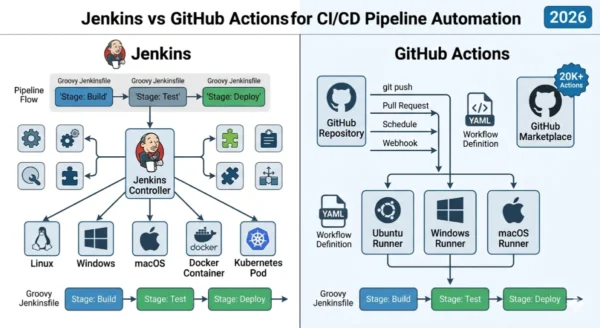
Jenkins is an open-source automation server that functions as both a CI/CD platform and a general-purpose automation hub. Originally launched as the Hudson project in 2004 at Sun Microsystems, it became Jenkins in 2011 after Oracle’s acquisition and has been community-driven ever since. Jenkins operates through a controller-agent model: a central Jenkins controller orchestrates build jobs and distributes them to agent nodes — separate machines running on Linux, Windows, macOS, Docker containers, or Kubernetes pods. Pipelines are defined in Jenkinsfiles using either Declarative or Scripted Groovy syntax and stored alongside source code. With over 1,800 plugins spanning every tool in the software development lifecycle, Jenkins integrates with virtually any system — from legacy version control platforms like SVN and Perforce to modern cloud providers, deployment targets, and testing frameworks. Jenkins is free and open source. Its infrastructure cost is entirely determined by the hardware or cloud resources your team provisions and manages.
Strengths and Advantages
- Complete infrastructure control: Runs entirely on your hardware or your cloud account — no platform dependency, no vendor lock-in, no shared infrastructure
- On-premises and air-gapped support: Fully operational in environments with no internet access — critical for regulated industries, defense, and financial services with strict data sovereignty requirements
- Vast plugin ecosystem: Over 1,800 community and vendor-maintained plugins covering every build tool, testing framework, deployment target, and notification system in use today
- Advanced Groovy pipelines: Scripted Jenkinsfiles support full programming logic — loops, conditionals, shared library functions, dynamic stage generation — beyond what YAML-based tools can express
- VCS-agnostic: Works with GitHub, GitLab, Bitbucket, Azure DevOps, SVN, Perforce, and any other source control system simultaneously
- Enterprise-grade RBAC: Fine-grained role-based access control with mature auditing capabilities for complex organizational compliance requirements
Limitations and Challenges
- High maintenance overhead: Requires dedicated DevOps effort for installation, upgrades, plugin compatibility, security patching, and infrastructure scaling
- Complex initial setup: Standing up a production-grade Jenkins environment takes days to weeks — controller HA, agent provisioning, backup configuration, and plugin management all require expertise
- Groovy learning curve: Jenkinsfile syntax requires Groovy knowledge — a Java-adjacent language unfamiliar to many developers outside JVM ecosystems
- Plugin fragmentation risk: Plugin compatibility issues, abandoned plugins, and security vulnerabilities in community-maintained plugins create ongoing maintenance debt
- UI showing age: Jenkins’ web interface, while functional, lacks the modern developer experience of cloud-native CI/CD platforms
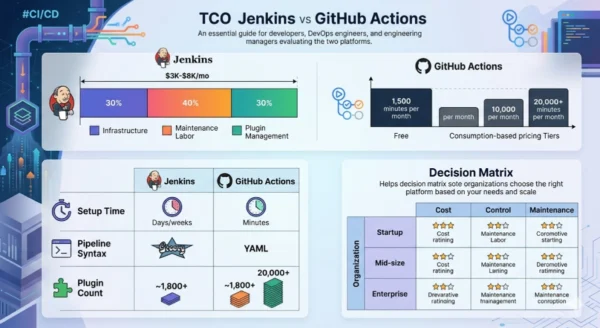
- Hidden TCO: Free software does not mean free — infrastructure and DevOps labor make Jenkins TCO $3,000–$8,000/month for a 50–200 developer organization
Jenkins Key Technical Parameters:
Pipeline Syntax: Declarative Jenkinsfile (structured, recommended) or Scripted Jenkinsfile (full Groovy programming). Agent Model: Controller-agent distributed architecture — agents connect via JNLP or SSH, run as processes or Docker containers. Plugin Count: 1,800+ plugins in the Jenkins Plugin Index covering CI, CD, testing, notifications, cloud providers, and security. Furthermore, Supported VCS: Any — GitHub, GitLab, Bitbucket, SVN, Perforce, Azure DevOps, and more via plugins. Additionally, Execution Model: Jobs run on provisioned agent infrastructure — scaling requires manual agent provisioning or Kubernetes plugin autoscaling. Moreover, Configuration Storage: XML configuration files and Jenkinsfiles stored in source control, managed via Jenkins Configuration as Code (JCasC) plugin.
Jenkins vs GitHub Actions for CI/CD: The GitHub Actions Side
Definition
GitHub Actions is GitHub’s native CI/CD and workflow automation platform, integrated directly into every GitHub repository. Launched in 2019, it operates as an event-driven automation system — workflows trigger on any GitHub repository event including pushes, pull requests, issue creation, releases, schedules, and external webhooks. Workflows are defined in YAML files stored in the .github/workflows/ directory, run on GitHub-hosted runners (Ubuntu, Windows, macOS) or self-hosted runners provisioned by your team. The GitHub Actions Marketplace contains over 20,000 publicly available reusable actions — pre-built workflow components for Docker builds, cloud deployments, test runners, notifications, and thousands of other tasks. GitHub handles all runner infrastructure provisioning, updates, and scaling for cloud-hosted runners. Since being acquired by Microsoft in 2018, GitHub has positioned Actions as the centerpiece of its developer platform, with deep integration across GitHub’s security scanning, dependency review, code review, and deployment environments features.
Strengths and Advantages
- Zero infrastructure setup: Push a YAML file to
.github/workflows/and your pipeline runs immediately — no server provisioning, no agent configuration, no maintenance overhead - Native GitHub integration: First-class access to every GitHub event, API, and context — PR status checks, deployment environments, branch protection rules, and secret management work natively without plugins
- Massive marketplace: 20,000+ reusable actions in the marketplace covering virtually every build tool, cloud provider, and deployment target — far more discoverable than Jenkins plugins
- Modern YAML syntax: Readable, version-controlled workflow files with matrix builds, conditional steps, reusable workflows, and environment-based approval gates built in
- Built-in security: OIDC federation for keyless cloud authentication, encrypted secrets management, dependency review, code scanning, and supply chain security features integrated at the platform level
- Fast developer onboarding: Developers familiar with GitHub can write and debug workflows without DevOps knowledge — the feedback loop is tighter and the tooling is already in their browser
Limitations and Constraints
- GitHub dependency: GitHub Actions is inseparable from GitHub — teams using GitLab, Bitbucket, Azure DevOps, or any other VCS cannot use it without migrating their repositories
- Hosted runner limits: GitHub-hosted runners have fixed CPU/RAM specifications and a 6-hour job time limit — memory or CPU-intensive enterprise workloads may hit these ceilings
- Free tier shrinkage: Private repository free minutes reduced from 2,000 to 1,500/month in 2026 — organizations with frequent pipelines exhaust free minutes quickly
- Cost scaling: Consumption-based pricing scales with usage — large organizations running hundreds of concurrent builds face annual costs of $12,000–$33,240 or higher
- YAML limitations for complex logic: YAML workflows lack the full programming expressiveness of Groovy Jenkinsfiles — complex conditional logic and dynamic pipeline generation require workarounds
- Third-party action security risk: Over 20,000 marketplace actions from community contributors — unvetted actions can introduce supply chain vulnerabilities requiring careful pinning and auditing
GitHub Actions Key Technical Parameters:
Workflow Syntax: YAML-based .github/workflows/*.yml files with jobs, steps, and actions as the core building blocks. Runner Types: GitHub-hosted runners (Ubuntu, Windows, macOS — managed by GitHub) or self-hosted runners on your infrastructure. Trigger Events: 35+ GitHub event types including push, pull_request, schedule, workflow_dispatch, release, and external repository_dispatch webhooks. Furthermore, Marketplace: 20,000+ publicly available actions versioned via Git tags — referenced by repository path and version pin. Additionally, Secrets Management: Encrypted secrets at repository, environment, and organization level with OIDC integration for passwordless cloud authentication. Moreover, Matrix Builds: Native matrix strategy for running parallel jobs across OS, language version, and configuration combinations in a single workflow definition.
Jenkins vs GitHub Actions for CI/CD: Architecture Deep Dive
Jenkins Architecture
- Central Jenkins controller manages job scheduling, plugin execution, and web UI — runs on your infrastructure
- Build agent nodes connect to controller via JNLP or SSH — each agent runs on a dedicated machine, VM, container, or Kubernetes pod
- Jenkinsfile defines pipeline stages (Build → Test → Deploy) in either Declarative or Scripted Groovy syntax
- Plugin system extends core functionality — SCM connectors, build tools, deployment targets, notification systems all added via plugins
- Shared Libraries enable reusable Groovy code across pipelines — centralizing common logic, security policies, and approved deployment patterns
- Distributed builds spread workload across multiple agents — scaling requires provisioning and registering additional agent nodes
- Configuration as Code (JCasC) plugin enables YAML-based controller configuration for repeatable, version-controlled Jenkins setup
GitHub Actions Architecture
- Event-driven: repository events (push, PR, schedule) trigger workflows defined in
.github/workflows/YAML files - Workflows contain jobs; jobs contain sequential steps; steps call actions or run shell commands
- GitHub-hosted runners are ephemeral VMs provisioned on demand — each job starts on a fresh runner, eliminating state contamination
- Actions are reusable workflow components — published to the Marketplace, versioned by Git tag, and referenced by repository path
- Reusable workflows allow entire workflow files to be called from other workflows — centralizing pipeline logic across repositories
- Environments define deployment targets with protection rules, required reviewers, and environment-scoped secrets for controlled CD
- Self-hosted runners extend Actions to your own infrastructure — enabling on-premises builds, custom hardware, or air-gapped environments
Pipeline Syntax Comparison: Same Build in Both Tools
Jenkins — Declarative Jenkinsfile
pipeline {
  agent any
  stages {
    stage('Build') {
      steps {
        sh 'npm install'
        sh 'npm run build'
      }
    }
    stage('Test') {
      steps {
        sh 'npm test'
      }
    }
    stage('Deploy') {
      when {
        branch 'main'
      }
      steps {
        sh './deploy.sh production'
      }
    }
  }
  post {
    failure {
      mail to: 'team@company.com',
           subject: 'Build Failed'
    }
  }
}
GitHub Actions — YAML Workflow
name: CI/CD Pipeline
on:
  push:
    branches: [main]
  pull_request:

jobs:
  build-test-deploy:
    runs-on: ubuntu-latest
    steps:
      - uses: actions/checkout@v4

      - name: Install dependencies
        run: npm install

      - name: Build
        run: npm run build

      - name: Test
        run: npm test

      - name: Deploy to production
        if: github.ref == 'refs/heads/main'
        run: ./deploy.sh production
        env:
          DEPLOY_KEY: ${{ secrets.DEPLOY_KEY }}
Jenkins vs GitHub Actions for CI/CD: Platform Architecture Comparison
| Architectural Dimension | Jenkins | GitHub Actions |
|---|---|---|
| Hosting model | Self-hosted — your servers, your responsibility | Cloud-hosted (GitHub) or self-hosted runners |
| Pipeline definition | Groovy Jenkinsfile (Declarative or Scripted) | YAML workflow files in .github/workflows/ |
| Execution model | Controller assigns jobs to registered agents | Events trigger ephemeral runner VMs on demand |
| Scaling approach | Manual agent provisioning or Kubernetes plugin | Automatic scaling for hosted runners |
| Extensibility | 1,800+ plugins (Java/Groovy-based) | 20,000+ marketplace actions (JS/Docker/composite) |
| VCS requirement | None — works with any VCS via plugins | GitHub repositories required |
Jenkins vs GitHub Actions for CI/CD: Use Cases and Real-World Scenarios
Where Jenkins Excels
- Regulated industries: Banks, healthcare, and government organizations requiring on-premises CI/CD with full data sovereignty, custom audit trails, and air-gapped build environments
- Legacy system integration: Organizations running builds against mainframe systems, proprietary build tools, or internal artifact registries that have no cloud-native equivalent
- Multi-VCS enterprises: Large organizations with code spread across GitHub, GitLab, Bitbucket, and SVN simultaneously — Jenkins orchestrates all pipelines from a single controller
- Complex approval workflows: Organizations requiring multi-stage human approval gates, change advisory board integrations, and complex governance pipelines that YAML-based tools handle poorly
- High-compute builds: Game studios, ML training pipelines, and simulation builds requiring custom hardware — large GPU servers, specialized test environments, or bare metal agents
Where GitHub Actions Excels
- GitHub-native teams: Any team using GitHub for source control gains native CI/CD with zero additional infrastructure — the natural default for the majority of developers in 2026
- Open source projects: Free unlimited minutes for public repositories make GitHub Actions the standard for open-source CI/CD — 68% of GitHub-hosted projects use Actions
- Startups and small teams: No DevOps engineer needed to maintain CI/CD infrastructure — founders and small engineering teams ship pipelines in minutes using marketplace actions
- Cloud-native deployments: Native integration with AWS, Azure, GCP, and Kubernetes via marketplace actions and OIDC keyless authentication — the cleanest path to cloud deployment automation
- Developer-driven automation: PR-triggered pipelines, automated dependency updates, issue triage, release automation — GitHub Actions extends naturally beyond CI/CD to full repository automation
Jenkins vs GitHub Actions for CI/CD: Team Profile Match
| Team Profile | Jenkins Fit | GitHub Actions Fit |
|---|---|---|
| Startup (1–20 devs) | Low — setup complexity and maintenance overhead drain limited engineering time | High — zero infra, free public repo minutes, marketplace actions for everything |
| Mid-size team (20–200 devs) | Medium — viable if team has dedicated DevOps, especially with existing Jenkins investment | High — Team plan, self-hosted runners for sensitive workloads, easy org-level management |
| Fortune 500 enterprise | High — compliance, legacy systems, multi-VCS, air-gapped environments all favor Jenkins | Medium — Enterprise plan viable for GitHub-centric orgs; limited for complex legacy pipelines |
| Open source project | Low — overhead unjustified for community projects with no dedicated infrastructure team | High — free unlimited minutes for public repos, community-friendly marketplace actions |
| Regulated industry (finance/health) | High — on-premises deployment, custom audit trails, full data sovereignty control | Medium — GitHub Enterprise can meet many compliance requirements but not air-gapped |
12 Critical Differences: Jenkins vs GitHub Actions for CI/CD
The Jenkins vs GitHub Actions for CI/CD comparison below covers every key dimension — from pipeline architecture and plugin ecosystems to pricing models, security capabilities, and migration complexity.
Aspect | Jenkins | GitHub Actions |
|---|---|---|
| Hosting Model | Self-hosted — your infrastructure, full control, your responsibility to maintain | Cloud-hosted by GitHub (or self-hosted runners optionally) — zero infrastructure management for hosted builds |
| Setup Time | Days to weeks — controller installation, agent setup, plugin configuration, security hardening | Minutes — create a YAML file in .github/workflows/ and your first pipeline runs immediately |
| Pipeline Language | Groovy (Declarative or Scripted Jenkinsfile) — powerful but requires Groovy/Java familiarity | YAML workflow syntax — readable, version-controlled, lower learning curve for most developers |
| Plugin / Action Ecosystem | 1,800+ plugins in Jenkins Plugin Index — mature, but plugin compatibility and maintenance varies | 20,000+ actions in GitHub Marketplace — rapidly growing, simpler versioning via Git tags |
| Pricing Model | Free and open source — costs are infrastructure (servers/cloud) plus DevOps labor for maintenance | Consumption-based — free minutes for public repos, 1,500 min/month for private (Free plan); Team from $4/user/month |
| Total Cost of Ownership | $3,000–$8,000/month for 50–200 developer org (infra + maintenance labor + plugin management) | $2,400–$33,240/year depending on plan and usage; 2026 hosted runner pricing reduced up to 39% |
| VCS Compatibility | Works with any VCS — GitHub, GitLab, Bitbucket, SVN, Perforce, Azure DevOps via plugins | GitHub repositories only — moving away from GitHub requires migrating to a different CI/CD platform |
| Security Model | You control everything — full RBAC, on-premises secrets, custom audit trails; you are responsible for patching | Managed by GitHub — OIDC keyless auth, built-in secret scanning, SOC 2 / ISO 27001 / PCI DSS compliance |
| On-Premises / Air-Gapped | Full support — Jenkins runs entirely offline with no internet connectivity required | Self-hosted runners required for on-premises; cloud control plane still needs internet access |
| Scalability | Scales via manual agent provisioning or Kubernetes plugin — horizontal scaling requires infrastructure management | Auto-scales for hosted runners — concurrent jobs scale instantly without infrastructure management |
| Developer Experience | Powerful but steep learning curve — Groovy pipelines, XML config, plugin management require DevOps expertise | Developer-friendly — YAML in the repo, inline logs, PR status checks, Marketplace browsing all within GitHub |
| Migration Complexity | Moving to Actions requires Jenkinsfile → YAML rewrite — 2 to 6 weeks depending on pipeline complexity | Migrating away from Actions to Jenkins requires reverse translation — similar effort for complex workflows |
Jenkins vs GitHub Actions for CI/CD: Pipeline Setup and Migration Guide
Phase 1 — Evaluate and Plan (Week 1)
- Audit your VCS and infrastructure: Identify where your source code lives. If all repos are on GitHub, GitHub Actions is the natural fit. If code spans GitHub, GitLab, SVN, or Bitbucket, Jenkins is likely necessary. Document all active pipelines and their complexity levels.
- Identify compliance requirements: Determine whether your industry mandates on-premises CI/CD, air-gapped build environments, or specific audit trail requirements. Regulated industries (banking, healthcare, government) frequently require Jenkins or equivalent self-hosted infrastructure.
- Assess team expertise: Evaluate your team’s Groovy vs YAML familiarity, DevOps capacity for infrastructure maintenance, and appetite for platform management overhead. Smaller teams without dedicated DevOps typically have a better experience with GitHub Actions.
- Calculate TCO honestly: Include infrastructure costs, DevOps labor for maintenance, plugin management time, and scaling costs in your Jenkins estimate. Include GitHub plan costs, expected runner minute consumption, and self-hosted runner costs in your Actions estimate.
- Define your build requirements: Document job time limits, memory/CPU needs, operating system requirements, and any specialized hardware (GPUs, test devices) needed. Flag any requirements that exceed GitHub Actions hosted runner specifications.
Phase 2 — Pilot and Configure (Weeks 2–3)
Setting Up Jenkins (New Installation)
- Install Jenkins controller via official Docker image or Linux package on dedicated VM or Kubernetes cluster
- Configure Jenkins Configuration as Code (JCasC) for repeatable, version-controlled setup from day one
- Install essential plugins: Git, Pipeline, Blue Ocean, Kubernetes (for agent scaling), Credentials Binding
- Provision and register build agents — define agent labels for platform targeting (Linux, Windows, Docker)
- Write your first Declarative Jenkinsfile — start simple with build and test stages before adding deployment
- Configure backup, monitoring, and alert policies for the controller before going to production
Setting Up GitHub Actions (New Workflow)
- Create
.github/workflows/ci.ymlin your repository — this single file is your entire pipeline configuration - Define trigger events:
on: pushfor builds on every commit,pull_requestfor PR checks - Define your jobs: each job specifies a runner (
runs-on: ubuntu-latest) and a list of steps - Browse the Marketplace for actions — use
actions/checkout@v4,actions/setup-node@v4, and deployment actions rather than writing shell from scratch - Add secrets via repository Settings → Secrets and Variables — reference as
${{ secrets.MY_SECRET }} - Enable branch protection rules requiring CI checks to pass before PR merge — completes your basic CI/CD loop
Phase 3 — Migrate from Jenkins to GitHub Actions (Weeks 3–6 for Complex Pipelines)
- Inventory your Jenkinsfiles and plugins: Document every stage, shared library dependency, credential reference, and plugin call in your existing pipelines. Prioritize pipelines by complexity — simple builds migrate in hours, complex multi-branch pipelines with shared libraries may take days.
- Find Marketplace equivalents: For each Jenkins plugin your pipelines use, search the GitHub Actions Marketplace for an equivalent action. Most common build tools (Maven, Gradle, npm, Docker, Terraform) have official or well-maintained community actions.
- Translate Jenkinsfile syntax to YAML: Convert
stage()blocks to GitHub Actionsjobs:, convertwhen{}conditions to GitHub Actionsif:expressions, and convertcredentials()calls to${{ secrets.NAME }}references. GitHub provides official migration documentation covering common patterns. - Migrate secrets and credentials: Transfer Jenkins credentials to GitHub encrypted secrets — never embed credential values in workflow files. Use GitHub Environments for deployment-scoped secrets with approval gate protection.
- Test in parallel before cutover: Run both Jenkins and GitHub Actions pipelines against the same commits for 1–2 weeks to validate equivalent behavior before disabling Jenkins. Budget 2–6 weeks total for organizations with 50+ complex pipelines.
Jenkins vs GitHub Actions for CI/CD: Cost, TCO and Performance Analysis
Jenkins Monthly TCO
$3K–$8K
For a 50–200 developer organization including infrastructure, DevOps labor, and plugin management
GitHub Actions Annual
$2.4K–$33K
Annual cost range from small Team plans to Enterprise deployments — 2026 pricing cut hosted runners up to 39%
Migration Time
2–6 Weeks
Estimated effort to migrate from Jenkins to GitHub Actions depending on pipeline complexity and plugin usage
Jenkins TCO Breakdown (50–200 Developer Organization)
| Cost Category | Monthly Estimate | % of Total TCO | Notes |
|---|---|---|---|
| Controller infrastructure | $300–600 | ~10% | VM or cloud instance for Jenkins controller with HA setup |
| Build agent infrastructure | $900–1,800 | ~25% | Multiple agent VMs or Kubernetes nodes for concurrent build capacity |
| DevOps maintenance labor | $1,800–4,800 | ~55% | The dominant cost — upgrading Jenkins, managing plugins, responding to failures |
| Plugin management and security | $400–800 | ~10% | Evaluating plugin updates, testing compatibility, patching CVEs |
| Total Monthly TCO | $3,400–8,000 | 100% | Human labor is 60–70% of Jenkins TCO — the most important variable |
GitHub Actions Pricing Tiers (2026)
| Plan | Price | Included Minutes | Best For |
|---|---|---|---|
| Free | $0 | 1,500 min/month (private repos); unlimited for public repos | Open source, solo developers, small personal projects |
| Team | $4/user/month ($48/user/year) | 3,000 min/month included; $0.008/min Linux overage | Startup and mid-size teams on GitHub already |
| Enterprise | $21/user/month ($252/user/year) | 50,000 min/month included; volume runner pricing | Large orgs needing SSO, SAML, audit logs, compliance controls |
| Self-hosted runners | Free (your infrastructure cost) | Unlimited — runs on your servers | Teams needing on-premises builds or custom hardware specs |
Performance and Developer Experience Comparison
| Performance Dimension | Jenkins | GitHub Actions |
|---|---|---|
| Time to first pipeline | Hours to days — controller setup, agent registration, plugin install, Jenkinsfile authoring | Minutes — create YAML file, push, watch run in GitHub UI immediately |
| Pipeline execution speed | Depends on agent specs — bare metal agents can be faster than GitHub-hosted runners for heavy builds | GitHub-hosted runners: 2 vCPU / 7 GB RAM (Linux) — adequate for most but limited for intensive builds |
| Concurrent build capacity | Limited by provisioned agents — scaling requires adding agents manually or via Kubernetes plugin | Scales automatically — GitHub handles concurrent runner provisioning for hosted workflows |
| Debugging experience | Blue Ocean UI, pipeline logs — good but requires navigating to separate Jenkins UI | Inline in GitHub PR / push view — annotated logs, re-run failed steps, real-time streaming |
| Maintenance overhead | Ongoing — Jenkins upgrades, plugin updates, agent health, disk space, security patching | Zero for hosted runners — GitHub manages all infrastructure; self-hosted runners require standard server maintenance |
Jenkins vs GitHub Actions for CI/CD: Decision Framework
Choosing the Right CI/CD Platform
The Jenkins vs GitHub Actions for CI/CD decision is not about which tool is objectively better — it is about which tool fits your team’s infrastructure model, compliance obligations, and engineering capacity. Most teams have a clear answer once they honestly assess three questions: Where does your code live? Does your industry require on-premises builds? Do you have dedicated DevOps capacity to maintain CI/CD infrastructure?
Choose Jenkins When:
- Your organization has on-premises deployment mandates or air-gapped build environments that cannot touch external networks
- You have existing Jenkins pipelines and a dedicated DevOps team — the migration cost and risk outweigh the benefit of switching
- Your code lives across multiple VCS platforms simultaneously (GitHub + GitLab + SVN + Bitbucket) requiring a single CI/CD orchestrator
- Your pipelines require advanced Groovy-level logic, shared libraries, or custom plugin integrations not available in the Actions marketplace
- You are in a regulated industry (finance, defense, healthcare) with audit, compliance, or data sovereignty requirements that demand full infrastructure control
- Your build workloads require specialized hardware — GPU nodes, large-memory servers, or custom test devices — that exceed GitHub-hosted runner specifications
Choose GitHub Actions When:
- All your source code is hosted on GitHub and your team already lives in the GitHub UI for code review, issues, and releases
- You are starting a new project or team and want CI/CD running in minutes without infrastructure investment or DevOps overhead
- You are an open-source project — free unlimited minutes for public repositories makes GitHub Actions the obvious standard
- Your team lacks dedicated DevOps capacity — GitHub Actions requires no server maintenance, plugin management, or infrastructure on-call responsibility
- You want native integration between CI/CD status and GitHub’s PR review, branch protection, deployment environments, and security scanning features
- Your standard build workloads fit within GitHub-hosted runner specs and you prefer paying for consumption over provisioning and maintaining your own fleet
Jenkins vs GitHub Actions for CI/CD: Quick Decision Tree
| Question | If Yes → Consider | If No → Consider |
|---|---|---|
| Does your org mandate on-premises or air-gapped CI/CD? | Jenkins | Either — proceed to next question |
| Is all your source code on GitHub? | GitHub Actions | Jenkins (multi-VCS support) |
| Do you have a dedicated DevOps engineer for CI/CD maintenance? | Jenkins viable | GitHub Actions (lower maintenance burden) |
| Do your pipelines require complex Groovy logic or shared libraries? | Jenkins | GitHub Actions |
| Is your team a startup or open-source project? | GitHub Actions | Evaluate TCO for your scale |
| Are you already running 50+ Jenkins pipelines in production? | Jenkins (migration cost too high) | GitHub Actions for new pipelines |
The Hybrid Reality in 2026
Many large organizations run both Jenkins and GitHub Actions simultaneously — GitHub Actions for repository-level CI and rapid development workflows, Jenkins for enterprise CD pipelines, legacy system integration, and compliance-regulated deployment processes. This hybrid approach is increasingly common and valid: use the right tool for the right layer of your delivery pipeline rather than forcing a single tool to do everything.
Frequently Asked Questions
Jenkins vs GitHub Actions for CI/CD: Final Takeaways for 2026
The Jenkins vs GitHub Actions for CI/CD comparison ultimately comes down to one question: does your team need to own its CI/CD infrastructure, or does it need to eliminate infrastructure from the equation entirely?
Jenkins — Key Takeaways:
- 15+ year legacy with 80% Fortune 500 CI/CD market presence
- Self-hosted architecture — complete control, complete responsibility
- 1,800+ plugins for any tool, VCS, or integration scenario
- Groovy pipelines support complex enterprise logic beyond YAML
- On-premises and air-gapped environments: only viable choice
- TCO $3K–$8K/month — labor-dominant, not software-dominant
GitHub Actions — Key Takeaways:
- Launched 2019, now at 51% developer adoption and 68% open-source CI/CD share
- Cloud-native — zero infrastructure setup for hosted runners
- 20,000+ marketplace actions, native GitHub integration
- YAML workflows: lower learning curve, version-controlled alongside code
- 2026 pricing reduced hosted runner costs up to 39%
- GitHub-only — not viable for multi-VCS or GitHub-free organizations
Practical Recommendation for 2026:
For new projects and teams starting fresh with code on GitHub — choose GitHub Actions. The infrastructure-free setup, native integration, and marketplace ecosystem make it the fastest path to production-quality CI/CD without DevOps overhead. For established enterprises with Jenkins in production, compliance requirements, multi-VCS environments, or complex legacy integration pipelines — keep Jenkins and consider adding GitHub Actions for repository-level workflows. For teams considering migration — calculate your honest TCO including DevOps labor, audit your pipeline complexity, and pilot GitHub Actions on your simplest pipelines before committing to a full migration. The Jenkins vs GitHub Actions for CI/CD decision is not permanent — many teams run both, and switching direction is feasible if your requirements change.
Whether you are a student building your first CI/CD pipeline, a developer evaluating platforms for a new project, or an engineering lead making a decision that will shape your team’s delivery velocity for years — understanding the full Jenkins vs GitHub Actions for CI/CD comparison gives you the context to choose with confidence. Explore our related comparisons below for deeper context on the broader DevOps platform landscape.
Related Topics Worth Exploring
Kubernetes vs Docker Swarm
The containers your Jenkins or GitHub Actions pipelines build need an orchestrator to run in production. Compare Kubernetes and Docker Swarm to understand which container platform best pairs with your CI/CD choice for end-to-end DevOps.
GitOps vs Traditional CI/CD
GitOps extends CI/CD by treating infrastructure configuration as code managed through Git workflows. Learn how GitOps changes the relationship between your CI pipeline and your deployment targets, and which approach pairs best with GitHub Actions or Jenkins.
AIOps vs Traditional IT Operations
Once your CI/CD pipelines are deploying continuously, your operations team needs intelligent monitoring to keep pace. Explore how AIOps platforms provide the anomaly detection and automated incident response that complements mature CI/CD delivery at scale.