Vector database vs relational database is the architectural decision sitting at the center of every AI-powered application built in 2026 — and most engineering teams are still trying to answer it without a clear framework for when each technology actually belongs. Relational databases have been the backbone of enterprise software for more than four decades. Structured tables, SQL queries, ACID transactions, and rock-solid consistency guarantees have powered everything from banking ledgers to e-commerce storefronts. But artificial intelligence changed the data problem. When your application needs to find “the ten most semantically similar documents to this query” or “all products visually resembling this image,” a SQL WHERE clause cannot help you.
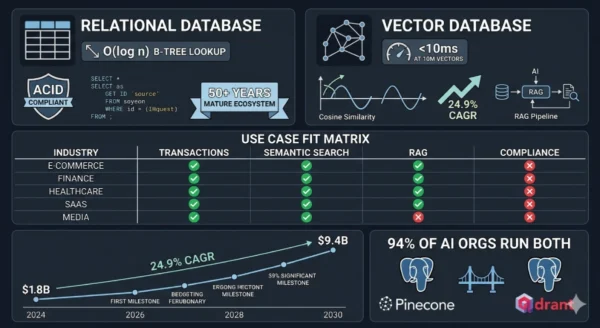
Vector databases were built precisely for that problem — storing high-dimensional numerical representations of data and enabling similarity search at a speed and scale that relational systems were never designed to achieve. The global vector database market reached $1.8 billion in 2024 and is projected to grow to $9.4 billion by 2030 at a 24.9% CAGR, driven entirely by the explosion of large language models, recommendation engines, image search, and retrieval-augmented generation (RAG) systems that require similarity-based retrieval rather than exact-match lookup.
That said, relational databases are not going anywhere — the $100+ billion global database market is dominated by systems like PostgreSQL, MySQL, and Oracle that continue to handle the transactional, analytical, and reporting workloads that keep businesses running. Whether you are a software engineer evaluating your backend stack for an AI feature, a data architect designing a new platform, a machine learning engineer building a RAG pipeline, or a student learning modern database infrastructure — this vector database vs relational database comparison gives you the complete technical picture, practical decision framework, and implementation guidance you need for 2026.
Vector Database vs Relational Database: The AI Data Landscape in 2026
The vector database vs relational database debate did not exist ten years ago — because the data problems driving it did not exist at scale. Relational databases dominated enterprise data infrastructure because the dominant data model was structured: rows, columns, foreign keys, and SQL joins. That model fit perfectly for customer records, financial transactions, inventory tables, and order histories. Then came the embedding revolution. Large language models convert text, images, audio, and video into dense numerical vectors — lists of hundreds or thousands of floating-point numbers that encode semantic meaning geometrically.
Two pieces of text that mean similar things will have vector representations that are mathematically close to each other in that high-dimensional space. Finding the most similar items to a query is not a matter of matching exact values — it is a matter of measuring geometric distance at scale. Relational databases, built around B-tree indexes optimized for exact-match and range queries, cannot do this efficiently. Vector databases were purpose-built to solve it, using Approximate Nearest Neighbor (ANN) algorithms and specialized index structures like HNSW and IVFFlat to find the closest vectors among billions of entries in milliseconds.
Vector Database vs Relational Database: The Relational Foundation
Definition
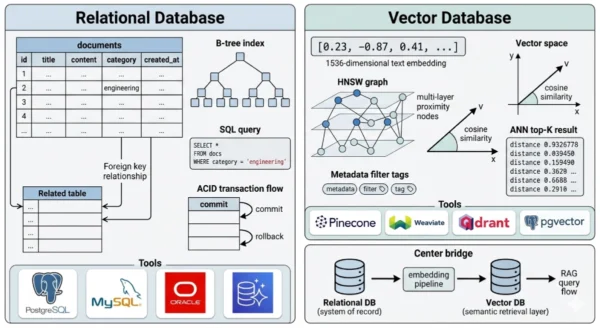
A relational database management system (RDBMS) is a database engine that organizes data into tables of rows and columns, enforces relationships between tables through primary and foreign keys, and provides a declarative query interface through Structured Query Language (SQL). First described theoretically by Edgar Codd in 1970 and commercially implemented through the 1970s and 1980s, relational databases are the most mature and widely deployed data management technology in history. They provide ACID guarantees — Atomicity, Consistency, Isolation, and Durability — that make them the correct choice for any workload where data integrity and transactional correctness are non-negotiable. In the vector database vs relational database comparison, the relational model’s defining characteristic is its optimization for exact-match and range queries against structured, typed data: “find all orders placed by customer 12345 after January 1, 2026 with a total above $500.” This query executes efficiently against a B-tree index because the answer is deterministic and the matching criteria are precise. No approximation is involved, no geometry is required, and no embedding model is consulted.
Strengths and Advantages
- ACID transactions: Full atomicity, consistency, isolation, and durability guarantees make relational databases the only correct choice for financial transactions, inventory management, order processing, and any workload where partial writes or dirty reads are unacceptable
- Mature SQL ecosystem: Decades of tooling, ORMs, query optimizers, database administrators, and developer familiarity — SQL is the most universally understood data query language in software engineering
- Complex joins and aggregations: Multi-table joins, GROUP BY aggregations, window functions, and subqueries that span structured data relationships are native SQL operations that vector databases cannot replicate
- Schema enforcement and data integrity: Typed columns, NOT NULL constraints, foreign key enforcement, and check constraints prevent data quality issues at the database layer — essential for regulated industries with strict data governance requirements
- Proven at enterprise scale: PostgreSQL, MySQL, Oracle, and SQL Server manage petabytes of structured data across thousands of enterprise deployments — operational playbooks, HA configurations, backup strategies, and performance tuning are thoroughly documented
- Operational tooling ecosystem: Database monitoring (pgBadger, SolarWinds), migration tooling (Flyway, Liquibase), replication, point-in-time recovery, and every major cloud provider’s managed database offering all center on relational databases
Limitations for AI Workloads
- No native vector indexing: B-tree and hash indexes are designed for exact-match and range queries on scalar values — they cannot efficiently search for the nearest neighbors of a high-dimensional floating-point vector
- Brute-force similarity is prohibitively slow: A naive cosine similarity computation across every row in a million-document table requires scanning and computing against every record — O(n) complexity that becomes unusable at the scale AI applications require
- Unstructured data is a second-class citizen: Text, images, audio, and video are stored as BLOBs without semantic indexing — the relational model has no concept of “meaning” or “similarity,” only equality and ordering of typed values
- Embedding storage overhead: Storing a 1536-dimensional float32 vector (OpenAI’s ada-002 output) as a relational column requires 6KB per row — tables with millions of embedded documents become storage-expensive and query-inefficient without specialized vector indexes
- Schema rigidity for evolving AI features: AI applications frequently change embedding models (updating from 768 to 1536 dimensions, or switching providers) — altering vector column dimensions in a live relational table is a major migration challenge
- Hybrid query performance: Combining a vector similarity search with relational filters (metadata filtering) requires query planner sophistication that most RDBMS systems lack natively, forcing application-level workarounds
Relational Database Core Technical Parameters:
Data Model: Tables (relations) of rows and typed columns — normalized schemas minimize redundancy and enforce referential integrity. Query Language: SQL — declarative, set-based language for exact-match, range, join, and aggregation queries. Index Types: B-tree (default), hash, GiST, GIN, partial, and expression indexes — optimized for scalar value lookup and sorting. Furthermore, Consistency Model: ACID transactions with configurable isolation levels — serializable, repeatable read, read committed, and read uncommitted. Additionally, Scaling Pattern: Vertical scaling (larger instance) and horizontal read replicas — write scaling through sharding (Citus, Vitess) or migration to NewSQL systems. Moreover, Leading Implementations: PostgreSQL, MySQL, MariaDB (open source); Oracle, Microsoft SQL Server, IBM Db2 (commercial); Amazon Aurora, Google Cloud SQL, Azure Database (managed cloud).
Vector Database vs Relational Database: What Vector Databases Add
Definition
A vector database is a data management system purpose-built to store, index, and query high-dimensional vector embeddings — the numerical representations produced by machine learning models when they encode text, images, audio, video, or any other data into a geometric space where semantic similarity corresponds to geometric proximity. Unlike relational databases, which find records by matching exact column values, vector databases find records by measuring mathematical distance: given a query vector (e.g., the embedding of a user’s search phrase), return the K records whose stored vectors are geometrically closest. This Approximate Nearest Neighbor (ANN) search is the core operation vector databases are architected to perform at scale. The vectors themselves are dense arrays of floating-point numbers — typically 384 to 3072 dimensions depending on the embedding model — and the challenge vector databases solve is performing this nearest-neighbor computation across millions or billions of vectors with millisecond latency. To achieve this, vector databases use specialized index structures that sacrifice perfect recall for dramatic speed gains: HNSW (Hierarchical Navigable Small World graphs), IVFFlat (Inverted File Index with flat quantization), and IVFPQ (with product quantization for memory compression) are the dominant approaches. In the vector database vs relational database framework, the fundamental distinction is the query model: relational databases ask “does this record exactly match these criteria?” while vector databases ask “which records are most similar to this query?” — a question no B-tree index can answer efficiently.
Strengths and Advantages
- Sub-millisecond ANN search at scale: HNSW and IVF-based indexes enable nearest-neighbor queries across tens of millions of vectors in under 10 milliseconds — the performance baseline that makes semantic search, RAG retrieval, and real-time recommendation engines viable in production
- Native embedding storage and indexing: Vector databases store embeddings as first-class indexed data types — no schema migration headaches when embedding dimensions change, and index construction is optimized for high-dimensional float arrays rather than adapted from scalar-value structures
- Semantic search capability: Querying by meaning rather than exact keywords — “find all customer support tickets similar to this complaint” returns semantically related records regardless of exact word match, enabling natural language search experiences that keyword-based systems cannot achieve
- RAG pipeline foundation: Retrieval-Augmented Generation systems — the dominant architecture for grounding LLM responses in proprietary or recent data — require a vector database to retrieve the most relevant document chunks given a user query embedding before passing them to the language model
- Multimodal data support: Images, audio, video, and code can all be encoded into embeddings and stored in a vector database — enabling cross-modal search (find images matching a text query) that relational databases cannot support
- Metadata filtering with vector search: Modern vector databases (Pinecone, Weaviate, Qdrant, Chroma) combine ANN search with structured metadata filters — “find the 10 most similar documents to this query among documents created after 2024 in the ‘engineering’ category” — blending vector and relational query patterns
Challenges and Limitations
- No ACID transaction guarantees: Most vector databases sacrifice transactional consistency for query performance — they are not appropriate for financial transactions, inventory management, or any workload where partial writes or read anomalies are unacceptable
- Approximate results, not exact: ANN algorithms trade recall for speed — you may not retrieve the single most similar vector in every query, only a high-probability approximation. For most AI applications this is acceptable; for applications requiring perfect recall, it requires tuning or exact search (which is slower)
- No native SQL joins: Vector databases cannot efficiently join multiple tables through foreign key relationships — they are optimized for single-collection similarity search, not multi-entity relational queries
- Embedding model dependency: The usefulness of a vector database is entirely dependent on the quality of the embedding model generating vectors — switching embedding providers requires re-embedding and re-indexing the entire collection
- Younger ecosystem: Vector databases as a distinct category emerged between 2019 and 2022 — operational best practices, enterprise tooling, monitoring integrations, and DBA expertise are far less mature than the four-decade relational database ecosystem
- Memory-intensive indexing: HNSW indexes are graph structures that must reside in RAM for fast query performance — large collections (100M+ vectors) require significant memory footprint and careful capacity planning
Vector Database Core Technical Parameters:
Data Model: Collections of vector embeddings with associated metadata — no fixed schema beyond vector dimensionality. Query Model: Approximate Nearest Neighbor (ANN) search — returns K most similar vectors to a query vector by cosine similarity, dot product, or Euclidean distance. Index Types: HNSW (speed/recall tradeoff), IVFFlat (memory efficiency), IVFPQ (compressed), ScaNN (Google’s optimized variant), DiskANN (disk-resident for massive scale). Furthermore, Consistency Model: Eventual consistency in most implementations — eventual or strong consistency options vary by vendor (Pinecone offers strong consistency for filtered queries). Additionally, Scaling Pattern: Horizontal scaling through collection sharding and distributed index segments — most major platforms offer serverless or managed auto-scaling. Moreover, Leading Implementations: Pinecone, Weaviate, Qdrant, Chroma (purpose-built); pgvector, SQLite-vec (relational extensions); Milvus, Vespa (open source enterprise-grade); Elasticsearch with dense vectors (hybrid).
Vector Database vs Relational Database: Architecture and Query Model Deep Dive
Relational Database Architecture
- Storage engine: Row-oriented (InnoDB, PostgreSQL heap) or column-oriented (Redshift, BigQuery) storage with pages written to disk — optimized for read/write of individual rows or bulk column scans
- Index structures: B-tree indexes on scalar columns enable O(log n) lookup by value — hash indexes enable O(1) equality lookup; neither supports multi-dimensional proximity search
- Query planner: Cost-based optimizer analyzes statistics and available indexes to produce an efficient execution plan for each SQL query — accounts for joins, filters, sorts, and aggregations
- Transaction manager: MVCC (Multi-Version Concurrency Control) in PostgreSQL and MySQL enables concurrent reads and writes without blocking — each transaction sees a consistent snapshot of the database
- Replication: Primary-replica streaming replication provides read scale-out and high availability — logical replication enables cross-version and cross-platform data streaming
- Write-Ahead Log (WAL): All changes written to WAL before being applied to data pages — enables point-in-time recovery and replication from a consistent log stream
- Extensions: PostgreSQL’s pgvector extension adds vector storage and HNSW/IVFFlat indexing natively — enabling vector similarity search within a relational system for smaller-scale AI workloads
Vector Database Architecture
- Vector storage layer: Embeddings stored as dense float arrays — typically float32 or float16 for memory efficiency — with associated scalar metadata fields (document ID, timestamp, category, source) in a companion store
- HNSW index structure: A multi-layer proximity graph where each node connects to its nearest neighbors at multiple scales — query traversal navigates from a sparse upper layer to a dense lower layer, finding approximate nearest neighbors in O(log n) graph hops
- IVF (Inverted File) index: Partitions the vector space into Voronoi cells using k-means clustering — queries search only the cells closest to the query vector, dramatically reducing the comparison count
- Product quantization (PQ): Compresses high-dimensional vectors by approximating them as combinations of learned sub-vector codebook entries — reduces memory footprint 8–64x at a modest recall cost
- Metadata filtering: Structured scalar fields (strings, numbers, booleans, arrays) stored alongside vectors — pre-filter or post-filter strategies restrict ANN search to matching metadata subsets
- Distributed architecture: Collections sharded across nodes by vector ID or cluster assignment — query coordination aggregates top-K results from each shard and merges the global result set
- Embedding pipeline integration: Most vector databases expose APIs for directly ingesting raw text/images and calling an embedding model (OpenAI, Cohere, HuggingFace) as part of the upsert operation
Vector Database vs Relational Database: Query Model Comparison
| Query Type | Relational Database (SQL) | Vector Database | Winner |
|---|---|---|---|
| Exact record lookup | SELECT * FROM orders WHERE id = 12345 — O(log n) B-tree lookup | Point lookup by vector ID — efficient but not its strength | Relational |
| Semantic similarity search | Requires pgvector extension and HNSW index or brute-force scan — not native | Native ANN query — return top-K similar vectors in milliseconds | Vector DB |
| Aggregation and analytics | SELECT category, COUNT(*), AVG(price) FROM products GROUP BY category — native SQL | Not supported — no GROUP BY or aggregate functions | Relational |
| Multi-table joins | Foreign key joins with optimized merge/hash join algorithms — core SQL capability | No join support — single-collection queries only | Relational |
| Hybrid vector + filter | Requires pgvector with WHERE clause — possible but query planning is complex | Native pre-filter and post-filter on metadata fields | Vector DB (at scale) |
| Full-text keyword search | GIN index with tsvector/tsquery (PostgreSQL) — effective for exact terms | Sparse vector (BM25) or dense semantic search — better semantic understanding | Vector DB (semantic); Relational (exact) |
| ACID transactions | Full multi-statement transaction support — commit/rollback across multiple tables | Limited or absent — most support single-record atomic upserts only | Relational |
| Bulk data ingest | COPY command, bulk INSERT — efficient for structured data | Batch upsert APIs — efficient for vector collections, slower if embedding must be computed first | Roughly equal |
Vector Database vs Relational Database: Index Structure Comparison
| Index Type | Used In | Optimized For | Complexity |
|---|---|---|---|
| B-tree | PostgreSQL, MySQL, SQL Server (default) | Exact match and range queries on ordered scalar values | O(log n) lookup, O(log n) insert |
| Hash Index | PostgreSQL, MySQL Memory engine | Equality lookup only — no range support | O(1) lookup, O(1) insert |
| GIN / Full-text | PostgreSQL tsvector, Elasticsearch | Inverted index for keyword and document search | O(log n) term lookup |
| HNSW | Pinecone, Weaviate, Qdrant, pgvector | Approximate nearest neighbor in high-dimensional space — best recall/speed tradeoff | O(log n) query, high RAM requirement |
| IVFFlat | pgvector, Milvus, FAISS | ANN with lower memory footprint than HNSW — trades some recall | O(sqrt n) query, lower RAM than HNSW |
| IVFPQ | Milvus, FAISS, Vespa | Compressed ANN for billion-scale collections — 8–64x memory reduction | O(sqrt n) query, minimal RAM per vector |
| DiskANN | Azure AI Search, Weaviate (experimental) | Disk-resident ANN for massive scale — indexes too large for RAM | O(log n) query with disk I/O overhead |
Vector Database vs Relational Database: Use Cases and Real-World Scenarios
Where Relational Databases Are Essential
- Financial transactions and accounting systems: Bank transfers, payment processing, general ledger, and double-entry accounting all require strict ACID guarantees — a transaction that debits one account must atomically credit another, with no possibility of partial application
- E-commerce order management: Order creation, inventory reservation, payment capture, and fulfillment status updates all involve multi-table writes that must succeed or fail as a unit — relational databases with foreign key constraints and transactions are the correct architecture
- User account and authentication systems: User records, permissions, roles, and session data are highly structured, require referential integrity, and involve writes that must be immediately consistent — RDBMS is the standard choice
- Reporting and business intelligence: SQL aggregations, multi-dimensional GROUP BY queries, and ad-hoc analytics across structured business data are where relational databases and their columnar analytics variants (Redshift, BigQuery) excel
- Healthcare records and EHR systems: Patient demographics, diagnoses, prescriptions, and care plans require structured schemas, audit logs, referential integrity, and HIPAA-compliant access controls — all native to mature RDBMS platforms
Where Vector Databases Are Essential
- Retrieval-Augmented Generation (RAG) systems: The dominant architecture for enterprise LLM applications — documents, knowledge base articles, and internal data are embedded and stored in a vector database, then retrieved by semantic similarity to ground LLM responses in relevant context
- Semantic and natural language search: Applications where users search by intent rather than exact keywords — “find papers about climate change adaptation strategies in coastal regions” returns semantically relevant results that keyword search misses entirely
- Recommendation engines: User preference embeddings and item embeddings (products, content, songs) stored in vector databases enable “find items similar to what this user has engaged with” — the core retrieval operation for Netflix, Spotify, and e-commerce recommendation systems
- Image and multimodal search: Visual similarity search — finding products visually similar to an uploaded photo, detecting duplicate images, or searching a video library by visual content — requires embedding models (CLIP, DINO) and vector database retrieval
- Anomaly detection and fraud pattern matching: Encoding transaction patterns as vectors and querying for anomalous records that are geometrically distant from the cluster of normal behavior — a vector-native approach to pattern-based fraud detection
Vector Database vs Relational Database: Industry Adoption Patterns
| Industry | Relational DB Primary Use | Vector DB Primary Use | Architecture Pattern |
|---|---|---|---|
| E-commerce and Retail | Order management, inventory, customer records, pricing | Product similarity search, visual search, personalized recommendations | PostgreSQL + Pinecone/Weaviate side by side |
| Financial Services | Transactions, account records, regulatory reporting, audit logs | Document similarity for compliance review, fraud pattern detection, contract analysis | Oracle/SQL Server for core banking + vector DB for AI features |
| Healthcare / Life Sciences | Patient records, clinical notes (structured), billing, EHR | Clinical literature search, patient similarity for cohort identification, drug discovery | PostgreSQL + Milvus or Weaviate for research pipelines |
| Technology / SaaS | User accounts, billing, product usage, configuration | Semantic code search, support ticket similarity, AI copilot knowledge retrieval (RAG) | PostgreSQL with pgvector for small scale; dedicated vector DB as scale grows |
| Media and Content | Content metadata, user subscriptions, licensing, distribution | Content recommendation, duplicate detection, semantic tagging, multimodal search | MySQL + Elasticsearch with dense vectors or dedicated vector DB |
| Legal and Compliance | Case management, billing records, client data, court filings | Contract clause similarity, case law retrieval, regulatory document search (RAG) | PostgreSQL + Pinecone or Qdrant for legal AI features |
12 Critical Differences: Vector Database vs Relational Database
The vector database vs relational database comparison below covers every key dimension — from data models and query languages to consistency guarantees, indexing approaches, scaling patterns, and the types of production failures unique to each system.
Aspect | Relational Database | Vector Database |
|---|---|---|
| Data Model | Tables of typed rows and columns — structured, schema-enforced, normalized data with foreign key relationships between entities | Collections of high-dimensional float vectors with associated metadata fields — schema-flexible, no normalization requirement, optimized for similarity not structure |
| Query Model | Exact-match and range queries — SQL WHERE clauses match records where column values equal, are greater than, or fall within specific typed values | Approximate Nearest Neighbor (ANN) search — returns the K records whose stored vectors are most geometrically similar to a query vector by cosine similarity, dot product, or Euclidean distance |
| Result Type | Exact and deterministic — a query run twice against the same data returns the same result set; matches are precise | Approximate and probabilistic — ANN algorithms return a high-probability set of nearest neighbors, not guaranteed perfect recall; exact search is available but slower |
| Index Architecture | B-tree (default), hash, GIN, and GiST indexes — all optimized for scalar value comparison in low-dimensional space | HNSW, IVFFlat, IVFPQ, and DiskANN — graph and clustering-based structures optimized for proximity search in high-dimensional float space |
| Consistency Model | Full ACID guarantees — multi-statement transactions commit atomically, with configurable isolation levels preventing dirty reads and phantom rows | Eventual consistency in most implementations — strong consistency varies by vendor and query type; not suitable for transactional workflows requiring atomic multi-record writes |
| Schema Requirements | Strict schema — column types, NOT NULL constraints, and foreign key relationships must be defined before data insertion; migrations required for structural changes | Schema-flexible — vector dimensionality is fixed per index, but metadata fields can be added freely; embedding dimension changes require index recreation |
| Join Capability | Native multi-table joins — INNER, LEFT, RIGHT, and FULL OUTER joins with optimized merge and hash join algorithms are a core SQL competency | No join support — vector databases are designed for single-collection queries; multi-entity queries require application-layer joins after retrieval |
| Aggregation Support | Full SQL aggregation — GROUP BY, COUNT, SUM, AVG, MIN, MAX, window functions, and HAVING clauses are native operations | Limited aggregation — some vector databases support basic counts and faceted metadata aggregations, but complex GROUP BY analytics are not supported |
| Scaling Architecture | Vertical scaling for writes; horizontal read replicas; write sharding via Citus, Vitess, or migration to NewSQL for massive write throughput | Horizontal scaling by collection sharding — most managed vector databases (Pinecone, Weaviate Cloud) handle auto-scaling transparently; write throughput scales with nodes |
| Ecosystem Maturity | 50+ years of development — comprehensive tooling for monitoring, migration, backup, replication, ORMs, and every major programming language has mature database drivers | 3–7 years old as a category — rapidly improving but fewer production battle-tested operational patterns, less monitoring tooling, and smaller DBA talent pool |
| Failure Mode | Hard failures — constraint violations, deadlocks, connection pool exhaustion, and disk I/O saturation produce explicit errors; silent data corruption is rare | Soft failures — embedding model drift, dimension mismatch after model changes, and index build failures can cause poor retrieval quality without explicit error codes |
| AI Workload Fit | Limited without extensions — pgvector adds ANN capability to PostgreSQL but performs poorly vs dedicated vector DBs beyond ~1M vectors; not suitable as standalone AI retrieval infrastructure | Purpose-built for AI — semantic search, RAG pipelines, recommendation retrieval, multimodal search, and embedding-based anomaly detection are native use cases |
Vector Database vs Relational Database: Implementation Guide
Phase 1 — Starting Point: Relational Database Foundation
- Choose PostgreSQL as your relational baseline: For most organizations building new applications in 2026, PostgreSQL is the default choice — it is open source, feature-rich, has native pgvector support for early-stage vector workloads, runs on every cloud managed database service, and has the largest community. MySQL and MariaDB are strong alternatives for read-heavy web workloads with simpler schemas.
- Design your schema for the transactional core: Identify the entities that require ACID transactions — users, orders, accounts, inventory, subscriptions — and model them as normalized relational tables with appropriate indexes, foreign key constraints, and NOT NULL enforcement. This foundation does not change when you add vector capabilities.
- Add pgvector for initial AI features: Install the pgvector PostgreSQL extension (
CREATE EXTENSION vector;) and add vector columns to relevant tables. For a document table, add aembedding vector(1536)column and create an HNSW index. This supports semantic search over collections up to roughly one million documents before dedicated vector database performance becomes necessary. - Implement an embedding pipeline: Write application logic that calls an embedding model API (OpenAI embeddings, Cohere embed, or a self-hosted HuggingFace sentence-transformers model) on document upsert and stores the resulting vector in your pgvector column alongside the structured metadata. Batch this operation for bulk imports.
- Establish your indexing strategy: For pgvector, create HNSW indexes (
CREATE INDEX ON documents USING hnsw (embedding vector_cosine_ops);) after initial bulk data load — building the index on an empty table and inserting is less efficient than bulk-load then index-create. Configuremandef_constructionparameters based on your recall vs build time requirements.
Phase 2 — Scaling: Introducing a Dedicated Vector Database
When to Migrate from pgvector to a Dedicated Vector DB
- Your vector collection exceeds 5–10 million records and query latency with pgvector HNSW exceeds your SLA — dedicated vector databases like Pinecone and Qdrant outperform pgvector at this scale because their entire architecture is optimized for ANN, not adapted from a general-purpose engine
- You need metadata filtering combined with vector search at low latency — pgvector’s query planner struggles to optimally combine HNSW traversal with WHERE clause filtering; Qdrant and Weaviate have purpose-built pre-filtering architectures for this combination
- You need to support multiple embedding model dimensions simultaneously — different models, different indexes — which is simpler to manage in a vector database’s collection-per-index architecture than as multiple pgvector columns in a relational table
- Your AI retrieval queries are creating resource contention with your transactional workload — separating the vector store from your OLTP database prevents ANN index scans (which are CPU and memory intensive) from degrading transactional query latency
Choosing a Dedicated Vector Database
- Pinecone: Fully managed, serverless, strong consistency for filtered queries — best for teams that want zero infrastructure management and are building RAG pipelines or semantic search with OpenAI embeddings. Proprietary — no self-hosted option
- Weaviate: Open source, schema-aware, native multi-tenancy, built-in vectorization modules — best for teams that want self-hosted flexibility, GraphQL querying, and first-class hybrid search (BM25 + vector)
- Qdrant: Open source, written in Rust, exceptional filtered search performance, payload indexing — best for teams with complex metadata filtering requirements and performance-sensitive latency SLAs
- Chroma: Open source, developer-friendly Python-native API, lightweight — best for prototyping and development environments; production deployments require additional infrastructure work for HA and scale
Phase 3 — Production Architecture: The Dual-Database Pattern
- Design the data synchronization architecture: Your relational database remains the system of record for all structured data — document content, metadata, timestamps, and ownership. The vector database stores only the embedding and a foreign key reference back to the relational record. Any document update triggers a re-embedding and vector upsert in the vector database, keeping both stores consistent.
- Implement the retrieval pattern for RAG: The standard RAG architecture retrieves context in two steps: (1) embed the user’s query using the same model used for document indexing, (2) query the vector database for the top-K most similar document chunks by cosine similarity with optional metadata pre-filters, (3) fetch the full document content from the relational database using the returned IDs, (4) assemble the retrieved context and pass it to the LLM with the original query. This pattern cleanly separates semantic retrieval (vector DB) from structured data access (relational DB).
- Implement chunking strategy for long documents: Embedding models have token limits (512 to 8192 tokens depending on the model) — long documents must be split into overlapping chunks before embedding. Store chunk metadata (document ID, chunk index, character offset) in both the relational database and as vector metadata to enable full document reconstruction after retrieval.
- Add monitoring for embedding quality: Track retrieval precision by logging which retrieved chunks are actually used by the LLM in its final response. Low utilization suggests poor retrieval relevance — which may indicate embedding model mismatch, poor chunking strategy, or data drift that requires re-embedding the collection with an updated model.
- Handle embedding model updates: When you change embedding models (e.g., upgrading from text-embedding-ada-002 to text-embedding-3-large), you cannot mix vectors from different models in the same index — they live in different geometric spaces and proximity has no meaning across them. Build a migration pipeline that re-embeds the entire collection using the new model, creates a new vector database index, validates retrieval quality, and cutover atomically. Keep the old index available for rollback.
Vector Database vs Relational Database: Cost, Performance, and Team Structure
Vector DB Market Growth
24.9%
CAGR of the vector database market 2024–2030 — from $1.8B to $9.4B
Performance Advantage
100x+
Speed advantage of HNSW vector search vs brute-force relational scan at 10M+ vectors
Relational DB Dominance
94%
Of AI-building organizations still run relational databases for transactional workloads alongside vector DBs
AI Adoption Driver
65%
Of organizations building AI applications use or plan to use a dedicated vector database in 2026
Vector Database vs Relational Database: Cost Comparison Guide (2026)
| Deployment Option | Relational Database | Vector Database | Monthly Cost Estimate |
|---|---|---|---|
| Open source self-hosted (small) | PostgreSQL on a 2-vCPU / 8GB instance | Qdrant or Weaviate on a 4-vCPU / 16GB instance (RAM for HNSW index) | $50–$200/month (infrastructure only) |
| Managed cloud (small team) | Amazon RDS PostgreSQL db.t3.medium | Pinecone Starter (1M vectors, serverless) | $50–$200/month |
| Managed cloud (production) | Amazon Aurora PostgreSQL, 2 AZ, db.r6g.large | Pinecone Standard or Weaviate Cloud — 10M vectors | $500–$3,000/month |
| Enterprise scale | Aurora Global Database or Google Cloud Spanner | Pinecone Enterprise, Weaviate Enterprise, or Milvus on Kubernetes | $5,000–$50,000+/month |
| pgvector (hybrid) | PostgreSQL + pgvector on RDS or Aurora | N/A — vector capability built into relational instance | $200–$2,000/month — avoids separate vector DB cost up to ~5M vectors |
| Embedding model API cost | N/A | OpenAI text-embedding-3-small: $0.02/1M tokens; ada-002: $0.10/1M tokens — one-time embedding cost per document | Varies heavily by corpus size and update frequency |
Vector Database vs Relational Database: Team Role Requirements
| Role | Relational DB Responsibilities | Vector DB Responsibilities | Skill Gap to Bridge |
|---|---|---|---|
| Backend Engineer | SQL queries, ORM models, schema migrations, connection pooling | Vector upsert APIs, embedding pipeline integration, ANN query construction | Embedding model concepts, vector similarity search API patterns |
| Database Administrator (DBA) | Query optimization, index tuning, replication, backup/recovery, capacity planning | HNSW parameter tuning (m, ef_construction, ef), collection sharding, index rebuilds | ANN index theory, vector database operational tooling |
| ML / AI Engineer | Minimal — reads feature data from relational tables for model training | Embedding model selection, dimension selection, chunking strategy, retrieval quality evaluation | Core role for vector DB — embedding models and retrieval evaluation are primary skills |
| Data Engineer | ETL pipelines into relational tables, CDC pipelines, data quality | Embedding pipeline orchestration, re-embedding workflows for model updates, vector store synchronization | Embedding pipeline orchestration, understanding of embedding model APIs |
| Platform / DevOps Engineer | PostgreSQL HA, replication, managed database provisioning, Terraform | Vector database Kubernetes deployment, HNSW index memory capacity planning, managed vector DB provisioning | Vector database infrastructure patterns, memory-heavy index sizing |
Vector Database vs Relational Database: Decision Framework
Choosing the Right Database Architecture
The vector database vs relational database decision is almost never a replacement choice — it is an extension choice. The overwhelming majority of production AI systems use both: a relational database for structured transactional data and a vector database (or pgvector within PostgreSQL) for semantic retrieval. The real decision is when to add a dedicated vector database, which vector database to use, and how to architect the boundary between the two systems. The wrong answer is assuming your relational database can handle everything — or assuming a vector database replaces your need for structured, transactional data storage.
Stay with Relational DB Only If:
- Your application has no semantic search, recommendation, or LLM-powered features — purely transactional or analytical workloads with structured data and exact-match queries do not require vector infrastructure
- Your AI feature set is small and early-stage — pgvector within PostgreSQL handles vector workloads up to roughly 1–5 million documents without the operational overhead of a separate vector database
- Your team has no ML or AI engineering capacity — implementing and maintaining embedding pipelines and vector databases requires expertise that may not be justified for a small or occasional AI feature
- Your data is fully structured and your queries are always exact-match — financial reporting, compliance checks, and operational dashboards over structured data do not benefit from vector similarity
- Your budget does not support additional managed database infrastructure — pgvector is free and adds vector capability to your existing PostgreSQL instance with minimal additional cost
Add a Vector Database When:
- You are building a RAG pipeline for an LLM-powered feature — document retrieval by semantic similarity requires a vector store; pgvector is a reasonable start, but a dedicated vector database is the production-grade solution above 5M documents
- Your semantic search collection exceeds 5–10 million documents and pgvector query latency is degrading — dedicated vector databases outperform pgvector at scale because their HNSW implementations are more memory and CPU efficient
- You need complex metadata filtering combined with ANN search at low latency — Qdrant and Weaviate have pre-filtering architectures specifically designed for this query pattern that outperform pgvector’s query planner for combined vector + filter queries
- You are building multi-modal search — finding products by image upload, matching audio clips by sonic similarity, or cross-modal retrieval (text query → image results) requires embedding models and vector search as first-class infrastructure
- Your vector retrieval workload is causing resource contention with your transactional database — separating the vector store isolates ANN query CPU/memory consumption from your OLTP write path
Vector Database vs Relational Database: Quick Decision Table
| Question | If Yes → | If No → |
|---|---|---|
| Does your application require semantic search or RAG? | Vector database required — pgvector for small scale, dedicated for production | Relational database alone is sufficient for structured queries |
| Do your queries involve multi-table ACID transactions? | Relational database essential — vector DBs cannot replace transactional integrity | Vector database may suffice for read-heavy similarity search workloads |
| Does your vector collection exceed 5M documents? | Dedicated vector database recommended for performance | pgvector within PostgreSQL is adequate and simplifies your architecture |
| Do you need complex SQL joins and aggregations? | Relational database required — vector DBs have no join capability | Vector database’s API-based query model is sufficient |
| Are you building recommendation or personalization features? | Vector database for item/user embedding similarity retrieval | Collaborative filtering in a relational schema may be adequate at small scale |
| Do you need regulatory audit trails and schema enforcement? | Relational database with constraints, foreign keys, and audit log tables | Vector database metadata is sufficient for less regulated AI retrieval workloads |
Frequently Asked Questions
Vector Database vs Relational Database: Final Takeaways for 2026
The vector database vs relational database comparison resolves to an architecture principle rather than a competition: these two systems solve different data problems, and the engineering teams building production AI applications in 2026 need both. Relational databases handle the deterministic, transactional, structured layer of every application — the data that must be exactly right, auditable, and consistent. Vector databases handle the semantic, probabilistic, similarity-based retrieval layer that makes AI features possible — finding what’s relevant when there is no exact match to find.
Relational Database — Key Takeaways:
- Essential foundation — ACID transactions, SQL joins, and schema enforcement are irreplaceable for transactional workloads
- PostgreSQL with pgvector handles vector similarity search adequately up to ~5M vectors without separate infrastructure
- 50+ years of operational maturity — comprehensive tooling, HA patterns, and DBA expertise available
- Cannot perform semantic similarity search natively — pgvector is an extension, not a first-class capability
- Still the backbone of 94% of production AI-building organizations for their structured data layer
Vector Database — Key Takeaways:
- $1.8B market in 2024, growing to $9.4B by 2030 at 24.9% CAGR — essential AI infrastructure
- Purpose-built for semantic search, RAG, recommendations, and multimodal retrieval
- HNSW indexes enable sub-10ms ANN queries across tens of millions of vectors
- Cannot replace relational databases — no ACID transactions, no SQL joins, no aggregations
- Start with pgvector; migrate to Pinecone, Weaviate, or Qdrant when scale demands it
Practical Recommendation for 2026:
For teams beginning their vector database journey: start with PostgreSQL and the pgvector extension. Install it in minutes, add HNSW indexes to existing tables, and validate that semantic search or RAG retrieval actually improves your application before committing to separate infrastructure. When your vector collection outgrows pgvector’s performance — typically beyond five to ten million documents or when query latency exceeds your SLA — evaluate Qdrant for latency-sensitive filtered search, Weaviate for hybrid search and rich schema modeling, or Pinecone for teams that prefer fully managed infrastructure. Always keep your relational database as the authoritative system of record and use the vector database as a specialized retrieval index over a subset of your data. The vector database vs relational database architecture in 2026 is not a choice between old and new — it is the dual-layer data infrastructure that makes modern AI applications reliable, performant, and maintainable at scale.
Whether you are a backend engineer evaluating your stack for an AI feature, a data architect designing your organization’s AI data platform, or a student learning modern database infrastructure — the vector database vs relational database framework gives you the foundation to make informed decisions about when and how to adopt each technology. Explore the related comparisons below to complete your understanding of the modern AI data stack.
Related Topics Worth Exploring
MLOps vs DevOps
Vector databases are a key component of the MLOps infrastructure layer for AI applications. Understand how MLOps pipelines manage the full model lifecycle — from embedding generation through deployment and drift monitoring — and how vector databases fit into the broader AI delivery architecture.
SQL vs NoSQL Databases
Vector databases are often categorized alongside NoSQL systems as alternatives to relational databases — but the distinction is more nuanced. Understanding where vector databases sit in the broader NoSQL landscape helps clarify when document stores, key-value stores, or graph databases might be better fits for specific workloads.
Elasticsearch vs Solr
Elasticsearch’s dense vector support and Solr’s approximate nearest neighbor features have made traditional search engines viable alternatives to dedicated vector databases for hybrid search workloads. Compare the capabilities and tradeoffs to determine when a search engine suffices versus when a purpose-built vector database is necessary.