
Every image your display renders involves a hidden rhythm — a precise, repeating cycle of active drawing and controlled pausing that has governed screen technology since the first cathode ray tube flickered to life in the 1920s. Understanding horizontal vs vertical retrace is understanding the foundation of that rhythm. Horizontal retrace is the brief pause between scan lines, allowing the display to reposition before drawing the next row of pixels. Vertical retrace is the longer pause at the end of each complete frame, resetting the display to begin again from the top. In CRT monitors these retraces were physical movements of an electron beam. In modern LCD, OLED, and QD-OLED panels they are timing signals — digital blanking intervals inherited from analog display standards that remain the foundation of every refresh cycle, frame synchronization mechanism, and anti-tearing technology in use today. VSync, G-Sync, FreeSync, and the Variable Refresh Rate technologies inside every 2026 gaming monitor all operate by precisely controlling the vertical blanking interval. Understanding horizontal and vertical retrace is not just historical context — it is the essential foundation for understanding why screen tearing happens, how modern synchronization technologies fix it, and why display refresh rates are measured the way they are.
Horizontal vs Vertical Retrace in Modern Display Timing 2026
The principles behind horizontal vs vertical retrace were established in the 1930s for broadcast television and carried forward through every display standard that followed — VGA, HDMI, DisplayPort, and the Variable Refresh Rate protocols powering today’s gaming monitors. The horizontal vs vertical retrace distinction remains just as relevant today as it was in the CRT era, because every modern sync technology builds directly on these timing concepts.
Horizontal vs Vertical Retrace: The Line Reset Side
Definition
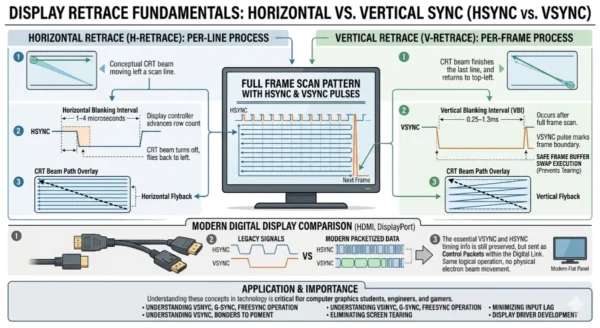
When comparing horizontal vs vertical retrace, horizontal retrace — also called the horizontal blanking interval or HBLANK — is the brief period between the end of one scan line and the beginning of the next. In CRT displays, it was the physical time required for the electron beam to turn off and travel from the right edge of the screen back to the left edge, ready to begin drawing the next line. During this interval the beam was blanked — switched off so that the return movement left no visible trace on the phosphor screen. In modern digital displays, horizontal retrace is a timing signal inherited from analog display standards. No physical beam exists, but the HSYNC pulse and horizontal blanking period remain embedded in digital video standards including VGA, HDMI, and DisplayPort. These timing signals tell the display controller when each scan line ends and when the next begins, synchronizing pixel data delivery with the display’s row-by-row refresh process.
Functions and Benefits
- Line transition control: Ensures precise timing between scan lines, preventing adjacent rows from bleeding into each other during rapid sequential rendering
- Flicker prevention: Clean blanking between lines eliminates the visual artifacts that occur when pixel data arrives out of sync with the display’s row refresh sequence
- Timing reference: HSYNC pulses provide the timing backbone for horizontal resolution — display controllers count HSYNC pulses to determine pixel placement within each row
- Bandwidth management: The blanking interval allows display electronics time to process end-of-line overhead before beginning the next row’s pixel data stream
- Legacy compatibility: Horizontal blanking timing embedded in digital video standards maintains backward compatibility with display controllers built on analog timing assumptions
- Resolution scaling: Horizontal blanking period duration directly impacts the achievable resolution at a given pixel clock frequency — tighter blanking enables more active pixels per line
Limitations and Constraints
- Bandwidth overhead: Horizontal blanking periods consume pixel clock cycles that cannot carry active pixel data, reducing effective bandwidth efficiency
- Fixed timing legacy: Standard blanking intervals were designed for CRT beam travel times — modern flat panels carry this overhead even though no physical reset is required
- Refresh rate ceiling: The combined time of active scan lines plus horizontal blanking intervals determines maximum achievable refresh rate at a given pixel clock
- Limited programmability: Unlike the vertical blanking interval which VRR technologies manipulate dynamically, horizontal blanking intervals remain largely fixed in current display standards
- Reduced data utility: While the horizontal blanking interval has been repurposed for closed captioning and metadata in broadcast TV, its use in PC display standards remains minimal
- Invisible to software: Unlike vertical blanking which GPU drivers and games actively synchronize against, horizontal blanking operates entirely at the hardware level below software visibility
Horizontal Retrace Technical Parameters:
HSYNC Pulse: The synchronization signal marking the end of active pixel data for each scan line, triggering the display controller to advance to the next row. Horizontal Blanking Period: The total interval including front porch, sync pulse, and back porch — during which no visible pixel data is transmitted. Furthermore, Front Porch: Brief delay between end of active line pixels and the HSYNC pulse, providing signal settling time. Additionally, Back Porch: Recovery period after the HSYNC pulse before active pixel data begins on the next line. Moreover, Pixel Clock: The master timing frequency determining how many pixels per second the display interface transmits — directly linked to horizontal resolution and refresh rate achievable within blanking constraints.
Horizontal vs Vertical Retrace: The Frame Reset Side
Definition
The vertical side of horizontal vs vertical retrace — also called the vertical blanking interval (VBLANK or VBI) — is the period between the completion of the last scan line of one frame and the beginning of the first scan line of the next. In CRT displays it was the time required for the electron beam to travel from the bottom-right corner of the screen back to the top-left corner, ready to begin the next frame. In modern digital displays it is the timing gap between frames — a controlled pause during which no active pixel data is transmitted and the display controller resets its internal state for the next frame cycle. The vertical blanking interval is the most critical timing concept in display synchronization because it is the precise moment when it is safe to update the displayed image without causing visual artifacts. VSync works by waiting for the VBLANK before swapping frame buffers. G-Sync and FreeSync work by dynamically adjusting the duration of the VBLANK to match GPU frame delivery timing, eliminating the mismatch that causes screen tearing.
Functions and Benefits
- Screen tearing prevention: Updating the frame buffer during VBLANK ensures the display never reads a partially updated frame, eliminating the horizontal tear lines visible in unsynchronized rendering
- Frame synchronization anchor: VSYNC pulses provide the timing reference that GPU drivers, game engines, and display controllers use to coordinate frame delivery with display refresh cycles
- Double buffering enablement: The VBLANK window is when back buffer and front buffer swap occurs in double-buffered rendering — clean swap during blanking prevents any visible transition artifact
- VRR foundation: Variable Refresh Rate technologies (G-Sync, FreeSync, HDMI VRR) work by dynamically extending or compressing VBLANK duration to match GPU frame output timing
- Refresh rate definition: The number of vertical blanking intervals per second equals the display’s refresh rate — a 360Hz monitor completes 360 full VBLANK cycles every second
- Metadata transmission: VBLANK periods carry HDR metadata, color profile updates, and display configuration signals between GPU and monitor in modern display standards
Limitations and Tradeoffs
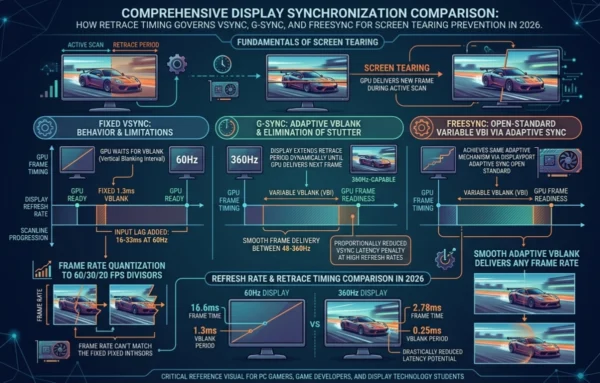
- Input lag from VSync: Waiting for VBLANK before presenting a rendered frame introduces 1–2 frame delays — at 60Hz that is 16–33ms of added input latency, noticeable in competitive gaming
- Frame rate quantization: Fixed VBLANK timing quantizes frame rates to divisors of the refresh rate — a GPU rendering at 40fps on a 60Hz display appears at 30fps due to missed blanking windows
- Stutter at low framerates: When GPU frame time exceeds the VBLANK interval, the same frame is displayed multiple times causing perceptible stuttering in visually complex scenes
- VRR range limits: G-Sync and FreeSync can only adjust VBLANK within the monitor’s supported refresh rate range — below the minimum (typically 48Hz) LFC kicks in but adds complexity
- Bandwidth overhead: The vertical blanking interval represents unused display bandwidth — high refresh rate displays minimize this overhead but cannot eliminate it entirely
- Compatibility requirements: Adaptive VBLANK technologies require matching GPU and monitor hardware support — mismatched systems fall back to standard fixed-interval VBLANK behavior
Vertical Retrace Technical Parameters:
VSYNC Pulse: The synchronization signal marking the end of the last active scan line, signaling GPU drivers that the display is entering the vertical blanking interval and frame buffer swap is safe. Vertical Blanking Interval Duration: The total period between frames — longer on 60Hz displays (approximately 1.3ms), much shorter on 360Hz panels. Furthermore, Frame Buffer Swap: The double-buffering operation where back buffer replaces front buffer during VBLANK to display the next rendered frame without tearing. Additionally, VRR Window: In G-Sync and FreeSync displays, the VBLANK duration is extended dynamically by the display scaler until the GPU signals that the next frame is ready. Moreover, Refresh Rate: The number of complete vertical scan-and-retrace cycles per second — directly determining maximum frame rate and the fundamental cadence of all display timing.
Horizontal vs Vertical Retrace: Technical Architecture Deep Dive
CRT Display Retrace Architecture
- Electron gun fires beam of electrons at phosphor-coated screen, exciting pixels to emit light
- Horizontal deflection coils sweep the beam left-to-right across each scan line at high speed
- HSYNC signal triggers beam blanking and horizontal flyback to left edge between each line
- After completing all scan lines, vertical deflection coils reset beam to top-left corner
- VSYNC signal triggers beam blanking during vertical flyback — the vertical retrace period
- Interlaced scanning draws odd lines then even lines alternately (fields) to reduce flicker at lower refresh rates
- Progressive scanning draws all lines sequentially per frame — standard for PC monitors and modern displays
Modern Digital Display Architecture
- No physical electron beam — pixels addressed electronically row by row via display controller
- HSYNC and VSYNC timing signals preserved in HDMI, DisplayPort, and VGA standards for compatibility
- Display controller scans pixel matrix top-to-bottom, left-to-right in same pattern as CRT beam
- Horizontal blanking encoded in pixel stream timing — no physical return movement required
- Vertical blanking interval used by GPU drivers to safely swap frame buffers without tearing
- VRR hardware manipulates VBLANK duration dynamically — extending it until next GPU frame is ready
- Self-emissive OLED pixels update individually per row — same top-to-bottom timing discipline maintained
Display Scan Cycle: Frame Timing Breakdown
60Hz Display — Fixed Retrace Timing
- Frame begins: display controller starts scanning from row 1, pixel 1
- Each row scanned left to right — horizontal blanking interval between each line (~1–4μs)
- After 1,080 active rows (1080p), horizontal blanking intervals totaled approximately 1–4ms
- Last active pixel transmitted — display enters vertical blanking interval
- VSYNC pulse generated — GPU driver receives notification that VBLANK has started
- Frame buffer swap executes during VBLANK (~1.3ms at 60Hz)
- Display controller resets to row 1 — new frame begins at exactly 16.67ms after last frame start
VRR Display — Adaptive Retrace Timing
- Frame begins: display controller starts scanning from row 1 as usual
- Each row scanned normally — horizontal blanking intervals unchanged per line
- Last active pixel transmitted — display enters vertical blanking interval
- Instead of fixed VBLANK duration, G-Sync/FreeSync hardware extends VBLANK dynamically
- Display waits — VBLANK period stretches until GPU signals next frame is ready
- GPU delivers completed frame — display immediately begins scanning new frame from row 1
- Total frame time varies dynamically — zero tearing, zero fixed-rate stutter, minimal input lag
Horizontal vs Vertical Retrace Across Display Technologies
| Display Technology | Horizontal Retrace | Vertical Retrace | Blanking Type |
|---|---|---|---|
| CRT Monitor | Physical electron beam flyback — beam blanked during horizontal travel | Physical beam reset from bottom-right to top-left during VBLANK | Analog blanking — actual beam suppression required |
| LCD (IPS/VA) | Timing signal only — no physical movement, inherited from VGA standard | VSYNC pulse triggers frame buffer swap — no physical reset | Digital blanking — timing preserved for compatibility |
| OLED / QD-OLED | Row addressing timing — each pixel row addressed sequentially top to bottom | VSYNC triggers next frame start — self-emissive pixels reset per row | Digital blanking — same timing architecture as LCD |
| VRR (G-Sync/FreeSync) | Fixed per line — horizontal blanking not variable in current standards | VBLANK duration extended dynamically to match GPU frame delivery | Adaptive blanking — variable VBLANK is the core VRR mechanism |
| Mini-LED | Identical to LCD — same timing architecture with local dimming overlay | VSYNC used for frame timing plus local dimming zone update coordination | Digital blanking with additional dimming synchronization layer |
Horizontal vs Vertical Retrace: Use Cases and Real-World Applications
Where Horizontal Retrace Matters
- Display standards design: Engineers designing HDMI, DisplayPort, and VGA timing specifications must account for horizontal blanking overhead when calculating maximum resolution at a given pixel clock
- Custom resolution configuration: Users creating custom resolutions using tools like Custom Resolution Utility (CRU) must specify valid horizontal blanking timing for the display to accept the signal
- Broadcast television: Horizontal blanking intervals in broadcast signals historically carried closed captions, teletext data, and test signals — understanding HBLANK is essential for broadcast engineering
- Retro gaming and emulation: Cycle-accurate emulators of CRT-era systems time hardware events to the HSYNC signal — code that writes to graphics registers during HBLANK produces specific visual effects
- FPGA display controllers: Hardware engineers implementing display controllers in FPGAs must generate accurate HSYNC timing to drive monitors correctly within standard timing specifications
Where Vertical Retrace Matters Most
- PC gaming: Every frame synchronization decision in PC gaming — VSync on or off, G-Sync or FreeSync enabled — directly involves vertical retrace timing and VBLANK synchronization
- Game engine development: Engine frame loop timing, double buffer management, and display latency optimization all require precise understanding of VSYNC signal behavior and VBLANK windows
- Graphics programming: OpenGL, DirectX, and Vulkan all expose VSync control through VBLANK synchronization APIs — graphics programmers must understand VBLANK to implement smooth rendering
- Display driver development: GPU driver engineers implement frame pacing, adaptive sync, and display synchronization features directly around VBLANK detection and manipulation
- Film and video production: Frame cadence matching between camera capture rates and display refresh rates involves vertical retrace timing to prevent judder in 24fps content on 60Hz displays
Horizontal vs Vertical Retrace Industry Application Patterns
| Domain | Horizontal Retrace Relevance | Vertical Retrace Relevance |
|---|---|---|
| PC Gaming | Minimal — handled entirely by display hardware below game software visibility | Critical — VSync, G-Sync, FreeSync all operate on VBLANK; affects tearing, latency, smoothness |
| Game Development | Occasionally — custom resolutions and display timing in engine display initialization | Essential — frame loop timing, buffer swap scheduling, input lag minimization strategies |
| Broadcast Engineering | High — HSYNC timing critical for video signal standards, closed caption embedding | High — VSYNC defines frame rate standards (29.97Hz, 25Hz, 24Hz) for broadcast formats |
| Retro Gaming / Emulation | High — HBLANK timing determines when vintage hardware can safely update graphics registers | High — VBLANK is the safe window for sprite updates, palette changes, and raster effects |
| Display Hardware Engineering | Essential — HSYNC timing specification determines achievable resolution and pixel clock | Essential — VSYNC and VBLANK design determines refresh rate range, VRR capability, frame pacing |
12 Critical Differences: Horizontal vs Vertical Retrace
The horizontal vs vertical retrace comparison below covers every key technical, functional, and practical dimension — from signal timing and duration to gaming relevance and VRR compatibility.
Aspect | Horizontal Retrace (HBLANK) | Vertical Retrace (VBLANK) |
|---|---|---|
| Occurrence Frequency | Once per scan line — occurs hundreds to thousands of times per frame depending on resolution | Once per complete frame — occurs at the refresh rate (60, 144, 360 times per second) |
| Direction in CRT | Horizontal — beam travels from right edge back to left edge to start the next line | Vertical — beam travels from bottom-right corner back to top-left to start the next frame |
| Duration | Very brief — approximately 1–4 microseconds per line at modern display timings | Longer — approximately 0.5–1.5 milliseconds per frame depending on refresh rate |
| Synchronization Signal | HSYNC pulse — marks end of active pixels per line and triggers controller line advance | VSYNC pulse — marks end of last active line and signals GPU that frame buffer swap is safe |
| Primary Purpose | Transition between scan lines without visible artifacts or line-boundary distortions | Transition between complete frames — the critical window for safe image buffer updates |
| Artifact Prevented | Line boundary distortion — prevents visible glitches at the transition between adjacent rows | Screen tearing — prevents horizontal tear lines from GPU frame updates mid-scan |
| Software Visibility | Invisible to software — operates entirely at display hardware level below API access | Directly accessible — GPU APIs expose VSYNC waiting, game engines synchronize to VBLANK |
| Modern Relevance | Hardware-level concern for display engineers, broadcast technicians, FPGA designers | Directly relevant to every developer, gamer, and user making frame synchronization decisions |
| VRR Manipulation | Not manipulated by VRR technologies — horizontal timing remains fixed in current standards | Core mechanism of G-Sync and FreeSync — VBLANK duration adjusted dynamically per frame |
| Impact on Refresh Rate | Contributes to refresh rate ceiling via accumulated blanking overhead across all scan lines | Directly defines the frame rate boundary — fewer or shorter VBLANK intervals enable higher Hz |
| Double Buffering | No direct relationship — horizontal blanking does not trigger buffer management operations | Triggers buffer swap — double and triple buffering operations execute during VBLANK window |
| Input Lag Effect | No measurable impact on input lag — too brief and too frequent to affect frame delivery timing | Direct input lag impact — VSync waiting for VBLANK adds 1–2 frames of latency at fixed rates |
Horizontal vs Vertical Retrace: VSync, G-Sync, and FreeSync Implementation Guide
Understanding Your Synchronization Options
- Identify Your Hardware: First, check your GPU make (Nvidia or AMD) and your monitor’s supported sync technologies — G-Sync is Nvidia-exclusive, FreeSync works on AMD and some Nvidia GPUs via G-Sync Compatible certification.
- Check Refresh Rate Range: Then, identify your monitor’s VRR range (e.g., 48–165Hz) — this is the range over which adaptive VBLANK manipulation is effective. Frame rates outside this range require LFC or fallback behavior.
- Assess Your Frame Rate: Additionally, determine whether your GPU consistently delivers frames within your monitor’s VRR range for your target games — if not, hardware upgrade or graphics settings adjustment may be needed first.
- Choose Sync Strategy: Furthermore, select VSync, adaptive sync, or no sync based on your priority — tearing-free smoothness, minimum input lag, or maximum raw frame rate each favors a different approach.
- Configure Frame Pacing: Subsequently, for competitive gaming enable NVIDIA Reflex or AMD Anti-Lag alongside VRR to minimize the pipeline latency between input and displayed frame even with sync enabled.
- Test and Validate: Finally, use tools like RTINGS.com input lag measurements and in-game frame time graphs to verify your configuration is delivering consistent frame pacing without unexpected stutter or latency spikes.
Sync Technology Comparison: VSync vs G-Sync vs FreeSync
VSync — Fixed VBLANK Synchronization
- GPU waits for VSYNC signal before presenting each completed frame
- Eliminates screen tearing completely when frame rate matches refresh rate
- Adds 1–2 frames of input latency — 16–33ms at 60Hz
- Frame rate quantizes to refresh rate divisors (60fps, 30fps, 20fps)
- Stutter visible when GPU misses VBLANK window and holds previous frame
- Triple buffering reduces stutter but maintains input lag penalty
- Available on all GPUs and monitors — no special hardware required
G-Sync — Adaptive VBLANK (Nvidia)
- Display hardware extends VBLANK dynamically until GPU signals next frame ready
- Eliminates tearing and fixed-rate stutter simultaneously
- Minimal input lag — frame presented as soon as rendered, no fixed VBLANK wait
- Requires Nvidia GPU and G-Sync certified or G-Sync Compatible monitor
- G-Sync module in certified monitors provides more consistent overdrive and low-lag performance
- Effective within monitor’s VRR range — LFC doubles refresh rate below minimum Hz
- Works alongside NVIDIA Reflex for additional pipeline latency reduction in supported games
FreeSync — Adaptive VBLANK (AMD)
- Open standard using variable-length VBIs — fundamentally same VBLANK mechanism as G-Sync
- Eliminates tearing and stutter within the supported refresh rate range
- No proprietary hardware module required — works via DisplayPort Adaptive Sync standard
- FreeSync Premium Pro adds HDR and LFC requirements for certification tier
- Compatible with AMD Radeon GPUs and many Nvidia GPUs via G-Sync Compatible
- Variable quality across certified monitors — consistency varies without G-Sync module requirements
- Works with AMD Anti-Lag for additional input latency reduction alongside VRR
Implementation Best Practices
Optimal Sync Configuration
- Enable G-Sync or FreeSync if your hardware supports it — adaptive VBLANK is objectively superior to fixed VSync for most use cases
- Cap your frame rate 3–5fps below monitor maximum to prevent G-Sync/FreeSync from exiting VRR range at peak performance
- Enable in-game VSync as a fallback when using G-Sync to prevent tearing if frame rate exceeds monitor maximum
- Use NVIDIA Reflex or AMD Anti-Lag in supported games to minimize GPU render queue depth and reduce pipeline latency
- For competitive gaming where input lag is paramount, consider VSync off with frame rate cap near refresh rate maximum
- Test your specific game and hardware — frame pacing varies significantly between titles and GPU driver versions
Common Configuration Pitfalls
- Never enable both VSync and G-Sync simultaneously in Nvidia Control Panel — this disables G-Sync’s adaptive VBLANK and reverts to fixed VSync behavior
- Avoid running frame rates chronically below your monitor’s FreeSync minimum without LFC enabled — this exits VRR range and tearing returns
- Do not assume all FreeSync monitors perform equally — Premium Pro certification has stricter requirements than basic FreeSync
- Avoid VSync in competitive multiplayer titles where 16–33ms additional input lag is perceptible and impactful
- Never ignore frame pacing — even with VRR enabled, inconsistent frame times (not just average FPS) cause visible stutter
- Do not enable triple buffering with G-Sync or FreeSync — it adds unnecessary frame buffering that increases latency without benefit
Horizontal vs Vertical Retrace: Performance, Latency and Display Technology Analysis
VSync Input Lag at 60Hz
VSync ON: +16–33ms added latency per frame
G-Sync/FreeSync: Near-zero additional latency
VBLANK Duration by Refresh Rate
60Hz display: ~1.3ms VBLANK per frame
360Hz display: ~0.22ms VBLANK per frame
Frame Rate Quantization (VSync)
At 60Hz: GPU at 40fps displays at 30fps
With VRR: 40fps displays at exactly 40fps
Sync Technology Performance Comparison
| Performance Aspect | VSync Off | VSync On | G-Sync / FreeSync |
|---|---|---|---|
| Screen Tearing | Present — GPU sends frames regardless of display readiness | Eliminated — frame swaps locked to VBLANK | Eliminated — adaptive VBLANK matches GPU output |
| Input Lag | Minimum — frames displayed as soon as rendered | +1–2 frames added latency from VBLANK wait | Near-minimum — frame presented immediately when ready |
| Stutter | None from sync — frame pacing dependent on GPU consistency | Present when GPU misses VBLANK window | Eliminated within VRR range — frame shown when ready |
| Frame Rate Cap | Uncapped — GPU renders as fast as possible | Capped to refresh rate or its divisors | Dynamic — any rate within VRR range displayed accurately |
| Hardware Requirement | None — works on any GPU and display combination | None — software setting available universally | Matching GPU and VRR-capable monitor required |
Retrace Legacy in Modern Display Standards
How Modern Displays Inherited CRT Timing
- VGA standard (1987): Defined HSYNC and VSYNC signal timing based on CRT beam travel requirements — still referenced in monitor EDID data today
- HDMI and DisplayPort: Carried forward horizontal and vertical blanking periods in digital packet format — preserving timing compatibility with display controllers built on analog assumptions
- VESA timing standards: Coordinated Video Timings (CVT) and Generalized Timing Formula (GTF) define blanking intervals for custom resolutions — all derived from CRT-era timing requirements
- DisplayPort Adaptive Sync: Extended VBLANK variable duration to enable FreeSync — directly manipulating the timing parameter originally sized for CRT vertical flyback
- 360Hz gaming displays: Reduced blanking overhead to absolute minimums to achieve ultra-high refresh rates within available pixel clock bandwidth
Retrace in 2026 Display Technology
- QD-OLED at 360Hz: Samsung’s V-Stripe QD-OLED panels entering production in 2026 operate at 360Hz with VBLANK intervals of under 0.25ms — yet still use the same VSYNC architecture
- HDMI 2.1 VRR: Console gaming VRR on PS5 and Xbox Series X uses HDMI VRR — variable VBLANK manipulation extended to living room displays
- DisplayPort 2.1: 80Gbps bandwidth enables higher resolutions at extreme refresh rates — achieved partly by optimizing blanking overhead at the pixel clock level
- AI upscaling displays: MSI’s MEG 321URX with onboard AI processes frames during the VBLANK window — repurposing the blanking interval for AI inference tasks
- Future directions: QD-LED displays in prototype stage may introduce fundamentally new addressing models — but will still require frame synchronization mechanisms descended from VBLANK
Choosing the Right Sync Technology for Your Use Case
Matching Sync Strategy to Your Priority
The horizontal vs vertical retrace relationship determines every sync tradeoff you face as a PC user. The right synchronization approach depends entirely on your primary use case, hardware, and what tradeoff you are willing to accept. Unlike many technology comparisons where one option is clearly superior, horizontal vs vertical retrace based display synchronization genuinely involves tradeoffs between tearing elimination, input lag, smoothness, and hardware cost. Understanding how each approach manipulates the vertical blanking interval allows you to make an informed choice that matches your actual priorities rather than following general recommendations that may not fit your specific situation.
Use Case Decision Matrix
| Use Case | Recommended Approach | Reasoning |
|---|---|---|
| Competitive multiplayer gaming | VSync off with frame rate cap, or G-Sync/FreeSync | Minimum input lag critical — VSync’s 16–33ms latency penalty is perceptible in fast-paced games |
| Single-player / story games | G-Sync or FreeSync enabled | Smooth, tear-free experience without VSync stutter — visual quality priority over input lag |
| Desktop productivity | VSync or no sync — display handles refresh naturally | No fast motion or tearing concern — sync technology irrelevant for static UI work |
| Video and content creation | VSync on or G-Sync for smooth playback preview | Frame cadence consistency important for accurate motion preview during editing |
| Budget gaming without VRR monitor | VSync on with triple buffering, or VSync off with frame cap | No VRR available — choose between eliminating tearing (VSync) or minimizing lag (off + cap) |
| High refresh rate (240Hz+) gaming | G-Sync or FreeSync within VRR range | At 240Hz+ VBLANK intervals are so short that VSync lag is minimal — VRR still superior for consistency |
Progressive Sync Technology Adoption
Entry Path: Start With What You Have
For users without VRR-capable hardware, maximize existing sync options:
- Enable VSync in games where tearing is visible and input lag is tolerable
- Use frame rate caps 3–5fps below refresh rate to minimize VSync stutter frequency
- Enable triple buffering if available to reduce stutter without increasing lag further
- Consider Adaptive VSync (Nvidia) or Enhanced Sync (AMD) for automatic VSync on/off switching
- Upgrade monitor before GPU if VRR support is the primary goal — monitor longevity exceeds GPU cycles
Optimal Setup: Full VRR Configuration
For users with compatible GPU and VRR monitor hardware:
- Enable G-Sync or FreeSync in GPU control panel and confirm active in monitor OSD
- Enable in-game VSync as fallback to prevent tearing above monitor maximum refresh rate
- Cap frame rate 3–5fps below monitor maximum in GPU overlay or RTSS
- Enable NVIDIA Reflex or AMD Anti-Lag in supported competitive titles
- Verify VRR is active using GPU overlay frame time graph — look for variable frame times matching GPU output
Frequently Asked Questions: Horizontal vs Vertical Retrace
Horizontal vs Vertical Retrace: Final Takeaways for 2026
The horizontal vs vertical retrace distinction began as an engineering necessity for cathode ray tube displays — physical constraints governing electron beam movement across phosphor screens. Decades later, horizontal vs vertical retrace survives as the timing architecture beneath every display technology from entry-level office monitors to 360Hz QD-OLED gaming panels, and as the foundational mechanism behind every display synchronization technology that matters to PC users in 2026.
Horizontal Retrace — Key Takeaways:
- Occurs between every scan line — thousands of times per frame
- Governs line-to-line transition timing via HSYNC signal
- Prevents line boundary artifacts and maintains pixel clock synchronization
- Operates below software visibility — not directly configurable by end users
- Relevant to display hardware engineers, broadcast technicians, retro developers
- Contributes to refresh rate ceiling through accumulated blanking overhead
Vertical Retrace — Key Takeaways:
- Occurs once per frame — defines the display’s refresh rate cadence
- VSYNC signal marks the safe window for GPU frame buffer swaps
- Foundation of VSync, G-Sync, FreeSync, and all VRR technologies
- Directly relevant to every gamer and developer making sync decisions
- G-Sync and FreeSync work by dynamically adjusting VBLANK duration
- Carries HDR metadata, display configuration, and in 2026 — AI inference
Practical Recommendation for 2026:
If you are a PC gamer, the most practical application of understanding vertical retrace is making informed sync technology decisions. Enable G-Sync or FreeSync if your hardware supports it — adaptive VBLANK manipulation delivers tearing-free smoothness without VSync’s input lag penalty. Cap your frame rate slightly below your monitor maximum to keep the GPU operating within the VRR range. For competitive multiplayer where every millisecond of input lag matters, consider VSync off with a frame rate cap to eliminate tearing while minimizing latency. If you are a game developer or graphics programmer, understanding VBLANK timing and double buffer swap mechanics is essential knowledge for smooth frame delivery. If you are studying display technology, computer graphics, or hardware engineering, horizontal and vertical retrace are the foundational concepts from which all modern display synchronization and timing architecture descends.
Whether you encountered horizontal vs vertical retrace while debugging screen tearing in a game, studying computer graphics fundamentals, configuring a new monitor, or building display hardware — understanding horizontal vs vertical retrace gives you the conceptual foundation to make sense of every display synchronization technology, from the VGA monitors of the 1980s to the 360Hz QD-OLED panels and AI-enhanced displays of 2026 and beyond.
Related Topics Worth Exploring
VSync vs G-Sync vs FreeSync: Deep Dive
Explore the complete comparison of display synchronization technologies — how each manipulates the vertical blanking interval, their performance tradeoffs, and which to choose for your specific gaming hardware and use case.
Logical vs Physical Memory Addresses
Understand the operating system memory abstraction layer — a parallel concept to display timing abstraction where hardware constraints are hidden behind software interfaces that simplify developer interaction with complex underlying mechanisms.
GPU Architecture: How Graphics Cards Render Frames
Discover how modern GPUs generate the frames that your display’s vertical retrace timing governs — from shader pipelines and rasterization to frame buffer management and display output encoding.
Wow, superb blog layout! How long have you been blogging for? You make blogging look easy. The overall look of your website is magnificent; it’s very useful and easy to understand the topics you cover.