
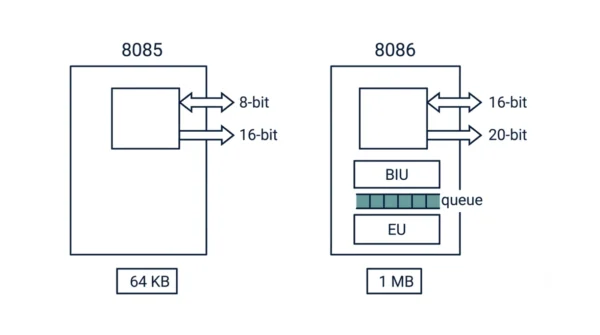
The 8085 is an 8-bit Intel microprocessor with an 8-bit data bus and a 16-bit address bus, so it reaches 64 KB of memory and runs near 3 MHz. The 8086 is a 16-bit chip with a 16-bit data bus and a 20-bit address bus, so it reaches 1 MB and runs at 5 to 10 MHz. Crucially, the 8086 adds instruction pipelining, memory segmentation, and hardware multiply and divide, while the 8085 has none of these. In short, the 8086 is the wider, faster, more capable successor.
The 8085 and 8086 are two classic Intel microprocessors, and they appear in every computer organisation and GATE syllabus. The 8086 came a few years after the 8085, so it shows clearly how the technology evolved. Students often mix up which one is 8-bit and which is 16-bit, and they forget which chip pipelines.
The core difference is width and ambition. The 8085 keeps things simple and cheap, while the 8086 widens the buses, adds an instruction queue, and segments memory for far more reach. This guide defines each processor, compares them in detail, and shows when each one matters.
If you are still mapping out the basics, it helps to know the difference between a microprocessor and a microcontroller first. The deeper design split behind these chips is the RISC vs CISC story.
What is the 8085 Microprocessor?
The 8085 is an 8-bit microprocessor that Intel released in 1976. It processes 8 bits of data at a time, so its data bus is 8 bits wide. Its address bus is 16 bits wide, which means it can address 216 = 64 KB of memory.
The 8085 is an accumulator-based design, so most operations route through one accumulator register. It runs at roughly 3 MHz, uses about 6,500 transistors, and carries a simple instruction set of around 80 instruction types. Because it needs little external hardware and only one operating mode, it stays cheap and easy to teach. As a result, it is still the standard first chip in microprocessor courses.
Advantages of the 8085:
- Simple and cheap, so it suits learning and small embedded tasks.
- Needs little external hardware, which keeps boards compact.
- Easy 50% duty-cycle clocking and a single operating mode.
- A small, clear instruction set that is easy to follow.
Disadvantages of the 8085:
- Only 64 KB of memory, because the address bus is just 16 bits.
- No pipelining and no instruction queue, so it cannot overlap work.
- No memory segmentation and no hardware multiply or divide.
- Slow 8-bit transfers compared with the 8086.
What is the 8086 Microprocessor?
The 8086 is a 16-bit microprocessor that Intel released in 1978. It processes 16 bits at a time, so its data bus is 16 bits wide. Its address bus is 20 bits wide, so it can address 220 = 1 MB of memory, a sixteen-fold jump over the 8085.
The 8086 is a general-purpose-register design with a richer instruction set, and it adds hardware multiply and divide. Internally it splits into a Bus Interface Unit (BIU) and an Execution Unit (EU), so it can prefetch instructions into a 6-byte queue and pipeline them. It also uses memory segmentation through the CS, DS, SS, and ES segment registers. Moreover, it offers minimum and maximum operating modes, and the maximum mode supports a coprocessor such as the 8087.
Advantages of the 8086:
- Addresses 1 MB of memory, so it runs far larger programs.
- Pipelines via the BIU/EU split, which overlaps fetch and execute.
- Faster 16-bit transfers and clock speeds of 5 to 10 MHz.
- Hardware multiply and divide, plus more registers and instructions.
Disadvantages of the 8086:
- Higher cost, because it uses about 29,000 transistors.
- Needs more external hardware and support chips.
- More complex to program, since segmentation adds extra rules.
- A 33% duty cycle and two operating modes add design effort.
8085 vs 8086: Comparison Table
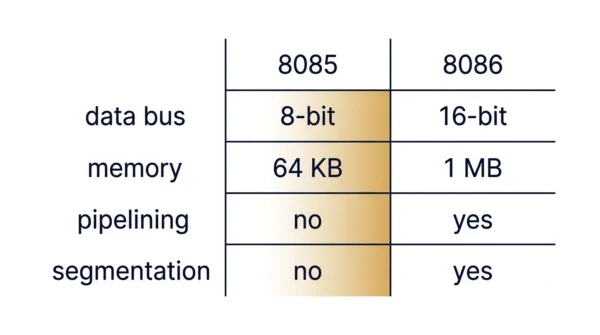
| Aspect | 8085 | 8086 |
|---|---|---|
| Processor width | 8-bit microprocessor | 16-bit microprocessor |
| Data bus | 8-bit data bus | 16-bit data bus |
| Address bus | 16-bit address bus | 20-bit address bus |
| Memory access | Up to 216 = 64 KB | Up to 220 = 1 MB |
| Instruction queue | No instruction queue | Has a 6-byte instruction queue |
| Pipelining | Not supported | Supported, via the BIU/EU split |
| Memory segmentation | No segmentation | Segmented (CS, DS, SS, ES) |
| Clock speed | About 3 MHz | 5, 8, or 10 MHz variants |
| Duty cycle | 50% duty cycle | 33% duty cycle |
| Arithmetic support | Integer and decimal only | Integer, decimal, and ASCII arithmetic |
| Register model | Accumulator based | General-purpose-register based |
| Flags | 5 flags (S, Z, AC, P, CY) | 9 flags (OF, DF, IF, TF, S, Z, AC, P, CY) |
| Operating modes | Single mode only | Two modes (minimum and maximum) |
| Transistor count | About 6,500 | About 29,000 |
| External hardware | Requires less external hardware | Requires more external hardware |
| I/O addressing | 28 = 256 I/O ports | 216 = 65,536 I/O ports |
| Multiprocessing | Single processor only | Maximum mode supports more than one processor |
| Cost | Low | High |
How the 8086 Pipelines: BIU and EU
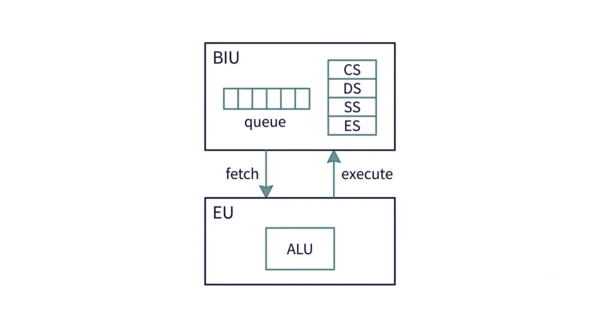
The biggest internal change is pipelining, so it is worth seeing how it works. The 8085 fetches one instruction, executes it, and only then fetches the next. As a result, the bus sits idle during execution, and execution waits during a fetch.
The 8086 fixes that by splitting into two units that run in parallel. The Bus Interface Unit handles memory and reads instruction bytes ahead of time into a 6-byte queue. Meanwhile, the Execution Unit takes the next instruction straight from that queue and runs it on the ALU. So the chip fetches and executes at the same time, which keeps both units busy.
Segmentation is the other key addition. The 8086 forms a 20-bit physical address from a 16-bit segment register and a 16-bit offset, using the rule address = (segment × 16) + offset. Because there are four segment registers (CS, DS, SS, ES), a program can keep code, data, stack, and extra data in separate 64 KB windows that together span the full 1 MB.
A Worked Example: Adding Two Numbers
Take one small task: add two 16-bit numbers. The contrast shows the gap clearly.
On the 8085, a 16-bit add needs several 8-bit steps, because the data bus moves only 8 bits at once. So the program adds the low bytes, then adds the high bytes with carry, and there is no multiply instruction at all. The chip also fetches each instruction only after the previous one finishes.
On the 8086, one ADD AX, BX adds both 16-bit values in a single instruction, since the data bus is 16 bits wide. Furthermore, a real multiply like MUL BX exists in hardware. While the EU runs that add, the BIU is already prefetching the next instructions into the queue. So the 8086 does more per instruction and wastes less time waiting on memory.
When to Use the 8085 or 8086
You rarely choose between these two chips in modern products, yet the trade-off still guides exam answers and small projects.
Pick the 8085 when simplicity and cost lead. It suits learning, basic control tasks, and small embedded boards, because it needs little hardware and is easy to reason about. That is exactly why colleges still teach assembly on it.
Pick the 8086 when you need more memory and speed. Its 1 MB reach, 16-bit data path, and pipelining suit larger programs and the early PC era it powered. So in short, the 8085 teaches the fundamentals, while the 8086 shows where the architecture was heading.
Interview Questions
Frequently Asked Questions
Wrapping Up
The 8085 and 8086 mark two steps in the same story. The 8085 keeps the design small, cheap, and easy to learn, while the 8086 widens everything and adds real performance features.
Remember the simple rule: the 8085 is 8-bit with a 64 KB reach and no pipelining, and the 8086 is 16-bit with a 1 MB reach, pipelining, and segmentation. Both still earn their place in exams, because together they show how a microprocessor grows up. So knowing this trade-off answers most 8085 vs 8086 questions you will meet.
Related reading on DiffStudy:



