
DELETE is a DML command that removes specific rows using a WHERE clause. It logs each row, so it can be rolled back. TRUNCATE is a DDL command that removes all rows at once, far faster, and resets the identity counter. So DELETE vs TRUNCATE comes down to this: DELETE is selective and reversible, while TRUNCATE is an all-or-nothing fast reset.
DELETE and TRUNCATE both remove data from a table, but they work very differently under the hood. Picking the wrong one can cost you speed, or worse, data you meant to keep.
This is one of the most common SQL interview questions, usually phrased as “what is the difference between DELETE and TRUNCATE?” This guide defines each command, compares them in detail, shows the syntax, and explains when to use which.
It also has a close cousin: DROP, which removes the whole table. See our guide to DROP vs TRUNCATE for that comparison.
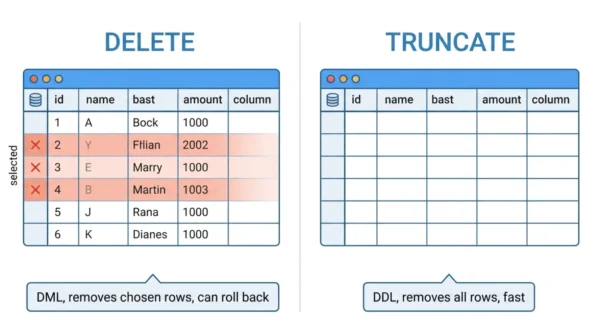
What is the DELETE Command?
DELETE is a DML (Data Manipulation Language) command that removes rows from a table. With a WHERE clause, it removes only the rows that match. Without one, it removes every row, one at a time.
Because it works row by row, DELETE logs each deletion, so it can be rolled back inside a transaction. It also fires triggers, and it does not reset the table’s identity (auto-increment) counter.
That control makes DELETE the right tool for selective removal. But it is slower on large tables, due to the per-row logging.
What is the TRUNCATE Command?
TRUNCATE is a DDL (Data Definition Language) command that removes all rows from a table at once. It cannot take a WHERE clause, so it is all or nothing.
Instead of deleting rows individually, TRUNCATE deallocates the data pages, which makes it much faster and uses minimal logging. It also resets the identity counter back to its seed and frees the storage.
The trade-offs: TRUNCATE does not fire triggers, and in many databases it auto-commits, so it usually cannot be undone. The empty table structure stays in place.
DELETE vs TRUNCATE: Comparison Table
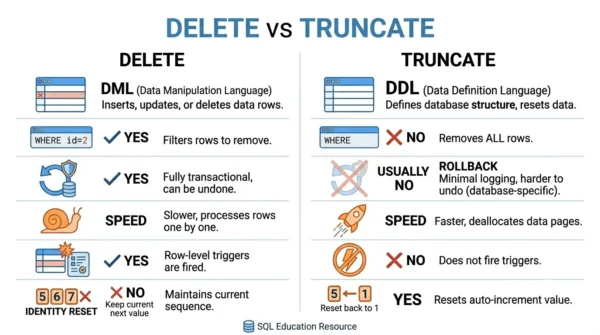
| Aspect | DELETE | TRUNCATE |
|---|---|---|
| Command type | DML (Data Manipulation) | DDL (Data Definition) |
| Rows removed | Specific rows or all | All rows only |
| WHERE clause | Yes — can filter | No |
| Speed | Slower (row by row) | Faster (deallocates pages) |
| Rollback | Yes, within a transaction | Usually no (database-dependent) |
| Triggers | Fires DELETE triggers | Does not fire triggers |
| Identity / auto-increment | Not reset | Reset to the seed |
| Transaction log | Logs every row | Minimal logging |
| Locking | Row-level locks | Table-level lock |
| Storage space | Not always freed | Frees the space |
| Table structure | Retained | Retained |
| Permissions needed | DELETE permission | Higher (ALTER on the table) |
Syntax and Examples
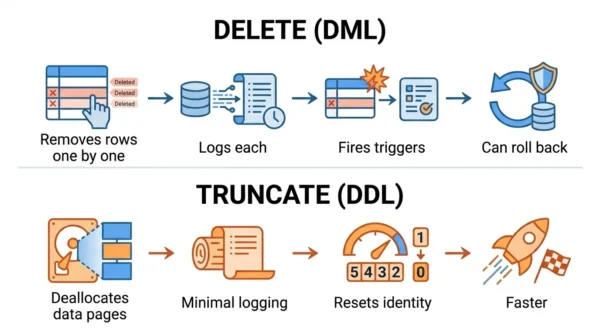
The syntax shows the key difference: DELETE can target rows, while TRUNCATE always clears the whole table.
-- DELETE: remove only matching rows (can roll back)
DELETE FROM employees
WHERE department = 'Sales';

-- DELETE every row, still row by row and logged
DELETE FROM employees;

-- TRUNCATE: remove ALL rows instantly, reset identity
TRUNCATE TABLE employees;
Notice that TRUNCATE takes no condition. If you only want to remove some rows, DELETE with a WHERE clause is the only choice.
DELETE vs TRUNCATE vs DROP
A third command, DROP, is often compared alongside these two, and the trio is a favourite interview question. The simplest way to remember them:
- DELETE removes chosen rows, keeping the table.
- TRUNCATE removes all rows, keeping the empty table.
- DROP removes the entire table, structure and all.
So the scope grows from rows, to all rows, to the whole table. For the full DROP comparison, see DROP vs TRUNCATE.
When to Use DELETE or TRUNCATE
Use DELETE when you need to remove specific rows, when you might need to roll back, or when triggers must fire. It is the safe, precise choice for everyday data changes.
Use TRUNCATE to empty an entire table quickly, such as a staging or temporary table. It fits when you do not need a filter, triggers, or an undo. It is faster and resets the identity counter, which is handy when reloading data.
In short, reach for DELETE for control and TRUNCATE for speed on a full wipe.
Interview & Exam Questions
Frequently Asked Questions
Wrapping Up
DELETE and TRUNCATE both clear data but suit different jobs. DELETE removes chosen rows with full control and the option to roll back. TRUNCATE wipes the whole table fast and resets the identity.
Remember the scope ladder: DELETE for some rows, TRUNCATE for all rows, and DROP for the entire table. Choose DELETE when you need precision or an undo, and TRUNCATE when you need a quick, complete reset.
Related reading on DiffStudy:



