
Cloud computing is a service model that rents computing power, storage, and software over the internet, so you pay only for what you use. Virtualization is a technology that splits one physical server into several virtual machines, so you squeeze more out of your own hardware. In short, virtualization is a building block, while cloud computing is a service often built on top of it.
At first, cloud computing and virtualization sound similar, and people often use the terms interchangeably. Yet they solve different problems: one delivers IT as a rented service, while the other makes hardware more efficient.
Indeed, knowing the difference helps you plan infrastructure, control costs, and pick the right tool. So this guide defines each technology, weighs their benefits and drawbacks, compares them in detail, and shows when to use which.
Cloud services are often sold in tiers, so it also helps to know IaaS vs PaaS vs SaaS.
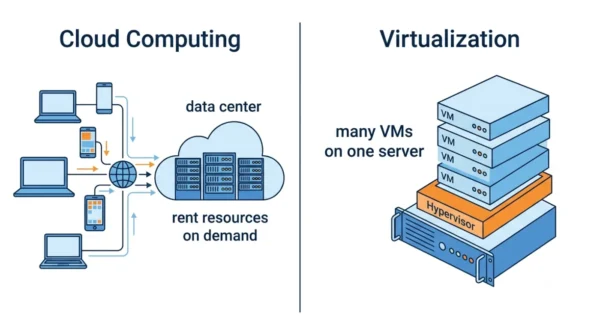
What is Cloud Computing?
Cloud computing changes how you access technology. Instead of buying and running physical servers, you rent computing power, storage, and software over the internet. It works like paying a utility for electricity rather than running your own generator, so you pay only for what you use while the provider handles the infrastructure.
Key benefits of cloud computing:
- Instant scalability: add storage or compute in minutes, not weeks.
- Global access: reach your apps and data from anywhere with an internet connection.
- Cost efficiency: avoid upfront hardware spend and cut operational costs.
- Automatic updates: the provider handles software updates and security patches.
- Disaster recovery: built-in backup and recovery across several regions.
Potential drawbacks:
- Internet dependency: poor connectivity can disrupt your work.
- Security concerns: trusting a third party with sensitive data needs care.
- Ongoing costs: monthly subscription fees add up over time.
- Limited control: you get less customisation than on-premises kit.
For example, major providers include Amazon Web Services (AWS), Microsoft Azure, Google Cloud Platform, and IBM Cloud. In general, they sell three service models:
- Infrastructure as a Service (IaaS): rent virtual servers and storage.
- Platform as a Service (PaaS): ready-made development platforms and tools.
- Software as a Service (SaaS): finished apps like Gmail or Salesforce.
What is Virtualization?
In essence, virtualization is like building several apartments inside one building. So it lets you run many virtual computers, called virtual machines, on a single physical server, each running independently. A software layer called a hypervisor divides the hardware, so each virtual machine gets its own slice of CPU, memory, and storage.
Because each virtual machine can run its own operating system and apps without disturbing the others, virtualization squeezes far more value from one server. So it is the foundation that makes flexible, isolated environments possible.
Key benefits of virtualization:
- Resource optimisation: get more from existing hardware.
- Isolation: separate apps and services for better security and stability.
- Quick deployment: spin up a new virtual machine in minutes.
- Cost reduction: fewer physical servers mean lower power, cooling, and space costs.
- Easy backup: back up and restore whole virtual machines quickly.
Potential challenges:
- Performance overhead: virtual machines use slightly more resources than bare metal.
- Management complexity: watching many virtual environments needs proper tools.
- Single point of failure: if the physical server dies, every virtual machine on it goes down.
- Licensing costs: some software licences cost more in virtual environments.
For instance, popular platforms include VMware vSphere, Microsoft Hyper-V, Citrix XenServer, and open-source options like KVM and VirtualBox. Container tools such as Docker and Kubernetes also sit under the virtualisation umbrella.
Cloud Computing vs Virtualization: Comparison Table
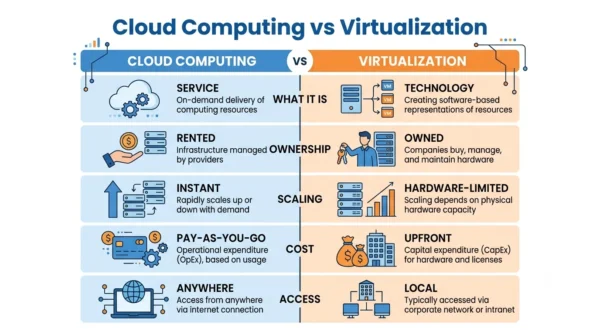
| Aspect | Cloud Computing | Virtualization |
|---|---|---|
| What it is | A service delivery model | A hardware technology |
| Primary function | Delivers computing over the internet | Creates virtual machines on one server |
| Relationship | Often built on virtualization | A building block cloud relies on |
| Ownership | Provider owns the hardware; you rent | You own and manage the hardware |
| Location | Provider’s data centres (off-site) | Your own premises (on-site) |
| Scalability | Instant, on demand | Limited by physical hardware |
| Cost model | Pay-as-you-go (OpEx) | Upfront hardware + licences (CapEx) |
| Accessibility | From anywhere with internet | Usually the local network |
| Maintenance | Provider handles infrastructure | You maintain the hardware |
| Internet dependency | Needs a stable connection | Works offline on the LAN |
| Disaster recovery | Built in across regions | You plan backups yourself |
| Examples | AWS, Azure, Google Cloud | VMware, Hyper-V, KVM, VirtualBox |
| Best for | Scaling, remote teams, low upfront cost | Control, compliance, existing hardware |
Key Differences Explained
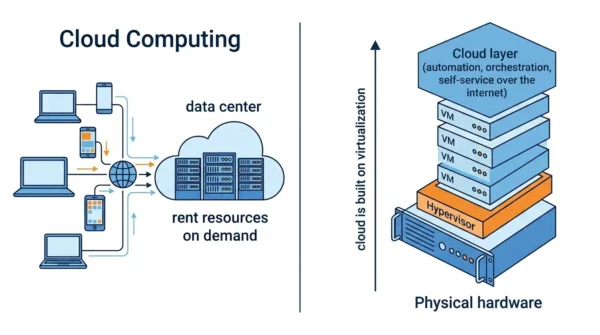
Scope and purpose. Cloud computing is a service that delivers computing over the internet, whereas virtualization is the technology that makes such delivery efficient. So one is what you buy, and the other is how it is built.
Ownership and control. Specifically, with the cloud you rent resources from a provider. With virtualization, you usually own and manage the physical hardware yourself, even while you run virtual machines on it.
Scalability. Cloud computing scales almost instantly, since you add resources with a few clicks. Virtualization, by contrast, is capped by the capacity of the hardware you own.
Cost structure. Cloud computing follows an operating-expense model with monthly fees, while virtualization needs upfront capital spending on hardware and licences. As a result, the cheaper option depends on how long and how heavily you use it.
Technical link. Importantly, cloud computing relies on virtualization underneath, then adds automation, orchestration, and self-service on top. Virtualization itself, however, focuses on abstracting and isolating resources.
Choosing the Right Approach
Pick cloud computing when your organisation needs:
- Rapid scaling for a growing business.
- Remote access for distributed teams.
- Less IT management overhead.
- Lower upfront costs.
- Built-in disaster recovery and backup.
Go with virtualization when you need:
- Full control over your infrastructure.
- Compliance with strict data-location rules.
- More value from existing hardware.
- Isolated testing and development environments.
- Predictable, controlled costs.
Getting started with cloud computing: firstly, assess which apps and data can move. Next, compare AWS, Azure, and Google Cloud for your needs. Then start small with non-critical apps. After that, plan a phased migration. Finally, monitor usage to keep costs in check.
Implementing virtualization: firstly, check that your servers have enough CPU, memory, and storage. Next, choose a hypervisor such as VMware, Hyper-V, or an open-source option. Then design your virtual-machine layout. After that, install and configure the platform. Finally, deploy the virtual machines and add monitoring to track performance.
Best Practices and Common Pitfalls
Cloud computing best practices:
- Right-size resources, and review instance sizes against real usage.
- Use auto-scaling to absorb traffic spikes efficiently.
- Set billing alerts and budget limits to control cost.
- Lean on managed services to cut operational overhead.
- Plan for security with encryption, access controls, and audits.
Virtualization best practices:
- Keep CPU, memory, and storage use below about 80%.
- Leave room for growth when sizing virtual machines.
- Back up regularly, and test your recovery procedures.
- Use standard VM templates for consistent deployments.
- Segment the network to isolate different workloads.
Common pitfalls to avoid: firstly, do not over-provision more resources than you need. Also, never neglect security, since both models need it. Then watch spending closely to avoid bill shock. Likewise, plan capacity properly to prevent performance issues. Finally, design for flexibility so you avoid vendor lock-in.
Frequently Asked Questions
Wrapping Up
Ultimately, cloud computing and virtualization are not really an either/or choice. For example, many organisations use both, with virtualization optimising on-premises hardware and the cloud adding scale and reach.
In short, match the tool to the job: cloud computing for rapid scaling, global access, and low management, and virtualization for control, compliance, and squeezing value from hardware you own. Because the cloud is built on virtualization, the two work best as partners rather than rivals.
Related reading on DiffStudy:



