
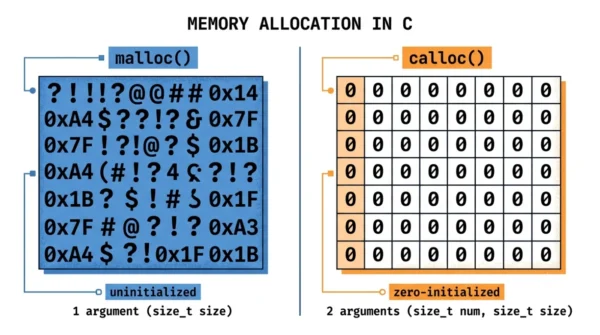
The main difference between malloc and calloc in C is initialization. malloc() allocates a single block of uninitialized memory (it holds garbage values) and takes one argument, the total size in bytes. calloc() allocates memory for a number of elements, sets every byte to zero, and takes two arguments: the count and the size of each element. Use malloc() when you will overwrite the memory anyway, and calloc() when you need it pre-zeroed.
Malloc vs calloc is a classic C interview question and a daily decision in any program that manages dynamic memory. Both functions live in <stdlib.h>, both return a void pointer to heap memory, and both are freed with free(). So the choice comes down to a few precise differences.
The biggest difference is whether the memory starts out cleared. There are also differences in arguments, speed, and a safety check that catches one common bug. This guide covers each, with syntax, code, and the difference between malloc and calloc laid out in a table.
Both are forms of dynamic memory allocation on the heap, so it helps to know how the stack and heap differ first.
What is malloc()?
malloc(), short for memory allocation, reserves a single block of memory on the heap and returns a pointer to it. It takes one argument: the total number of bytes you want. The function signature is void *malloc(size_t size).
The memory it returns is uninitialized. It holds whatever garbage values were already in that location, so you must set the contents yourself before reading them. If the allocation fails, malloc() returns NULL, which you should always check.
Because it does no extra work beyond reserving the block, malloc() is marginally faster than calloc(). It is the right choice when you will fill the memory immediately anyway.
What is calloc()?
calloc(), short for contiguous allocation, also reserves heap memory, but it is designed for arrays. It takes two arguments: the number of elements and the size of each element. The signature is void *calloc(size_t num, size_t size).
Its defining feature is that it sets every byte to zero. So the memory comes back clean, which is ideal for counters, arrays, and structures that should start empty. Like malloc(), it returns NULL on failure.
calloc() also performs an internal overflow check on num × size, so it is safer than computing the total size yourself and passing it to malloc(). The zeroing makes it slightly slower, though the cost is small.
Difference Between malloc() and calloc()
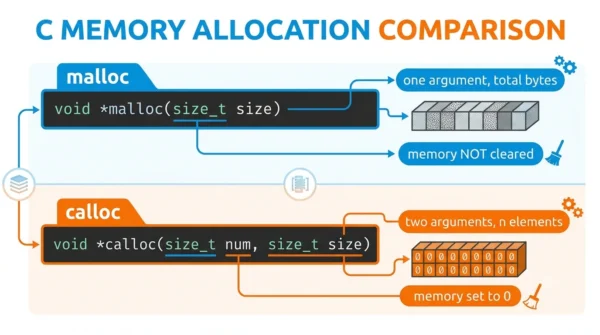
| Aspect | malloc() | calloc() |
|---|---|---|
| Full form | Memory allocation | Contiguous allocation |
| Arguments | One: total size in bytes | Two: number of elements, size of each |
| Initialization | Uninitialized (garbage values) | Zero-initialized (all bytes 0) |
| Speed | Slightly faster (no zeroing) | Slightly slower (zeroes memory) |
| Overflow check | No | Yes, on number × size |
| Syntax | malloc(n * sizeof(int)) | calloc(n, sizeof(int)) |
| Return | void* (NULL on failure) | void* (NULL on failure) |
| Best for | Memory you will overwrite anyway | Memory that must start at zero |
| Freed with | free() | free() |
Syntax and Code Examples
The two calls look almost the same. The difference is the argument list and what the memory contains afterward.
#include <stdio.h>
#include <stdlib.h>

int main(void) {
    int n = 5;

    // malloc: one argument (total bytes), memory is UNINITIALIZED
    int *a = malloc(n * sizeof(int));
    if (a == NULL) return 1;        // always check
    // a[0..4] hold garbage until you set them

    // calloc: two arguments (count, size), memory is ZEROED
    int *b = calloc(n, sizeof(int));
    if (b == NULL) return 1;
    // b[0..4] are all 0

    printf("%d %d\n", b[0], b[4]);  // 0 0

    free(a);
    free(b);
    return 0;
}
The malloc() array starts with unpredictable values, so reading it before writing is a bug. The calloc() array starts at zero, which is why it suits counters and accumulators.
When to Use malloc vs calloc

Use malloc() when you will write every element before you read it, such as copying data into a freshly allocated buffer. Skipping the zeroing saves a little time, and the garbage values do not matter because you overwrite them.
Use calloc() when the memory must start clean, such as an array of counters, a frequency table, or a struct whose fields should default to zero or NULL. Its built-in overflow check also makes it the safer choice when the size is count × element_size.
In short, malloc is the lean default and calloc is the safe, pre-zeroed option. The difference is small in everyday code, but interviewers love to test that you know it.
Where realloc Fits
A third function, realloc(), completes the picture. It resizes an existing block from malloc() or calloc(), preserving the contents up to the smaller of the old and new sizes. Its signature is void *realloc(void *ptr, size_t new_size).
So the trio splits cleanly: malloc() and calloc() create memory, and realloc() grows or shrinks it. Any memory from all three is released with free().
Interview Questions on malloc vs calloc
malloc() allocates one block of uninitialized memory and takes a single size argument. calloc() allocates memory for a number of elements, zero-initializes every byte, and takes two arguments (count and element size). So the headline difference is that calloc clears the memory and malloc does not.malloc() only reserves the block, while calloc() also writes zeros to every byte, which adds a little work. The gap is usually tiny, and for very large blocks calloc can be efficient because the operating system may hand back already-zeroed pages. Choose based on whether you need zeroed memory, not on the small speed difference.calloc(num, size) performs an internal overflow check on num × size, so it refuses a request that would overflow rather than allocating too little memory. With malloc(num * size) you compute that product yourself, and an overflow there can cause a buffer that is smaller than expected, a classic security bug.Frequently Asked Questions
Wrapping Up
malloc and calloc both hand you heap memory, but calloc clears it to zero and takes two arguments, while malloc leaves it uninitialized and takes one. calloc also guards against an overflow that malloc leaves to you.
So reach for calloc() when the memory must start at zero or you are sizing an array, and reach for malloc() when you will fill it yourself. Either way, check the return value and free the block when you are done.
Related reading on DiffStudy:
- Stack vs Heap Memory Allocation
- Static vs Dynamic Memory Allocation
- Structure vs Class in C
- CS Fundamentals hub



