
ftell() reports where you are in a file: it returns the current position as a byte offset from the start. fseek() moves you: it sets the position indicator to a chosen spot, measured from the start, the current point, or the end. So ftell reads the position, while fseek changes it, and together they give C programs random access to files.
The C standard library uses a position indicator to track where the next read or write will happen in a file. The ftell() and fseek() functions let you read and move that indicator, which unlocks random access instead of plain start-to-end reading.
In short, this guide explains what each function does, shows their syntax and a working example, lists the whence constants, compares them in a table, and covers common use cases.
They build on C file handling, so it also helps to know malloc vs calloc for the memory side.
What is ftell()?
Specifically, ftell() returns the current value of the file position indicator for a stream. Indeed, the value is a byte offset measured from the beginning of the file. Its signature is simple:
long ftell(FILE *stream);So you pass it an open FILE *, and it gives back a long. On success, that is the current offset; on error, it returns -1L. Because ftell only reports the position, it never changes where you are or alters the file. For example, it is handy for remembering a spot or working out a file’s size.
What is fseek()?
By contrast, fseek() moves the file position indicator to a new location. You give it the stream, an offset in bytes, and a whence reference point. Its signature is:
int fseek(FILE *stream, long offset, int whence);So the offset is added to the position named by whence. As a result, fseek can jump forward, jump backward, or move to an absolute spot. Then it returns 0 on success and a non-zero value on failure. Unlike ftell, fseek actively changes where the next read or write will land.
The whence Constants
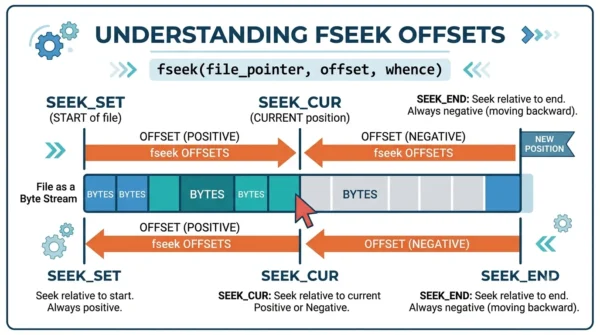
Specifically, the third argument to fseek, whence, picks the reference point for the offset. In total, there are three standard constants:
- SEEK_SET: the offset is measured from the beginning of the file.
- SEEK_CUR: the offset is measured from the current position.
- SEEK_END: the offset is measured from the end of the file.
For example, fseek(fp, 0, SEEK_END) jumps to the end, while fseek(fp, 0, SEEK_SET) returns to the start. In fact, that last call is exactly what rewind(fp) does.
Code Example: File Size with fseek and ftell
For instance, a classic use pairs both functions to find a file’s size. You seek to the end, ask where you are, then rewind:
#include <stdio.h>

int main() {
    FILE *fp = fopen("data.txt", "rb");
    if (fp == NULL) return 1;

    fseek(fp, 0, SEEK_END);   /* jump to the end of the file */
    long size = ftell(fp);    /* current position = size in bytes */
    rewind(fp);               /* back to the start, like fseek(fp, 0, SEEK_SET) */

    printf("File size: %ld bytes\n", size);
    fclose(fp);
    return 0;
}
Here fseek moves to the end, ftell reads the offset there (which equals the byte count), and rewind sends the indicator back so you can read the file normally.
ftell() vs fseek(): Comparison Table
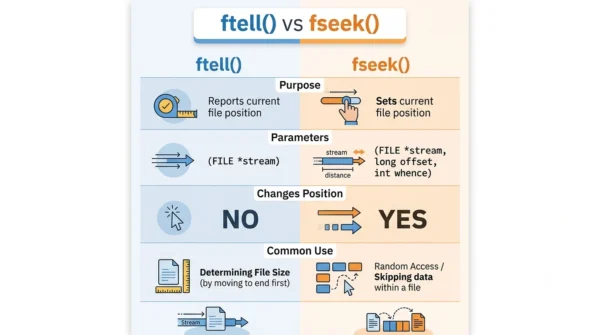
| Aspect | ftell() | fseek() |
|---|---|---|
| Purpose | Reports the current position | Sets the position |
| Signature | long ftell(FILE *stream) | int fseek(FILE *stream, long offset, int whence) |
| Parameters | Just the stream | Stream, offset, and whence |
| Return value | Current offset, or -1L on error | 0 on success, non-zero on error |
| Changes position? | No (read-only) | Yes |
| whence constants | Not used | SEEK_SET, SEEK_CUR, SEEK_END |
| Direction | Tells you where you are | Moves you where you want |
| Effect on file | Never modifies it | Lets you reposition to modify |
| Common use | File size, save a checkpoint | Random access, skip, rewind |
| Often paired with | Used after an fseek | Used before a read or write |
| Related helper | Size = fseek(SEEK_END) then ftell | rewind(fp) = fseek(fp, 0, SEEK_SET) |
| Access type | Read-only query | Read-write positioning |
Common Use Cases
As a result, ftell and fseek give files a flexible, random-access toolkit. So here are the cases where they shine.
- Random access within files: firstly, jump straight to any byte instead of reading from start to end, which is vital for large files.
- File position management: use ftell to remember a spot or measure size, and fseek to return there later.
- File modification: seek to a position, then overwrite or update that part without rewriting the whole file.
- Parsing structured data: in a large CSV or binary record file, seek to the row or record you need, then read just that part.
- Seekable streams: similarly, let users rewind or skip sections, which improves media and log viewers.
- Error recovery: mark checkpoints with ftell, then fseek back to the last good point if processing fails.
Frequently Asked Questions
Wrapping Up
ftell() and fseek() turn plain sequential files into random-access ones. ftell tells you the current byte offset, while fseek moves the indicator using an offset and a whence reference point.
So remember the pair: ftell reads the position, and fseek sets it. With SEEK_SET, SEEK_CUR, and SEEK_END, you can find a file’s size, jump to any record, and recover from errors with ease.
Related reading on DiffStudy:



