
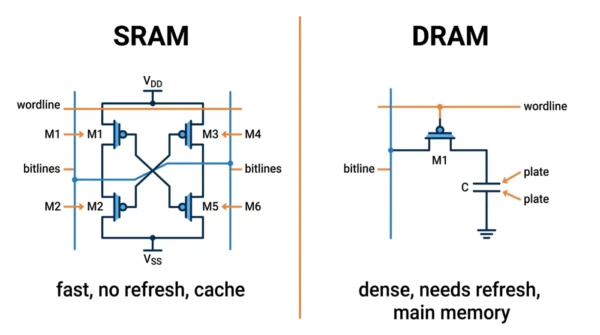
SRAM (Static RAM) and DRAM (Dynamic RAM) are both volatile memories, but they store a bit differently. SRAM holds each bit in a six-transistor flip-flop, so it is fast and needs no refresh, which suits cache memory. DRAM holds each bit in a tiny capacitor, so it is denser and cheaper but must be refreshed, which suits main memory. In short, SRAM trades cost for speed, while DRAM trades speed for capacity.
SRAM and DRAM are the two main types of semiconductor RAM inside a computer. They appear in every COA and GATE syllabus. Students often blur how each one stores a bit and where it sits in the hierarchy.
Both are volatile, so both lose their data when the power goes off. Yet they differ in speed, cost, density, and refresh, and those differences decide where each one is used. This guide defines each type, compares them in detail, and shows when to use which.
If you are still mapping out memory basics, it helps to know the difference between RAM and ROM first.
What is SRAM?
SRAM stands for Static Random Access Memory. It stores each bit in a flip-flop built from six transistors, often called a 6T cell. Because the flip-flop holds its state as long as power is on, SRAM is “static” and needs no refresh.
That stability gives SRAM very fast, direct access, with typical access times of about 1 to 10 nanoseconds. So designers use it where speed matters most. Good examples are the L1, L2, and L3 cache inside a processor and the CPU registers. The trade-off is cost: six transistors per bit make SRAM larger and pricier per bit.
Advantages of SRAM:
- Very fast access, since there is no refresh delay.
- Stable while powered, so the data stays put without refreshing.
- Simple to interface with the processor at high speed.
Disadvantages of SRAM:
- Expensive per bit, because each cell uses six transistors.
- Low density, so a chip holds far less data than DRAM.
- Larger silicon area for the same capacity.
What is DRAM?
DRAM stands for Dynamic Random Access Memory. It stores each bit in a single capacitor paired with one transistor, the 1T1C cell. The capacitor charge leaks away over time, so the controller must refresh every cell every few milliseconds to keep the data.
That refresh adds a little latency, so DRAM is slower than SRAM, with access times of roughly 10 to 60 nanoseconds. However, one capacitor per bit makes DRAM very dense and cheap, so it serves as the main memory in computers. The DDR4 and DDR5 modules in your system are DRAM.
Advantages of DRAM:
- High density, so a chip holds a lot of data.
- Low cost per bit, because each cell is just one transistor and one capacitor.
- Scales to large capacities for main memory.
Disadvantages of DRAM:
- Slower than SRAM, since refresh and capacitor access add delay.
- Needs a refresh circuit, which adds design effort and power.
- Loses data quickly without refresh, even while powered.
SRAM vs DRAM: Comparison Table
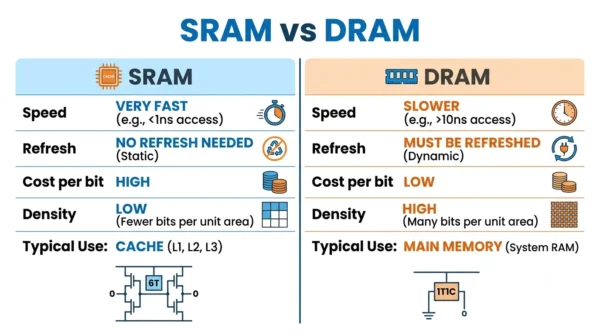
| Aspect | SRAM | DRAM |
|---|---|---|
| Full form | Static Random Access Memory | Dynamic Random Access Memory |
| Memory cell | Flip-flop, six transistors (6T) | One transistor + one capacitor (1T1C) |
| Refresh | Not required | Required every few milliseconds |
| Speed | Faster | Slower |
| Access time | About 1–10 ns | About 10–60 ns |
| Cost per bit | Higher (expensive) | Lower (cheaper) |
| Density | Low (fewer bits per chip) | High (more bits per chip) |
| Capacity per chip | Smaller | Larger |
| Power use | Lower (no refresh cycles) | Higher (periodic refresh) |
| Structure | Complex | Simple |
| Stability | Holds data while powered | Needs refresh to hold data |
| Volatility | Volatile (lost without power) | Volatile (lost without power) |
| Typical role | Cache memory and registers | Main memory (system RAM) |
| Common examples | L1/L2/L3 CPU cache, fast buffers | DDR4 and DDR5 system memory |
How SRAM and DRAM Store Data
SRAM keeps each bit in a flip-flop, a small loop of six transistors that locks onto a 0 or a 1. The loop holds that value steadily while power is on, so the processor can read or write it directly, with no waiting. Because nothing leaks, SRAM never needs a refresh.
DRAM keeps each bit as charge on a capacitor, gated by one transistor. A charged capacitor reads as a 1 and an empty one as a 0. The charge leaks, though, so a refresh circuit reads and rewrites every cell on a fixed cycle. That single capacitor is why DRAM packs so much memory into a small, cheap chip.
Applications of SRAM and DRAM
Each memory lands where its strengths fit, so both appear throughout a computer.
- SRAM as cache: the L1, L2, and L3 caches use SRAM to feed the CPU frequently used data at full speed.
- SRAM in fast buffers: registers, small high-speed buffers, and parts of network gear rely on its quick access.
- DRAM as main memory: the system RAM that holds running programs and open files is DRAM, because capacity matters there.
- DRAM in graphics and devices: specialised DRAM such as GDDR serves GPUs and many embedded systems that need bulk memory cheaply.
So SRAM sits close to the processor for speed, while DRAM provides the large, affordable working memory behind it.
When to Use SRAM or DRAM
Choose SRAM when speed is the priority and the capacity is small. Processor cache and real-time buffers are a perfect fit, because instant access matters more than cost there.
Choose DRAM when you need large capacity at a reasonable price. Main memory is the classic case, since a system needs gigabytes of RAM and DRAM delivers that cheaply.
In practice a computer uses both. A small, fast SRAM cache sits in front of a large, cheap DRAM main memory. So the design gets speed where it counts and capacity everywhere else.
Interview Questions
Frequently Asked Questions
Wrapping Up
SRAM and DRAM solve the same job from opposite ends. SRAM uses fast, stable flip-flops for speed, while DRAM uses tiny capacitors for cheap, dense capacity.
Remember the simple rule: SRAM for cache, DRAM for main memory. Both are volatile, but SRAM trades cost for speed, and DRAM trades speed for capacity. Knowing that trade-off is enough to answer most exam and interview questions on the two.
Related reading on DiffStudy:



