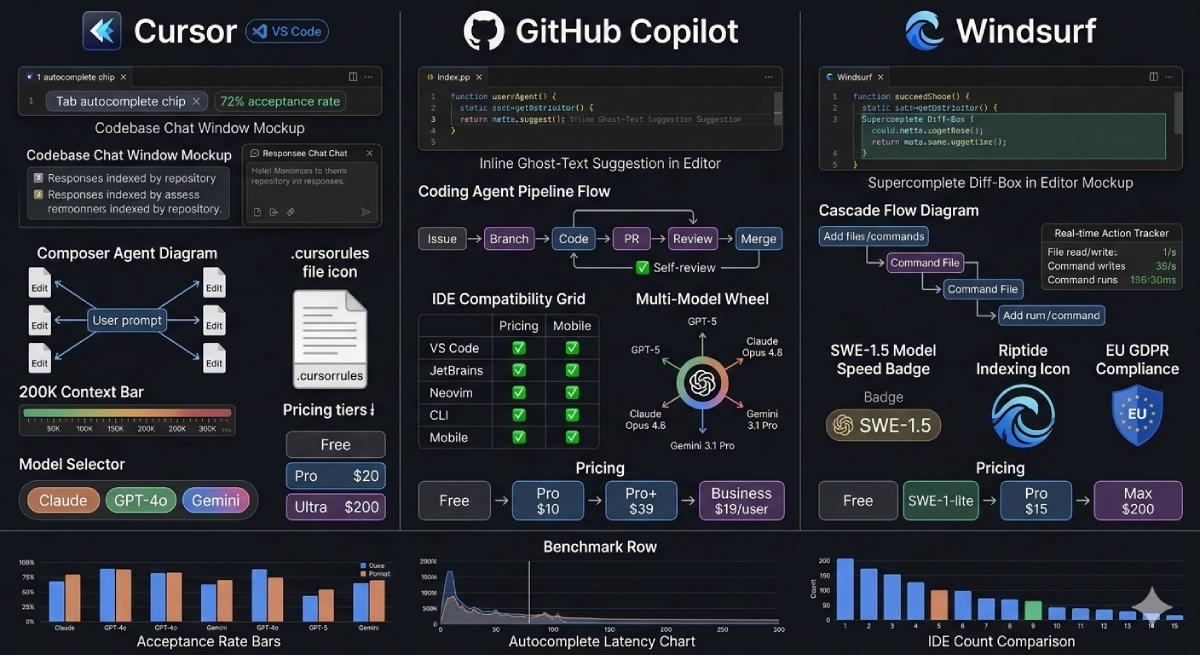
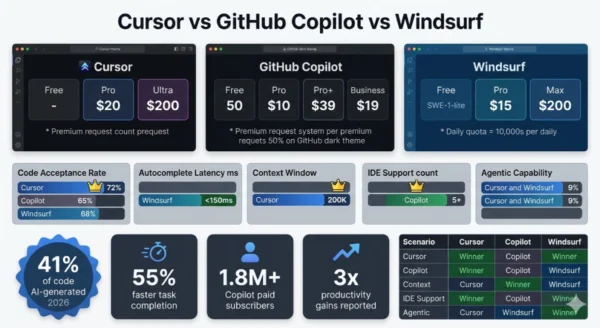
Cursor vs GitHub Copilot vs Windsurf is the defining tooling debate for software engineers in 2026 — and unlike most tool comparisons, the right answer genuinely depends on how you code, not just what features you want. Forty-one percent of all code written today is AI-generated, and every developer who has not yet adopted an AI coding tool is operating at a measurable productivity disadvantage compared to those who have. The problem is that the category has matured and fragmented simultaneously: GitHub Copilot has grown from a simple autocomplete extension into a full agentic coding platform with issue-to-PR pipelines and multi-model support. Cursor has evolved from a VS Code fork into the benchmark for AI-first IDE design, with a 72% code acceptance rate and a Composer mode that edits across a dozen files from a single prompt.
Windsurf, built by Codeium, introduced Cascade — an agentic flow engine that tracks your real-time coding actions and executes multi-step tasks with less hand-holding than any competing tool. Each tool has a genuine winning use case. The mistake most developers and engineering teams make is treating this as a single “best AI coding tool” decision, when the real question is what kind of work you are doing today, who is paying, what IDE you cannot give up, and how much autonomy you want to hand to the agent. Whether you are a solo developer evaluating your first AI coding subscription, an engineering manager building a tooling standard for your team, a data scientist who codes in Jupyter and JetBrains, or a startup founder who needs maximum output per dollar — this Cursor vs GitHub Copilot vs Windsurf comparison gives you everything you need to make the right call in 2026.
Cursor vs GitHub Copilot vs Windsurf: The AI Coding Landscape in 2026
The Cursor vs GitHub Copilot vs Windsurf comparison represents three distinct answers to the same question: how should AI be embedded in the software development workflow? GitHub Copilot, launched in 2021 by GitHub and OpenAI, defined the category with inline autocomplete and grew into a full platform with Coding Agents, multi-model access, and the widest IDE support of any tool in this space. Cursor, a VS Code fork built AI-first by Anysphere, raised the ceiling on what an AI-integrated editor could do — its Composer agent mode, repo-indexed chat, and 72% code acceptance rate set new developer expectations for agentic coding. Windsurf, developed by Codeium and launched as a standalone AI IDE in late 2024, distinguished itself with Cascade — an agentic flow engine with real-time awareness of developer actions — and positioned itself as the autonomous coding tool that requires the least steering. All three tools changed their pricing, added agent capabilities, and expanded model access in the twelve months leading into 2026, making any comparison from even six months ago unreliable.
Cursor vs GitHub Copilot vs Windsurf: GitHub Copilot Deep Dive
Definition
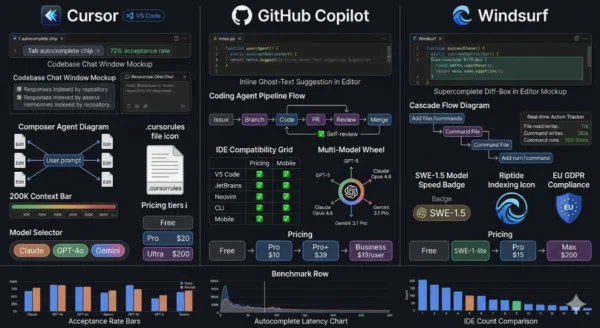
GitHub Copilot is Microsoft and GitHub’s AI coding platform — the tool that invented the modern AI code completion category in 2021 and has since expanded into a full-stack AI development environment. What started as an OpenAI Codex-powered autocomplete extension for VS Code has become a multi-model, multi-IDE, agentic coding platform that handles everything from inline suggestions to full autonomous issue-to-PR workflows. In the Cursor vs GitHub Copilot vs Windsurf comparison, Copilot’s defining characteristic is breadth: it is the only tool among the three that works natively across VS Code, JetBrains IDEs, Neovim, the GitHub CLI, and mobile — making it the only viable AI coding option for developers whose primary environment is IntelliJ, PyCharm, WebStorm, or any other JetBrains tool. Copilot’s Coding Agent — which accepts a GitHub issue as input and autonomously writes code, opens a pull request, responds to review comments, and runs security scans — is tightly integrated with GitHub’s existing workflow in a way that neither Cursor nor Windsurf can match. With Pro+ tier access to GPT-5, Claude Opus 4.6, Gemini 3.1 Pro, and Grok Code, Copilot in 2026 is also the most model-diverse option in this comparison.
Strengths and Advantages
- Widest IDE support in the category: VS Code, all major JetBrains IDEs (IntelliJ, PyCharm, WebStorm, GoLand, Rider), Neovim, GitHub CLI, and mobile — the only tool among the three that works in JetBrains, which is a dealbreaker for teams on those platforms
- Best value paid tier in the market: Copilot Pro at $10/month is the highest-value paid plan in this comparison — 300 premium requests, Coding Agent access, code review, and multi-model support at half the price of Cursor Pro and two-thirds the price of Windsurf Pro
- Coding Agent with GitHub-native workflow: Assign a GitHub issue directly to Copilot, and it autonomously branches, writes code, opens a pull request, self-reviews, and runs security scans — a tighter issue-to-production integration than either Cursor or Windsurf offer out of the box
- Most generous free tier: 2,000 completions and 50 premium requests per month free — sufficient to evaluate Copilot meaningfully before committing to a paid plan, and free indefinitely for verified students and open-source maintainers via GitHub Education
- Multi-model access at Pro+ tier: GPT-5, Claude Opus 4.6, Gemini 3.1 Pro, and Grok Code all accessible from a single $39/month subscription — model diversity that lets teams choose the best model for each task type
- Enterprise security and compliance posture: GitHub’s enterprise audit log, IP indemnity, SAML SSO, data residency options, and SOC 2 Type II compliance make Copilot the most straightforward AI coding tool for enterprise legal, security, and procurement approval
Limitations and Weaknesses
- Lower code acceptance rate: Copilot’s 65% completion acceptance rate trails Cursor’s 72% — a meaningful gap when multiplied across thousands of daily suggestions in a full-time development workflow
- Weaker codebase understanding in chat: Copilot Chat without workspace context enabled returns generic answers — it does not match Cursor’s repo-indexed chat that answers “how does authentication work in this project?” with precision drawn from your actual code
- No standalone AI IDE experience: Copilot is an extension layered on top of an existing editor — the AI integration is less deep than Cursor or Windsurf’s first-class AI-IDE design, which affects how naturally multi-file agent workflows feel
- Coding Agent requires Pro+ for full capability: The most powerful autonomous coding features require the $39/month Pro+ tier — the $10/month Pro plan’s agent capabilities are more limited in model quality and request volume
- Premium request limits can bite heavy users: 300 premium requests on Pro ($10/month) exhausts quickly for developers who use Chat extensively alongside autocomplete — heavy users pay $39/month for Pro+ or manage usage carefully
- Multi-file agent less seamless than Cursor Composer: While Copilot’s agent can handle multi-file tasks, the experience of simultaneously editing across many files from a single natural language prompt is less fluid than Cursor’s Composer interface
GitHub Copilot Core Technical Parameters (2026):
Pricing: Free (2K completions, 50 premium req/month) → Pro $10/month (300 premium req) → Pro+ $39/month (unlimited frontier models) → Business $19/user/month → Enterprise custom. IDE Support: VS Code, all JetBrains IDEs, Neovim, GitHub CLI, Mobile — broadest coverage in the category. Agentic Feature: Coding Agent — receives GitHub issue, autonomously codes, opens PR, self-reviews, runs security scans; Jira integration added March 2026. Furthermore, Model Access: GPT-5, Claude Opus 4.6, Gemini 3.1 Pro, Grok Code on Pro+; GPT-5 mini unlimited on free tier. Additionally, Code Acceptance Rate: 65% industry benchmark. Moreover, Unique Features: GitHub ecosystem integration, IP indemnity, enterprise audit trails, SAML SSO, free for GitHub Education students.
Cursor vs GitHub Copilot vs Windsurf: Cursor Deep Dive
Definition
Cursor is an AI-first code editor built by Anysphere — a fork of Visual Studio Code that reimagines the entire development environment around AI capabilities rather than adding AI as a plugin to an existing editor. Launched in 2022 and reaching widespread adoption through 2023 and 2024, Cursor has become the preferred tool for engineers who do complex, multi-file feature development on large codebases and want the AI to function as a collaborative pair programmer with genuine understanding of their project. In the Cursor vs GitHub Copilot vs Windsurf comparison, Cursor’s defining features are its Composer/Agent mode — which accepts a single natural language prompt and makes simultaneous edits across multiple files, generates tests, updates documentation, and runs commands — and its repo-indexed Chat, which understands the full structure of your codebase before answering any question. Cursor’s 72% code completion acceptance rate is the highest benchmark in this comparison. Its 200,000 token context window enables working with large, interconnected codebases without losing track of distant dependencies. The .cursorrules configuration system lets developers encode their project’s coding conventions, architecture patterns, and style preferences once — and have every AI interaction automatically respect them for every session thereafter.
Strengths and Advantages
- Highest code acceptance rate: 72% completion acceptance rate — the best quality benchmark in this comparison and a meaningful productivity advantage when compounded across thousands of daily interactions in a full-time engineering workflow
- Composer/Agent multi-file editing: Describe a feature or refactor in natural language and Cursor’s Composer simultaneously edits across 8, 10, or more files — creating new files, modifying existing ones, writing tests, and updating documentation as a coordinated agent operation
- Best-in-class codebase understanding: Cursor indexes your entire repository and uses that context for every chat and agent operation — ask “how does the payment service interact with the user model?” and receive an accurate answer drawn from your actual architecture, not generic advice
- .cursorrules configuration system: A project-level configuration file where you define your coding conventions, preferred patterns, test framework requirements, and architecture constraints — every AI interaction automatically respects them, dramatically improving output quality with minimal ongoing prompting overhead
- 200K token context window: Handles large codebases, monorepos, and interconnected multi-file projects without losing context between files — essential for enterprise-scale feature development where code dependencies span dozens of modules
- Multiple chat tabs and parallel sessions: Work on documentation generation in one chat tab while an agent executes a refactor in another — parallel AI session management that significantly improves throughput for complex feature development
Limitations and Weaknesses
- VS Code only (until March 2026): Cursor is a VS Code fork — developers whose primary workflow is JetBrains (IntelliJ, PyCharm, WebStorm) cannot use Cursor as their primary editor; JetBrains plugin support arrived March 2026 but is newer and less mature than the VS Code experience
- Higher cost than competitors: Cursor Pro at $20/month is double Copilot Pro ($10/month) and 33% more than Windsurf Pro ($15/month); team plans at $40/user/month are double Copilot Business ($19/user/month)
- Model change affects all instances: Changing the AI model in one Cursor window changes it across all open Cursor instances simultaneously — a workflow friction point for developers who prefer different models for different tasks (e.g., Gemini for documentation, Claude for complex code)
- 500 premium requests before throttle: Pro plan provides 500 premium requests before dropping to a slower queue — heavy agentic users may exhaust this mid-month and face the choice between the slow queue or upgrading to the $200/month Ultra plan
- Requires workflow adaptation: Getting full value from Cursor — .cursorrules setup, Composer prompting discipline, context management — requires deliberate workflow adaptation that takes time to develop and represents a higher learning curve than Copilot’s plug-in-and-go model
- No GitHub-native issue integration: Cursor’s agent operates from the editor environment — there is no equivalent to Copilot’s ability to receive a GitHub issue and handle the full coding-to-PR pipeline autonomously without developer initiation
Cursor Core Technical Parameters (2026):
Pricing: Free (limited completions) → Pro $20/month (500 premium req then slow queue) → Ultra $200/month (unlimited) → Team $40/user/month. IDE: VS Code fork — full native experience; JetBrains plugin added March 2026. Agentic Feature: Composer/Agent — multi-file edits from a single prompt across 10+ files simultaneously with test generation and documentation updates. Furthermore, Code Acceptance Rate: 72% — highest in category. Context Window: 200,000 tokens. Additionally, Model Access: Claude Sonnet 4.6, Claude Opus 4.6, GPT-4o, GPT-5, Gemini — model-switchable per session. Moreover, Unique Features: .cursorrules project config, repo-indexed Chat, multiple parallel chat tabs, Automations, privacy mode available.
Cursor vs GitHub Copilot vs Windsurf: Windsurf Deep Dive
Definition
Windsurf is an AI-native code editor developed by Codeium — a VS Code fork that launched as a dedicated AI IDE in late 2024 and rapidly carved out a position in the Cursor vs GitHub Copilot vs Windsurf landscape as the autonomous coding tool. Windsurf’s defining feature is Cascade, an agentic flow engine that does not simply suggest code or execute single-prompt instructions — it maintains real-time awareness of what you are doing as a developer, tracks file edits, variable renames, command outputs, and project state, and uses that continuous context to complete multi-step tasks with less hand-holding than either Cursor or Copilot require. Unlike Cursor’s Composer, which requires you to explicitly prompt each agent operation, Cascade observes your actions and incorporates them into its ongoing task context automatically. Windsurf’s Supercomplete feature extends beyond standard tab-to-accept autocomplete by analyzing code both before and after your cursor position, predicting your next edit, and presenting changes in a diff-box overlay rather than ghost text — a fundamentally different UX model for completion. Its proprietary SWE-1.5 model is purpose-built for software engineering tasks and delivers the fastest autocomplete latency in this comparison at under 150ms. Windsurf’s Riptide indexing system processes millions of lines of code across large monorepos efficiently. For teams with EU data sovereignty requirements, Windsurf offers GDPR compliance options that give it an edge in regulated European markets.
Strengths and Advantages
- Fastest autocomplete latency: Under 150ms — Windsurf’s SWE-1.5 model delivers the lowest completion latency in this comparison, which meaningfully affects flow-state preservation during active coding sessions where delays interrupt cognitive momentum
- Cascade real-time action awareness: Unlike prompt-then-execute agent models, Cascade tracks your actions as you work — if you rename a variable, Cascade sees it and propagates the rename; if you run a failing test, Cascade observes the output and incorporates it into its repair strategy without being prompted
- Best for autonomous task delegation: Describe a task to Cascade and step away — Windsurf is the tool best suited for delegating longer, autonomous coding operations where you want to review a finished result rather than guide each step interactively
- Best price-to-capability ratio: Windsurf Pro at $15/month delivers approximately 80% of Cursor’s agentic capability at 75% of Cursor’s price — the best value among AI IDE tools for developers who want strong agent performance without premium pricing
- EU compliance and GDPR options: Windsurf offers data residency and compliance configurations that satisfy GDPR requirements — a meaningful differentiator for European development teams and companies with strict data sovereignty requirements
- Unlimited free tier with SWE-1-lite: The free tier provides unlimited access to Windsurf’s SWE-1-lite model — more capable than generic free tiers and sufficient for many everyday coding tasks without spending anything
Limitations and Weaknesses
- Daily quota system on Pro tier: Windsurf overhauled pricing in March 2026, switching from credits to daily and weekly quotas — heavy users can hit daily limits on the $15/month Pro plan mid-day, forcing a wait until the next cycle or upgrading to $200/month Max
- VS Code only — no JetBrains support: Like Cursor, Windsurf is a VS Code fork with no native JetBrains support — teams whose workflow centers on IntelliJ or other JetBrains IDEs cannot use Windsurf as their primary editor
- Whisper voice-to-text integration issues: Windsurf handles the text input box differently from Cursor — the Whisper voice plugin does not work reliably in Windsurf, while it integrates more cleanly in Cursor (VS Code has native voice-to-text)
- No GitHub-native issue-to-PR workflow: Windsurf’s Cascade operates within the editor — it lacks Copilot’s GitHub ecosystem integration that routes issues directly to an autonomous coding agent and manages the full PR lifecycle
- Acquisition trajectory uncertainty: Codeium (Windsurf’s parent company) changed ownership context in a compressed period — teams making long-term tooling investments should monitor organizational stability before committing at the enterprise level
- Newer ecosystem with fewer community resources: Windsurf’s community of tutorials, .windsurf configuration examples, and troubleshooting guides is smaller than Cursor’s and significantly smaller than Copilot’s — teams adopting Windsurf have fewer community resources to draw on for workflow optimization
Windsurf Core Technical Parameters (2026):
Pricing: Free (unlimited SWE-1-lite) → Pro $15/month (daily/weekly quota system, switched March 2026) → Max $200/month (no daily throttle). IDE: VS Code fork — full native experience; no JetBrains support. Agentic Feature: Cascade — real-time action-aware agentic flow that tracks developer edits, command outputs, and project state to execute multi-step tasks autonomously. Furthermore, Autocomplete: Supercomplete — diff-box overlay showing predicted next edits based on before/after cursor context, under 150ms latency. Models: SWE-1.5 (proprietary), SWE-1-lite (free), Claude 3.7/4, GPT-4o, Gemini via premium credits. Additionally, Unique Features: Cascade real-time awareness, Riptide monorepo indexing, Memories (persistent cross-session context), EU GDPR compliance, .windsurf workflow directory committed to source control.
Cursor vs GitHub Copilot vs Windsurf: Feature Architecture Deep Dive
Agentic Architecture Comparison
Copilot Coding Agent
- Trigger: GitHub issue assigned to Copilot — works from the GitHub Issues interface without opening an IDE
- Execution: Creates branch, analyzes the codebase, writes code changes, generates tests, opens a pull request, self-reviews the diff, and runs security scans
- Review loop: Responds to review comments on the PR and iterates code — the full loop happens asynchronously while the developer does other work
- Integration: Jira integration (March 2026) — tickets can trigger the same pipeline from outside GitHub
- Best for: GitHub-native teams that want to delegate well-scoped issues with clear acceptance criteria to an autonomous agent while maintaining PR-based review culture
- Limitation: Requires Pro+ for full frontier model quality; less interactive mid-task than Cursor or Windsurf
Cursor Composer / Agent
- Trigger: Natural language prompt in the Composer panel — initiated explicitly by the developer from within the Cursor editor
- Execution: Reads relevant files, proposes a plan, simultaneously edits across multiple files (10+), creates new files, runs shell commands, generates tests, and updates documentation
- Review loop: Developer can inspect diffs inline, reject individual file changes, redirect mid-task, or approve the full changeset — highly interactive mid-task control
- Context: 200K token window with repo indexing — understands the full project architecture before making changes
- Best for: Complex, multi-file feature development where the developer wants to stay engaged and steer the agent throughout rather than delegating fully
- Limitation: No GitHub-native issue trigger; requires explicit developer initiation for each Composer session
Windsurf Cascade
- Trigger: Natural language prompt in Cascade — but Cascade also incorporates your ongoing real-time editor actions into its context without being explicitly prompted
- Execution: Reads files, runs commands, observes output, iterates — and tracks your manual actions (variable renames, file saves, terminal output) as additional context for ongoing task execution
- Review loop: Less interactive than Cursor — designed for “describe and delegate” workflows where you step back and review the finished result rather than steering each step
- Unique: Memories feature persists key decisions and context across separate sessions — Cascade knows what architectural decisions were made last week without being re-briefed
- Best for: Repetitive implementation tasks, boilerplate generation, CRUD scaffolding — tasks where you want to describe the goal and come back to a finished result
- Limitation: Less real-time steering control than Cursor mid-task; daily quota limits on Pro tier
Cursor vs GitHub Copilot vs Windsurf: Autocomplete Feature Comparison
| Feature | GitHub Copilot | Cursor | Windsurf |
|---|---|---|---|
| Completion mechanism | Ghost text inline — press Tab to accept, Alt+] / Alt+[ to cycle suggestions, Ctrl+Enter for multi-suggestion panel | Ghost text (Tab mode) — AI-predicted multi-line completions based on repo context, 72% acceptance rate | Supercomplete — diff-box overlay showing predicted changes rather than ghost text; context from before and after cursor |
| Acceptance rate | 65% industry benchmark | 72% — highest in comparison | ~68% — between Copilot and Cursor |
| Latency | Competitive — OpenAI-powered, generally under 200ms | Competitive — depends on model; typically 150–250ms | Under 150ms — fastest in comparison; SWE-1.5 optimized for speed |
| Context source | Current file + recently opened files + workspace context (when enabled) | Full repo index + 200K token context window — deepest codebase understanding | Riptide indexing for monorepos + before/after cursor context for Supercomplete |
| Multi-line prediction | Yes — can suggest entire functions or blocks | Yes — Tab mode predicts logical next action, not just next line | Yes — Supercomplete predicts entire diff blocks, not just next tokens |
Cursor vs GitHub Copilot vs Windsurf: Toolchain and Integration Comparison
| Integration | GitHub Copilot | Cursor | Windsurf |
|---|---|---|---|
| VS Code | ✅ Extension — deep integration, feels native | ✅ Built on VS Code fork — first-class experience | ✅ Built on VS Code fork — first-class experience |
| JetBrains IDEs | ✅ Full native plugin — IntelliJ, PyCharm, WebStorm, GoLand, Rider | ⚠️ Plugin added March 2026 — newer, less mature than VS Code experience | ❌ Not available — VS Code fork only |
| Neovim / Vim | ✅ Official Neovim plugin | ❌ Not available | ❌ Not available |
| GitHub CLI | ✅ gh copilot explain and gh copilot suggest commands | ❌ Not available | ❌ Not available |
| Mobile | ✅ GitHub mobile app integration | ❌ Not available | ❌ Not available |
| MCP (Model Context Protocol) | ✅ MCP server support | ✅ MCP server support | ✅ MCP server support |
| GitHub Issues integration | ✅ Native — Coding Agent accepts issues directly | ⚠️ Via MCP — possible but not native | ⚠️ Via MCP — possible but not native |
| Jira integration | ✅ Launched March 2026 | ❌ Not available natively | ❌ Not available natively |
| Privacy mode | ✅ Enterprise — code not used for training | ✅ Privacy mode available on Pro+ | ✅ Privacy mode available |
| Persistent memory | ⚠️ Limited — via custom instructions | ⚠️ Notepads / context files | ✅ Memories — explicit cross-session context persistence |
Cursor vs GitHub Copilot vs Windsurf: Use Cases and Real-World Scenarios
Where GitHub Copilot Is the Clear Winner
- JetBrains IDE users: IntelliJ, PyCharm, WebStorm, GoLand, and Rider developers have no viable alternative in this comparison — Copilot is the only tool with a mature, full-featured JetBrains plugin; Cursor’s JetBrains plugin arrived in March 2026 and is newer
- GitHub-native engineering teams: Teams whose entire development workflow lives in GitHub — issues, PRs, code reviews, CI/CD — benefit from Copilot’s Coding Agent integration more than any other team type; the issue-to-PR pipeline requires no context switching from existing workflow
- Budget-constrained teams and enterprises: $10/month Pro and $19/user/month Business make Copilot the easiest AI coding tool to justify in enterprise procurement — half the individual cost and half the team cost of Cursor’s equivalent tiers
- Students and open-source contributors: Free access through GitHub Education for verified students; free for verified open-source project maintainers — the most accessible entry point in this comparison for developers early in their careers
- Polyglot developers across multiple environments: Developers who split time across VS Code, a JetBrains IDE, the terminal, and mobile are the only group for whom Copilot’s cross-platform coverage is essential — no other tool follows you across all these contexts
Where Cursor Is the Clear Winner
- Complex multi-file feature development: Engineers building features that touch authentication middleware, API controllers, database models, frontend components, and test suites simultaneously — Cursor’s Composer mode is the most capable tool for this pattern, editing across all those files from a single coherent prompt
- Large codebase refactoring: Migrating a REST API to GraphQL, refactoring auth from sessions to JWT, or extracting a monolith into microservices — Cursor’s 200K context window and repo-indexed chat make it uniquely capable of understanding the full blast radius of a refactor before making changes
- Senior engineers who want to stay in control: Developers who want to use the agent as a highly capable collaborator — steering it, redirecting it mid-task, reviewing diffs file by file — rather than delegating fully; Cursor’s interactive Composer model fits this workflow better than Windsurf’s delegate-and-review model
- Teams with codified conventions: Engineering organizations with documented coding standards, architecture patterns, and style guides gain the most from Cursor’s .cursorrules system — baking conventions into the AI context eliminates constant re-prompting and produces more consistently on-standard code
- Parallel AI workflow users: Developers who run multiple AI tasks simultaneously — documentation in one chat tab, refactoring in another — benefit from Cursor’s multiple parallel chat tab support
Where Windsurf Is the Clear Winner
- Autonomous task delegation: Developers who want to describe a task — “scaffold a full CRUD API for the products resource with Prisma and Express” — and come back to a finished, reviewed result rather than interactively guiding each step; Cascade’s autonomous execution style is designed for this pattern
- Repetitive implementation work: CRUD endpoints, test suite generation, boilerplate scaffolding, data model migrations — tasks with clear patterns and predictable structure that Cascade executes reliably with minimal steering
- Speed-sensitive workflows: Developers for whom autocomplete latency directly affects typing rhythm and flow state — Windsurf’s sub-150ms SWE-1.5 completions are the fastest in this comparison and reduce the interruption-to-accept cycle that slower tools impose
- European teams with GDPR requirements: Development teams at EU-based companies or those handling EU citizen data who need verified data residency and GDPR compliance for their AI coding tool — Windsurf’s compliance options are the strongest in this comparison
- Value-seeking developers: Solo developers or small teams who want 80% of Cursor’s agentic capability at $15/month instead of $20/month — Windsurf Pro’s price-to-capability ratio is the best in the AI IDE category
The Dual-Tool Pattern: When to Use More Than One
- Copilot + Cursor: The most common dual-tool pattern among experienced developers in 2026 — use Copilot for JetBrains environments and quick inline autocomplete on familiar code, use Cursor for complex multi-file Composer sessions on large codebases; the two tools do not conflict if Copilot’s inline suggestions are disabled within Cursor
- Copilot + Windsurf: Copilot for GitHub issue-to-PR workflows and JetBrains work; Windsurf for autonomous boilerplate and scaffolding tasks where speed and delegation matter more than interactive control
- When the dual-tool pattern pays off: Senior developers at startups and mid-size companies who do diverse work — architecting new features (Cursor), handling GitHub-driven issue backlogs (Copilot), and delegating repetitive implementation (Windsurf) — report the highest productivity gains from multi-tool workflows
- When single-tool is better: Teams standardizing on a single tool for onboarding simplicity, cost management, and consistent team practices — in this case, Copilot wins for enterprise teams on mixed IDEs, Cursor wins for VS Code-native engineering teams doing complex work
Cursor vs GitHub Copilot vs Windsurf: Developer Profile Fit
| Developer Profile | Best Tool | Why |
|---|---|---|
| JetBrains primary IDE user | GitHub Copilot | Only tool with a mature, full-featured JetBrains plugin — no viable alternative in this comparison |
| Full-stack engineer on large VS Code codebase | Cursor | Composer multi-file agent + repo-indexed chat + 72% acceptance rate — best for complex, interconnected work |
| Solo developer or startup founder | Windsurf Pro ($15) or Cursor Pro ($20) | Best agentic capability per dollar; Windsurf wins on value, Cursor wins on quality |
| Enterprise engineering team (GitHub-native) | GitHub Copilot Business ($19/user) | Cheapest team plan, Coding Agent for issue backlogs, enterprise security, audit logs, SSO |
| Student or open-source maintainer | GitHub Copilot (free) | Free access through GitHub Education — no other tool in this comparison offers free access at this level |
| Developer doing repetitive implementation work | Windsurf | Cascade’s delegate-and-review model and fastest autocomplete latency are purpose-built for this pattern |
| EU-based team with GDPR requirements | Windsurf | Strongest GDPR compliance and EU data residency options among the three |
| Data scientist coding in Python / Jupyter | GitHub Copilot | Works in JetBrains (DataGrip, PyCharm), VS Code, and Jupyter — widest coverage for data science environments |
| Developer with codified team conventions | Cursor | .cursorrules bakes your architecture patterns and style conventions into every AI session without re-prompting |
| Budget-conscious developer | GitHub Copilot Pro ($10/month) | Highest value paid tier in the comparison — 300 premium requests, Coding Agent, multi-model access |

12 Critical Differences: Cursor vs GitHub Copilot vs Windsurf
The Cursor vs GitHub Copilot vs Windsurf comparison below covers every key dimension — from agentic capability and autocomplete quality to IDE support, pricing structure, codebase understanding, and the specific production scenarios each tool handles best.
Aspect | GitHub Copilot | Cursor | Windsurf |
|---|---|---|---|
| IDE Coverage | Widest — VS Code, all JetBrains IDEs, Neovim, CLI, Mobile | VS Code fork natively; JetBrains plugin added March 2026 | VS Code fork only — no JetBrains or Neovim support |
| Code Acceptance Rate | 65% — industry established benchmark | 72% — highest in comparison, meaningful compounding advantage at scale | ~68% — between Copilot and Cursor on benchmarks |
| Autocomplete Latency | Competitive — generally under 200ms depending on model | 150–250ms depending on model selected | Under 150ms — fastest; SWE-1.5 optimized specifically for low-latency completion |
| Agentic Model | Coding Agent: GitHub issue → autonomous branch, code, PR, review, security scan | Composer/Agent: multi-file edits from a prompt, interactive steering, 10+ simultaneous file edits | Cascade: real-time action-aware agent, observes developer actions without explicit prompts, delegate-and-review model |
| Codebase Understanding | Workspace context (when enabled) — improving but not repo-indexed by default | Full repo indexing — deepest codebase understanding, accurate answers about project architecture | Riptide indexing — strong for monorepos; Cascade’s real-time awareness adds implicit context |
| Individual Pricing | Free → Pro $10/month → Pro+ $39/month — best value paid tier | Free → Pro $20/month → Ultra $200/month — premium pricing for premium capability | Free (unlimited SWE-1-lite) → Pro $15/month → Max $200/month — best mid-tier value |
| Team / Enterprise Pricing | Business $19/user/month — cheapest team plan in comparison | Team $40/user/month — most expensive team plan in comparison | Team pricing available — between Copilot and Cursor |
| Context Configuration | Custom instructions — system prompt applied to all interactions | .cursorrules — project-level convention file that AI respects for every session; highest ROI configuration in AI coding | .windsurf workflows committed to source; Memories for cross-session persistence of key decisions |
| Model Access | GPT-5, Claude Opus 4.6, Gemini 3.1 Pro, Grok Code (Pro+) — most model options | Claude Sonnet 4.6, Claude Opus 4.6, GPT-4o, GPT-5, Gemini — switchable per session | SWE-1.5, SWE-1-lite (proprietary), Claude 3.7/4, GPT-4o — includes proprietary SE-optimized model |
| GitHub Workflow Integration | Native — Coding Agent accepts issues, opens PRs, responds to review comments autonomously | Via MCP — GitHub integration possible but not native or zero-config | Via MCP — similar to Cursor; not a GitHub-native product |
| Enterprise Security | SOC 2 Type II, SAML SSO, IP indemnity, audit logs, data residency — strongest enterprise posture | Privacy mode available; enterprise features improving but younger than Copilot’s posture | GDPR compliance, EU data residency — strongest among the three for European regulatory requirements |
| Learning Curve | Lowest — install extension, log in, autocomplete works immediately with no configuration required | Medium-high — getting full value requires .cursorrules setup, Composer prompting discipline, and workflow adaptation | Medium — Cascade is more autonomous and requires less prompting discipline than Cursor, but quota management adds complexity |
Cursor vs GitHub Copilot vs Windsurf: Getting Started and Configuration Guide
Getting Started with GitHub Copilot
- Install and authenticate in under 5 minutes: Install the GitHub Copilot extension from the VS Code marketplace or JetBrains plugin repository, sign in with your GitHub account, and autocomplete begins working immediately — no additional configuration required. This zero-friction setup is Copilot’s strongest onboarding advantage.
- Configure custom instructions for your project: Navigate to Copilot settings and add a custom instructions system prompt — describe your project’s language, framework, coding style, and any conventions the AI should follow. This is Copilot’s equivalent of Cursor’s .cursorrules and provides the highest immediate improvement in output quality beyond the default experience.
- Enable workspace context for Chat: In Copilot Chat settings, enable workspace indexing so that chat answers draw from your full project context rather than just the current file. This brings Copilot’s chat quality significantly closer to Cursor’s repo-indexed behavior.
- Set up the Coding Agent for issue-to-PR workflows: In your GitHub repository settings, enable Copilot as an assignable agent. Then from a GitHub issue, assign it to Copilot — describe the expected behavior clearly in the issue body, as the agent’s output quality correlates directly with specification clarity.
- For JetBrains: install from Plugin Marketplace: In IntelliJ or your JetBrains IDE, go to Settings → Plugins → search “GitHub Copilot” → install → authenticate. The JetBrains experience includes inline completion and Copilot Chat sidebar — configure it the same way as VS Code with custom instructions for consistent behavior across IDEs.
Getting Started with Cursor
Initial Setup (Week 1)
- Download Cursor from cursor.com and import your VS Code settings, extensions, and keybindings — Cursor preserves your entire VS Code configuration, making the transition invisible for most developers
- Open your project and let Cursor index the repository — the first indexing pass (a few minutes for medium codebases, longer for large ones) builds the semantic search index that powers repo-aware chat and Composer context
- Run your first Composer session: press Cmd+I (Mac) or Ctrl+I (Windows), describe a small, well-scoped task, and review the proposed multi-file changes using Cursor’s diff panel — understand how to accept, reject, and redirect before tackling larger tasks
- Set your default AI model: for most developers, Claude Sonnet 4.6 provides the best balance of code quality and request consumption; reserve Opus for complex architectural reasoning tasks
.cursorrules Configuration (Week 2 — Highest ROI Step)
- Create a
.cursorrulesfile in your project root — this is the single highest-ROI configuration change you can make in any AI coding tool; 30 minutes of setup produces dividends in every subsequent session - Document your project’s coding conventions: language version, framework, preferred patterns (e.g., “use async/await, never callbacks”), test framework and coverage requirements, naming conventions, and import style
- Add architecture notes: key module boundaries, which files to avoid modifying directly, the data model structure, and any known tech debt areas the AI should work around rather than into
- Commit .cursorrules to source control — every team member’s Cursor sessions automatically inherit the project conventions, making the entire team’s AI output more consistent and on-standard
Getting Started with Windsurf
- Download Windsurf and import VS Code settings: Like Cursor, Windsurf is a VS Code fork that preserves your existing extensions, keybindings, and settings — download from codeium.com/windsurf, import your VS Code profile, and your familiar environment is immediately available with Cascade added on top.
- Understand the quota system before you start: Windsurf Pro switched to daily and weekly quotas in March 2026 — unlike Cursor which drops to a slower queue, Windsurf blocks usage until the next cycle when quotas are exhausted. Plan your most demanding agentic sessions for the beginning of each day to avoid mid-task interruption.
- Configure .windsurf workflows for reusable prompts: Create workflow files in the
.windsurfdirectory of your project — these are committed to source control (unlike Cursor’s notepads) and store reusable prompt templates for recurring tasks like “generate tests for this module,” “add error handling to this function,” or “write JSDoc for this file.” This library of reusable workflows is Windsurf’s productivity multiplier equivalent to Cursor’s .cursorrules. - Use Cascade’s Memories for cross-session architectural context: When Cascade makes an important architectural decision — “we decided to use repository pattern here instead of active record” — explicitly ask it to save this to Memories. Subsequent sessions will reference this decision without being re-briefed, which significantly improves consistency on longer-running projects.
- Calibrate your Cascade task scope to the quota: Cascade’s autonomous execution is powerful but consumes quota at a rate proportional to task complexity. For Pro tier users, scope individual Cascade tasks to complete within the daily limit — break large features into discrete Cascade sessions rather than attempting full-feature autonomous generation in a single run that might exhaust the day’s quota mid-task.

Cursor vs GitHub Copilot vs Windsurf: Pricing, ROI, and Team Analysis
AI Code Share
41%
Of all code written in 2026 is AI-generated — up from near-zero just four years ago
Cursor Acceptance Rate
72%
Code acceptance rate for Cursor Tab — highest in the Cursor vs Copilot vs Windsurf comparison
Productivity Gain
55%
Faster task completion reported by developers using AI agentic coding tools vs baseline
Best Value Tier
$10
GitHub Copilot Pro per month — highest value paid AI coding plan in the 2026 market
Complete Pricing Comparison: Cursor vs GitHub Copilot vs Windsurf (2026)
| Plan Tier | GitHub Copilot | Cursor | Windsurf |
|---|---|---|---|
| Free | 2,000 completions + 50 premium requests/month; free for GitHub Education students and verified OSS maintainers | Limited completions — insufficient for full-time use; best treated as a trial tier | Unlimited SWE-1-lite model — genuinely usable for many everyday coding tasks at zero cost |
| Entry Paid | Pro: $10/month — 300 premium requests, Coding Agent, code review, multi-model access | Pro: $20/month — 500 premium requests then slow queue (not hard stop), all core features | Pro: $15/month — daily/weekly quota system; access to premium models including Claude and GPT-4o |
| Power / Pro+ | Pro+: $39/month — GPT-5, Claude Opus 4.6, Gemini 3.1 Pro, Grok Code; unlimited frontier model access | No direct equivalent — Ultra at $200/month is next tier | No direct equivalent — Max at $200/month is next tier |
| Power User | N/A — Pro+ at $39 covers most heavy users | Ultra: $200/month — unlimited usage, no throttle for heavy agentic workflows | Max: $200/month — unlimited daily usage, no quota throttle |
| Team | Business: $19/user/month — audit log, SAML SSO, policy management, enterprise security | Team: $40/user/month — shared team features, centralized billing | Team pricing available — positioned between Copilot Business and Cursor Team |
| Enterprise | Enterprise: custom pricing — data residency, IP indemnity, advanced compliance, dedicated support | Custom — enterprise features expanding but newer than Copilot’s enterprise posture | Custom — EU compliance and data residency options strongest among the three for European enterprises |
| Overage model | $0.04 per premium request beyond monthly allocation | Slow queue fallback (not blocked) after 500 premium requests on Pro | Blocked until next cycle on Pro; no overage option below Max tier |
ROI Analysis: Which Tool Pays for Itself Fastest?
| Scenario | Recommended Tool | Monthly Cost | Estimated Productivity Value | ROI Calculation |
|---|---|---|---|---|
| Individual developer at $60/hr, 160hr/month | Cursor Pro | $20/month | ~$480/month at 5% time saving (conservative) | 24x ROI at conservative estimates |
| JetBrains developer, any seniority level | Copilot Pro | $10/month | ~$200/month at 3% time saving (modest estimate for extension-based UX) | 20x ROI — only viable option for JetBrains |
| Solo founder, budget-conscious, repetitive tasks | Windsurf Pro | $15/month | ~$400/month at 4% time saving on implementation tasks | 27x ROI — best value-per-dollar for delegation workflows |
| 10-person engineering team on GitHub | Copilot Business | $190/month ($19/user) | ~$4,800/month at 5% team time saving at $60/hr average | 25x ROI — cheapest team plan with GitHub integration |
| Power user, full-time agentic workflows | Cursor Ultra | $200/month | ~$2,400/month at 25% time saving for developers who max usage daily | 12x ROI — only justified for developers who consistently exhaust lower tiers |
Cursor vs GitHub Copilot vs Windsurf: Decision Framework
Choosing the Right AI Coding Tool
The Cursor vs GitHub Copilot vs Windsurf decision comes down to four questions: What IDE do you live in? What kind of work takes most of your coding time? How much autonomy do you want the AI to have? And how does your budget compare to your tolerance for context-switching overhead? None of these tools is universally best — each has a genuine winning use case, and the most experienced developers in 2026 use two of them in combination. Start with this decision framework before committing to a paid plan, and remember that free tiers — particularly Copilot’s free plan for students and Windsurf’s unlimited SWE-1-lite — let you validate a tool against your actual workflow before spending anything.
Choose GitHub Copilot If:
- Your primary IDE is JetBrains (IntelliJ, PyCharm, WebStorm, GoLand) — there is no meaningful alternative in this comparison
- Your team’s development workflow is GitHub-native — issues, PRs, and code reviews all happen in GitHub, making the Coding Agent a natural extension of existing process
- Budget is a primary constraint — $10/month Pro and $19/user/month Business are the lowest cost paid tiers in this comparison by a significant margin
- You are a student or verified open-source maintainer — free access through GitHub Education makes it the obvious starting point
- You need the broadest possible IDE coverage for a team that uses different editors — only Copilot works across VS Code, JetBrains, Neovim, CLI, and mobile simultaneously
Choose Cursor If:
- Your primary IDE is VS Code and you regularly work on large, complex codebases where a 72% acceptance rate and repo-indexed chat provide compounding daily value
- Multi-file feature development is the bulk of your work — Composer’s ability to coordinate changes across 10+ files simultaneously from a single natural language prompt is your primary productivity lever
- Your team has codified engineering standards — .cursorrules turns those conventions into AI constraints that apply automatically, eliminating constant re-prompting overhead
- You want to stay in interactive control of agent operations — Cursor’s Composer model lets you steer, redirect, and inspect mid-task better than Windsurf’s more autonomous Cascade
- You run parallel AI workflows — multiple simultaneous chat tabs for separate concerns (refactoring + documentation simultaneously) is a Cursor-specific capability
Choose Windsurf If:
- You prefer to delegate tasks and review finished results — Cascade’s autonomous, action-aware execution model is designed for “describe and step away” workflows rather than interactive steering
- Autocomplete speed and flow-state preservation are your top priority — Windsurf’s sub-150ms SWE-1.5 completions are the fastest in this comparison
- You want strong agentic capability at a lower monthly cost — $15/month Pro delivers approximately 80% of Cursor’s agent performance at 75% of Cursor’s price
- Your team has EU GDPR compliance requirements — Windsurf’s data residency and compliance options are the most developed among the three for European regulatory contexts
- Your free tier SWE-1-lite usage is sufficient for your workload — Windsurf is the only tool in this comparison with a genuinely unlimited and useful free tier for everyday coding
Cursor vs GitHub Copilot vs Windsurf: Quick Decision Table
| Question | Copilot | Cursor | Windsurf |
|---|---|---|---|
| Do you use JetBrains as your primary IDE? | ✅ Yes — clear choice | ⚠️ JetBrains plugin added March 2026, less mature | ❌ No support |
| Is $10–15/month your budget ceiling? | ✅ Pro at $10/month | ❌ Pro starts at $20/month | ✅ Pro at $15/month |
| Do you work on large codebases with complex multi-file features? | ⚠️ Chat with workspace context helps | ✅ Composer + repo-index built for this | ✅ Cascade handles this well |
| Do you want to delegate tasks and review finished results? | ✅ Coding Agent for GitHub issues | ⚠️ Composer is more interactive than autonomous | ✅ Cascade’s core strength |
| Is your team fully GitHub-native (issues, PRs, CI all in GitHub)? | ✅ Coding Agent is a natural workflow fit | ⚠️ Via MCP only — not native | ⚠️ Via MCP only — not native |
| Do you need EU GDPR data compliance? | ⚠️ Enterprise tier required for full compliance | ⚠️ Privacy mode available, enterprise compliance improving | ✅ Strongest GDPR and data residency options |
| Is autocomplete latency critical to your flow state? | ⚠️ Competitive but not category-leading | ⚠️ Model-dependent; 150–250ms typical | ✅ Under 150ms — fastest in comparison |
| Does your project have codified coding conventions? | ⚠️ Custom instructions help | ✅ .cursorrules is the strongest convention-binding system | ⚠️ .windsurf workflows support reusable prompts |
Frequently Asked Questions
Cursor vs GitHub Copilot vs Windsurf: Final Takeaways for 2026
The Cursor vs GitHub Copilot vs Windsurf decision in 2026 is not about finding the best AI coding tool — it is about finding the right tool for your specific workflow, IDE, team, and task type. All three tools are genuinely good. All three have gotten dramatically better in the past twelve months. And all three will continue to change rapidly through the rest of the year. The developers who gain the most from AI coding tools are not the ones who picked the “winning” tool — they are the ones who learned a tool deeply, configured it well, and adapted their workflow to use it where it genuinely helps.
GitHub Copilot — Key Takeaways:
- Only tool supporting JetBrains, Neovim, CLI, and Mobile — widest coverage
- $10/month Pro is the best value paid plan in the 2026 market
- Coding Agent: GitHub issue → autonomous PR is the best GitHub-native workflow
- 1.8M+ paid subscribers — largest deployed user base in the category
- 65% acceptance rate — behind Cursor but strong at this price point
Cursor — Key Takeaways:
- 72% acceptance rate — highest code completion quality in comparison
- Composer multi-file agent is the best interactive agentic coding experience
- .cursorrules is the highest-ROI configuration action in AI coding
- 200K context window — deepest codebase understanding of the three
- $20/month Pro — premium pricing justified for complex codebase work
Windsurf — Key Takeaways:
- Sub-150ms SWE-1.5 autocomplete — fastest in the comparison
- Cascade real-time action awareness — best autonomous delegation experience
- $15/month Pro — best agentic price-to-capability ratio
- Strongest EU GDPR compliance and data residency options
- Unlimited free SWE-1-lite — most capable genuinely free tier
Practical Recommendation for 2026:
Start with the free tier of the tool most aligned with your primary IDE and workflow. JetBrains users: start with Copilot free. VS Code developers doing complex work: try Cursor’s free tier (limited but demonstrative) or start with Cursor Pro at $20/month. Developers who want autonomous delegation: try Windsurf’s unlimited free SWE-1-lite tier before paying for Pro. Once you have validated that a tool fits your workflow, take 30 minutes to configure it well — .cursorrules in Cursor, custom instructions in Copilot, .windsurf workflows in Windsurf — and your output quality will improve immediately. The Cursor vs GitHub Copilot vs Windsurf decision is not permanent: the tools do not lock in your code, your workflow adjusts in days, and the category will hand you multiple legitimate reasons to reassess by the end of 2026. Choose the right tool for today’s work, configure it well, and stay curious.
Whether you are making your first AI coding tool decision or optimizing a multi-tool workflow as an experienced developer, the Cursor vs GitHub Copilot vs Windsurf framework gives you the complete picture of what each tool does best and where it falls short. Explore the related comparisons below to complete your understanding of the modern AI-assisted development stack.
Related Topics Worth Exploring
Claude Code vs Codex CLI
Many senior engineers and founders pair a terminal-based AI coding agent with their IDE of choice — using Claude Code or Codex CLI for autonomous background work while Cursor or Copilot handles interactive editor sessions. Understand how terminal agents differ from IDE agents and when each approach wins.
Jenkins vs GitHub Actions
AI coding tools like Copilot’s Coding Agent produce pull requests that flow directly into your CI/CD pipeline. Understanding the CI/CD infrastructure that validates, tests, and deploys AI-generated code is increasingly essential for teams scaling their use of autonomous coding agents in production workflows.
MLOps vs DevOps
As AI coding tools generate more of your codebase, the infrastructure for delivering and maintaining that code — including AI models themselves — becomes the next frontier. MLOps extends the DevOps practices that ship AI-generated software into the operational frameworks that keep AI systems accurate, monitored, and continuously improving in production.