Document processing automation stands at a critical evolutionary juncture in 2026. While Optical Character Recognition and Robotic Process Automation have powered digitization initiatives for years, enterprises confronting exponentially growing unstructured data volumes require intelligence beyond simple text extraction and rule-based workflows. Intelligent Document Processing represents this evolutionary leap, combining artificial intelligence, machine learning, and natural language processing to transform how organizations handle everything from invoices and contracts to medical records and legal documents. Whether you’re a student exploring enterprise automation technologies, a developer architecting document workflows, or an IT professional evaluating modernization strategies, understanding the distinctions between IDP, OCR, and RPA is essential for building systems that scale with business complexity. This comprehensive guide examines these three pillars of document automation through technical, operational, and strategic perspectives to help you navigate the transition from legacy text recognition to cognitive document intelligence.
Document Automation Evolution in 2026
The global enterprise generates over 175 zettabytes of data annually, with 80-90% existing in unstructured formats like emails, PDFs, scanned documents, and images. This data explosion has exposed fundamental limitations in legacy document processing approaches built for structured, predictable inputs. The choice between IDP vs OCR and RPA now determines whether organizations merely digitize documents or truly extract intelligence from them, enabling automated decision-making that drives competitive advantage in data-intensive industries.
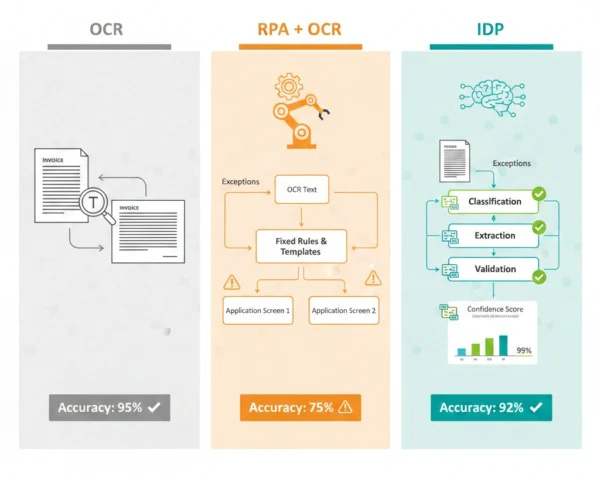
OCR: Text Recognition Foundation
Definition
Optical Character Recognition is foundational technology that analyzes images containing text and converts visual characters into machine-readable, editable digital text. OCR engines scan documents, identify character patterns through template matching or feature extraction, and translate them into ASCII or Unicode representations that computers can process. Modern OCR systems handle printed text across numerous fonts and languages, with advanced implementations processing handwritten text through machine learning techniques. Unlike intelligent document processing, OCR focuses exclusively on character recognition without understanding document structure, context, or meaning beyond literal text extraction.
Advantages
- Mature technology: Decades of development resulting in highly accurate character recognition for standard printed documents
- Wide availability: Numerous commercial and open-source implementations including Tesseract, ABBYY FineReader, and cloud services
- Fast processing: Can convert thousands of pages quickly without requiring extensive computational resources
- Simple integration: Straightforward API calls make OCR easy to incorporate into existing document workflows
- Language support: Comprehensive coverage across 100+ languages including character-based scripts like Chinese and Japanese
Disadvantages
- No contextual understanding: Cannot interpret document meaning, relationships between fields, or business logic
- Quality sensitive: Accuracy degrades significantly with poor image quality, skewed scans, or complex layouts
- Manual post-processing: Extracted text requires substantial human validation and correction for complex documents
- Limited adaptability: Struggles with variable formats, handwriting variations, and documents outside training parameters
- No decision-making: Provides raw text output but cannot classify, validate, or route documents based on content
Common OCR Applications:
Document Digitization: Converting paper archives, historical records, and scanned documents into searchable digital text for preservation and access. Data Entry Automation: Extracting text from forms, surveys, and questionnaires to eliminate manual transcription efforts. Furthermore, Text-to-Speech Systems: Providing text input for assistive technologies that convert written content into audio for visually impaired users. Additionally, License Plate Recognition: Identifying vehicle registration numbers from camera images for parking management and law enforcement applications.
RPA: Workflow Automation Layer
Definition
Robotic Process Automation deploys software robots that mimic human interactions with digital systems, automating repetitive, rule-based tasks across applications through UI automation or API integration. Unlike autonomous agentic AI systems that reason and adapt, RPA bots execute predefined workflows following explicit instructions programmed by developers. These bots navigate user interfaces, extract data from fields, perform calculations, enter information into systems, and trigger actions based on deterministic logic. When combined with OCR, RPA can process documents by first converting images to text, then using that text in automated workflows—though this combination lacks the intelligence to handle document variations or contextual interpretation that modern enterprises require.
Advantages
- End-to-end automation: Orchestrates complete workflows across multiple applications without requiring system integration
- Non-invasive deployment: Works through existing user interfaces without modifying underlying applications or databases
- Rapid implementation: Can be deployed in weeks for well-defined processes using low-code visual development tools
- Consistent execution: Performs tasks with perfect consistency eliminating human errors in repetitive workflows
- Scalability: Additional bots can be deployed easily to handle increased transaction volumes during peak periods
Disadvantages
- Brittle infrastructure: Bots break when application interfaces change, requiring constant maintenance and updates
- No learning capability: Cannot adapt to process variations or handle exceptions outside programmed rules
- Limited document understanding: When paired with OCR, still cannot interpret document context or validate extracted data intelligently
- Exception handling burden: Any deviation from expected patterns requires human intervention or extensive error-handling logic
- Maintenance overhead: Organizations report spending 30-40% of automation budgets fixing bots broken by system changes
Typical RPA + OCR Workflow:
Invoice Processing: RPA bot retrieves email attachments, calls OCR to extract text, parses specific fields using pattern matching, enters data into accounting system following fixed rules. Form Processing: Bot collects scanned forms, uses OCR for text conversion, validates extracted data against predefined criteria, populates database records with structured output. In addition, Document Routing: Bot monitors folder for new documents, applies OCR for text extraction, searches for keywords to determine classification, moves files to appropriate destinations. Moreover, Data Migration: Bot opens legacy system screens, captures data via OCR from non-exportable fields, transforms according to mapping rules, inputs into target system through UI automation.
IDP: Cognitive Document Processing
Definition
Intelligent Document Processing represents the convergence of multiple AI technologies including Optical Character Recognition, Natural Language Processing, Machine Learning, and Computer Vision to automate end-to-end document workflows with human-like understanding. IDP platforms don’t just extract text—they comprehend document structure, classify document types, identify relationships between fields, validate extracted data against business rules, and make intelligent routing decisions based on content analysis. These systems learn from examples, improving accuracy over time without explicit reprogramming. Therefore, IDP transforms documents from static data containers into actionable intelligence that drives automated business processes with minimal human intervention even when handling variable formats, poor quality scans, or complex unstructured documents.
Advantages
- Intelligent extraction: Understands document context, identifying relevant fields even when layout and format vary significantly
- Adaptive learning: Machine learning models improve accuracy through feedback, handling new document variations without reprogramming
- Straight-through processing: Achieves 70-95% automation rates eliminating manual review for majority of documents
- Complex document handling: Processes multi-page documents, tables, checkboxes, handwriting, and unstructured content effectively
- Business logic integration: Validates data, applies rules, performs lookups, and makes decisions based on extracted information
- Continuous improvement: Analytics identify accuracy trends enabling targeted model refinement and exception pattern detection
Disadvantages
- Higher complexity: Requires data scientists, machine learning expertise, and sophisticated infrastructure for optimal deployment
- Training requirements: Models need representative document samples for training, which can be challenging for rare document types
- Initial investment: Platform licensing, professional services, and infrastructure create $100K-$500K implementation costs
- Less transparency: Machine learning decision-making can be opaque making troubleshooting and auditing more difficult
- Integration challenges: Enterprise deployments require careful integration with existing systems, workflows, and security frameworks
Advanced IDP Capabilities:
Document Classification: Automatically identifies document types from invoices, contracts, forms, receipts across multiple categories without manual tagging. Table Extraction: Intelligently extracts data from complex tables preserving structure and relationships between cells regardless of formatting. In addition, Handwriting Recognition: Processes handwritten forms, signatures, and annotations using deep learning models trained on diverse writing styles. Moreover, Multi-Language Processing: Handles documents containing mixed languages, automatically detecting and processing text in appropriate linguistic contexts. Additionally, Confidence Scoring: Provides extraction confidence metrics enabling intelligent routing of low-confidence documents for human review.
Technical Architecture Breakdown
OCR Components
- Image preprocessing for noise reduction and skew correction
- Character segmentation isolating individual letters and symbols
- Feature extraction identifying character patterns and shapes
- Pattern recognition matching features against character templates
- Post-processing applying linguistic rules and dictionaries
- Output formatting converting recognized text to desired format
RPA + OCR Components
- Bot orchestration engine coordinating workflow execution
- OCR integration calling text extraction services
- Pattern matching parsing OCR output using regular expressions
- UI automation interacting with target applications
- Decision trees implementing conditional business logic
- Exception queues capturing failed transactions for review
IDP Platform Components
- Computer vision models for document layout analysis
- Deep learning OCR with contextual character recognition
- NLP engines understanding semantic relationships
- ML classifiers identifying document types automatically
- Validation engines applying business rules to extractions
- Human-in-the-loop interfaces for exception handling
- Analytics dashboards monitoring accuracy and throughput
Processing Flow Comparison
| Processing Stage | OCR Alone | RPA + OCR | IDP Platform |
|---|---|---|---|
| Document Intake | Manual upload or scan | Bot monitors folders/emails | Intelligent capture from multiple channels |
| Image Quality | Requires clean, well-aligned images | Bot may enhance but limited | AI-powered enhancement and correction |
| Text Extraction | Character recognition only | OCR plus field location by position | Context-aware extraction understanding fields |
| Classification | Not supported | Rule-based keyword matching | ML-powered automatic classification |
| Validation | None | Fixed rule checking | Business logic with fuzzy matching |
| Exception Handling | Manual review required | Bot halts, queues for human | Confidence scoring with intelligent routing |
| Learning | No adaptation | No adaptation | Continuous improvement from feedback |
Real-World Applications and Use Cases
OCR Best Applications
- Simple digitization: Converting printed documents into searchable PDFs for archival purposes
- Text extraction: Pulling text from images for translation services or content indexing
- Accessibility: Enabling screen readers to process scanned documents for visually impaired users
- Basic data capture: Extracting text when document format is highly standardized and predictable
RPA + OCR Applications
- Template-based processing: Invoices from single vendors with consistent layouts processed repeatedly
- High-volume simple documents: Standard forms with fixed field positions requiring system data entry
- Structured workflows: Processes where document handling is one step in larger rule-based automation
- Known format extraction: Documents with predictable structure where field locations don’t vary
IDP Platform Applications
- Multi-vendor invoices: Processing invoices from thousands of vendors with varying formats automatically
- Contract analysis: Extracting clauses, obligations, dates, and terms from legal agreements
- Medical records: Processing patient documents, prescriptions, lab results across healthcare systems
- Claims processing: Insurance claims with diverse document types requiring intelligent extraction and validation
Industry-Specific Adoption Patterns
| Industry | Document Challenge | Technology Fit | Typical Accuracy |
|---|---|---|---|
| Banking & Finance | Loan applications, KYC documents, bank statements from diverse sources | IDP (71% adoption rate) | 92-98% straight-through |
| Healthcare | Patient records, insurance claims, prescriptions, lab results | IDP with human review | 85-95% automated |
| Legal Services | Contract review, discovery documents, case files | IDP with NLP | 90-96% extraction |
| Manufacturing | Purchase orders, shipping documents, quality certificates | RPA + OCR often sufficient | 80-90% with templates |
| Government | Citizen applications, permits, licenses, compliance forms | IDP for public-facing, RPA for internal | 88-94% automated |
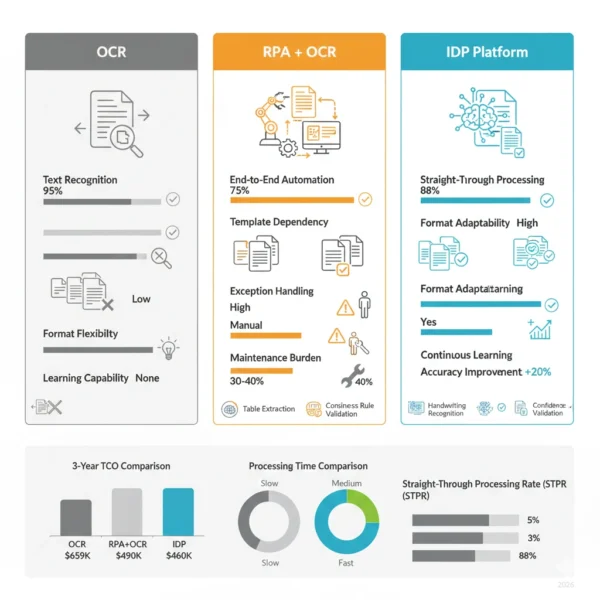
10 Critical Differences: IDP vs OCR and RPA
Aspect | OCR (Optical Character Recognition) | RPA + OCR | IDP (Intelligent Document Processing) |
|---|---|---|---|
| Core Function | Converts images of text into machine-readable characters | Automates workflows using OCR output with fixed rules | Extracts, classifies, validates documents with AI understanding |
| Intelligence Level | No intelligence, pure character pattern recognition | Rule-based logic without learning or adaptation | AI-powered with machine learning and continuous improvement |
| Document Understanding | None, outputs raw text without context | Limited to field location matching by position | Deep understanding of structure, semantics, relationships |
| Format Adaptability | Works on any text image but no format handling | Requires templates for each format variation | Handles diverse formats automatically through learning |
| Accuracy Rate | 95-99% for clean text, degrades with quality | 70-85% end-to-end with document variations | 85-98% with complex documents after training |
| Exception Handling | Not applicable, no exception concept | Bot halts, requires human intervention | Confidence scoring with intelligent routing |
| Data Validation | None, outputs whatever text is recognized | Fixed rule checking against predefined criteria | Business logic with fuzzy matching and lookups |
| Learning Capability | No learning, static pattern recognition | No learning, requires manual reprogramming | Continuous learning from feedback and corrections |
| Implementation Cost | $0-$5K for software licenses or free open-source | $50K-$150K including bot development | $100K-$500K for platform and training |
| Maintenance Burden | Minimal, OCR engines rarely need updates | High, 30-40% of budget on bot fixes | Low, models adapt reducing manual intervention |
Implementation and Integration Guide
Technology Selection Framework
- Document Complexity Assessment: First, analyze format variability, data structure consistency, and whether documents require contextual interpretation beyond text extraction.
- Volume and Variation Analysis: Then, evaluate monthly document volume, number of document types, format variations per type, and exception frequency.
- Accuracy Requirements: Additionally, determine acceptable error rates, cost of manual correction, and whether straight-through processing targets exceed 80%.
- Business Process Integration: Furthermore, assess whether document processing is standalone task or integrated step in end-to-end automation workflows.
- Resource and Expertise: Subsequently, evaluate available technical capabilities, budget constraints, and timeline requirements for deployment.
- ROI Calculation: Finally, model total cost of ownership including implementation, maintenance, and opportunity costs of continued manual processing.
Migration Path: From OCR/RPA to IDP
Phase 1: Assessment (Weeks 1-4)
- Inventory existing OCR/RPA document processes
- Document pain points including error rates and maintenance effort
- Collect sample documents representing diversity of formats
- Establish baseline metrics for accuracy and throughput
- Identify high-value pilot candidate processes
Phase 2: Pilot (Weeks 5-12)
- Select IDP platform aligned with use case requirements
- Train models using representative document samples
- Deploy pilot running parallel to existing process
- Measure accuracy, exceptions, processing time improvements
- Refine models based on correction feedback loops
Phase 3: Scale (Weeks 13-26)
- Expand to additional document types and processes
- Integrate IDP with downstream systems and workflows
- Gradually retire legacy OCR/RPA bots as IDP proves stable
- Implement monitoring and continuous improvement processes
- Train staff on exception handling and model optimization
Implementation Best Practices
Success Factors
- Start with high-volume, high-variation process demonstrating clear IDP advantages over OCR/RPA
- Invest heavily in training data quality, ensuring samples cover full document diversity
- Implement human-in-the-loop review for low-confidence extractions maintaining quality
- Establish feedback loops enabling models to learn from corrections and improve continuously
- Monitor accuracy by document type identifying where additional training needed
- Integrate IDP with existing RPA for end-to-end automation combining intelligence with workflow orchestration
Common Pitfalls
- Never deploy IDP without sufficient training data, insufficient samples guarantee poor accuracy
- Avoid treating IDP as drop-in OCR replacement, requires rethinking entire document workflow
- Don’t expect 100% accuracy from day one, machine learning requires iteration and refinement
- Resist urge to automate everything immediately, start narrow and expand based on results
- Never neglect change management, users must understand new exception handling workflows
- Don’t ignore data quality issues, garbage training data produces garbage models regardless of platform sophistication
Cost, Accuracy and ROI Comparison
Initial Implementation
OCR: $0-$5,000 for software licenses
RPA + OCR: $50,000-$150,000 for bot development
IDP: $100,000-$500,000 for platform and training
Ongoing Annual Costs
OCR: Minimal, mostly processing fees
RPA + OCR: 25-35% of initial for bot maintenance
IDP: 15-20% of initial plus usage fees
Accuracy & Throughput
OCR: 95%+ character accuracy but requires post-processing
RPA + OCR: 70-85% end-to-end success rate
IDP: 85-98% straight-through processing
Three-Year Total Cost of Ownership (10,000 documents/month)
| Cost Component | OCR + Manual | RPA + OCR | IDP Platform |
|---|---|---|---|
| Initial Setup | $5,000 | $100,000 | $300,000 |
| Annual Technology Costs | $6,000 | $30,000 | $60,000 |
| Manual Processing Labor (3 years) | $540,000 (50% reduction) | $216,000 (80% reduction) | $54,000 (95% reduction) |
| Bot Maintenance (3 years) | $0 | $90,000 | $30,000 |
| Error Correction Costs | $108,000 | $54,000 | $16,200 |
| Total 3-Year TCO | $659,000 | $490,000 | $460,200 |
| Savings vs Manual | Baseline | 26% savings | 30% savings + quality |
While IDP requires highest upfront investment, organizations processing 5,000+ documents monthly typically achieve superior ROI within 24-36 months through reduced manual labor, lower error correction costs, and minimal maintenance burden. RPA + OCR provides middle ground for standardized documents but maintenance costs accumulate as document varieties increase. Pure OCR with manual processing remains viable only when document volumes are low or when organizational readiness for automation is limited. The decision point shifts toward IDP as document complexity, format variability, and processing volumes increase.
Accuracy and Processing Metrics
Traditional OCR/RPA Performance
- Character Recognition: 95-99% accuracy for clean, standard fonts
- Field Extraction: 70-85% success rate when document layouts vary
- Manual Review Required: 20-30% of documents need human validation
- Processing Time: 30-60 seconds per document including exception handling
- Bot Breakage Rate: 15-25% of bots require monthly maintenance
IDP Platform Performance
- Contextual Extraction: 85-98% accuracy across diverse document formats
- Straight-Through Processing: 70-95% automation rate without human review
- Manual Review Required: 5-15% of documents flagged by confidence scoring
- Processing Time: 5-15 seconds per document with minimal exceptions
- Model Degradation: Continuous learning prevents accuracy decline over time
Hybrid Architecture Patterns
Strategic Integration: IDP Plus RPA
The most effective enterprise implementations combine IDP for intelligent document understanding with RPA for downstream workflow automation. This hybrid approach leverages IDP’s cognitive capabilities to extract and validate data from complex documents, then uses RPA to enter that data into multiple systems, trigger approvals, and orchestrate end-to-end processes. Consequently, organizations achieve both document intelligence and workflow automation without requiring custom API integrations for every target system. Similar to how agentic AI and traditional RPA complement each other, IDP and RPA create automation ecosystems exceeding capabilities of either technology alone.
Integration Architecture Patterns
Pattern 1: IDP-First Processing
IDP handles document intelligence while RPA executes downstream actions:
- IDP receives documents via email, API, or monitored folder
- Platform classifies document type and extracts relevant fields
- Validation engine applies business rules checking data quality
- Structured data passed to RPA bot via API or shared database
- Bot enters data into ERP, CRM, or other enterprise systems
- Bot triggers workflows like approvals, notifications, reporting
- Example: IDP processes invoices from any vendor, RPA enters into SAP and routes for approval based on extracted purchase order numbers
Pattern 2: RPA Orchestration with IDP
RPA bot orchestrates overall workflow calling IDP for document processing:
- RPA bot monitors for new documents or processes triggering events
- Bot retrieves documents and submits to IDP platform via API
- IDP returns extracted, validated data with confidence scores
- Bot evaluates confidence scores routing low-confidence to human queue
- High-confidence extractions processed automatically by bot
- Bot updates source systems, archives documents, sends notifications
- Example: RPA bot handles loan application workflow, calling IDP to extract data from uploaded documents, then populating loan origination system and triggering underwriting process
Real-World Implementation Example
Case Study: Healthcare Claims Processing
Challenge: Large health insurance provider processing 50,000+ claims monthly from 10,000+ healthcare providers with highly variable formats including handwritten notes, faxed forms, and electronic submissions.
Previous State (RPA + OCR):
- Required 30+ separate RPA bots each handling specific claim form templates
- Achieved only 65% straight-through processing rate
- 35% of claims required manual review due to extraction failures
- Bots broke monthly as providers updated forms requiring constant maintenance
- Processing time averaged 45 seconds per claim plus exception handling
IDP + RPA Hybrid Solution:
- Document Ingestion: RPA bots retrieve claims from email, fax server, and provider portal
- IDP Classification: Platform automatically identifies claim type regardless of source or format
- Intelligent Extraction: IDP extracts patient info, diagnosis codes, procedures, charges using contextual understanding
- Validation: Business rules verify patient eligibility, check coding accuracy, validate charge amounts against fee schedules
- Confidence Routing: Claims with 95%+ confidence proceed automatically, others routed for human review with pre-populated fields
- RPA Processing: Bots enter validated data into claims management system, trigger adjudication logic, generate payment files
- Continuous Learning: Human corrections fed back to IDP models improving accuracy over time
Results: 88% straight-through processing rate, 12-second average processing time, 70% reduction in manual review staff, 90% decrease in bot maintenance hours, projected ROI breakeven in 18 months with ongoing cost savings of $2.4M annually.
When to Use Hybrid vs Pure IDP
Deploy Hybrid (IDP + RPA)
- Document processing is one step in larger end-to-end workflow
- Need to interact with multiple systems lacking modern APIs
- Existing RPA infrastructure can be leveraged reducing investment
- Workflow includes non-document tasks like approvals, notifications
- Organization has RPA expertise but limited IDP experience
Deploy Pure IDP Platform
- Document extraction is the primary value driver
- Target systems have modern REST APIs for direct integration
- Want to minimize technology stack complexity and maintenance
- Document processing volume justifies purpose-built platform
- Organization ready to invest in end-to-end IDP capabilities
Frequently Asked Questions: IDP vs OCR and RPA
Making Strategic Document Automation Decisions in 2026
The choice between IDP vs OCR and RPA transcends simple technology evaluation, representing strategic decision about organizational capacity to handle exponentially growing unstructured data volumes with intelligence rather than brute-force automation. Each technology delivers value when deployed appropriately, and their optimal combination depends on document complexity, processing volume, format variability, and automation maturity.
Deploy OCR + Manual/RPA When:
- Processing fewer than 5,000 documents monthly
- Documents follow highly standardized templates with minimal variation
- Character recognition without understanding is sufficient
- Budget constraints prevent IDP investment
- Organization lacks data science expertise for model training
- Document quality is consistently high enabling reliable OCR
Deploy IDP Platform When:
- Processing 10,000+ documents monthly across diverse formats
- Document types exhibit high variability requiring contextual understanding
- Straight-through processing targets exceed 80% automation
- Manual review and error correction costs are substantial
- RPA maintenance burden from document changes is high
- Documents contain unstructured content like handwriting or complex tables
Strategic Recommendation for 2026:
Organizations should evaluate document automation on a process-by-process basis rather than making enterprise-wide technology mandates. Begin by assessing current OCR plus RPA pain points including maintenance burden, exception rates, and manual processing costs. Pilot IDP on your most document-intensive, variable-format process where traditional automation consistently underperforms. Run pilot parallel to existing process establishing clear success metrics around accuracy, throughput, and cost. Maintain hybrid architecture combining IDP for complex documents with OCR plus RPA for simpler standardized forms. Plan 18-36 month migration timeline allowing model training, staff development, and organizational adaptation. Consider managed IDP services if internal expertise is limited or implementation timeline is aggressive. Organizations executing thoughtful transitions achieve superior outcomes versus rushed implementations or delayed investments that allow competitive disadvantage to accumulate.
The document automation landscape in 2026 rewards organizations understanding these technologies as evolutionary stages rather than competing alternatives. Whether you’re a student exploring automation technologies, a developer architecting document workflows, or an IT professional modernizing legacy systems, recognizing when to apply simple text extraction, rule-based processing, or cognitive intelligence determines your success handling the data deluge defining modern business. Your competitive advantage comes not from technology brand loyalty but from matching capabilities to requirements, combining technologies strategically, and building systems that scale with business complexity. Just as networking infrastructure requires choosing appropriate security and connectivity technologies, document automation demands selecting extraction and processing tools aligned with specific workflow characteristics and quality requirements.
Related Topics Worth Exploring
Natural Language Processing in Enterprise
Discover how NLP powers IDP platforms to understand document semantics, entity relationships, and contextual meaning beyond text extraction.
Machine Learning Model Training
Learn best practices for collecting training data, labeling documents, and continuously improving model accuracy in production IDP deployments.
Agentic AI vs Traditional Automation
Explore how autonomous AI agents transform document workflows beyond IDP extraction to include decision-making and process orchestration.